















































































































Choosing the right server is crucial for business performance and scalability. Tower and rack servers are two common types, each suited for different deployment scenarios. Tower servers are standalone units, similar in appearance to a desktop PC but larger, while rack servers are compact machines designed to slide into standard server racks. Understanding their differences can help you select the most suitable solution for your organization.
What is the Tower Server?
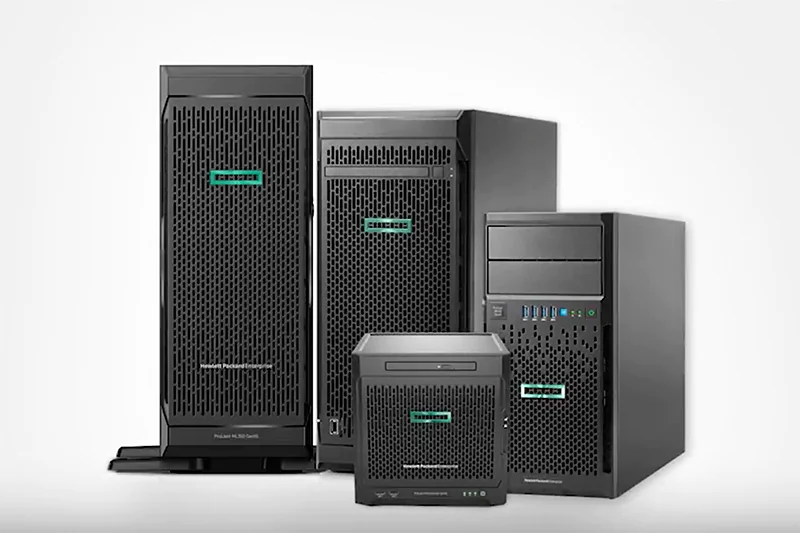
The tower server is the most common type of server you’ll encounter. Its appearance resembles a large PC host, but with extra slots for expanding functionality. The spacious chassis allows for higher configuration and redundancy, making it ideal for small offices, branch environments, or entry-level business applications.
Tower servers can handle a variety of tasks, from data storage to running multiple applications. They are easy to deploy without specialized racks, and their flexible placement—on a desk, floor, or shelf—makes them convenient for environments with limited server infrastructure.
Advantages:
- Easy to use and configure
- Flexible placement, no rack required
- Lower initial cost, suitable for small businesses and SMEs
Limitations:
- Larger footprint limits scalability for multiple servers
- Management can become inconvenient in larger setups
- Less ideal for high-density or high-performance data center deployments
What is the Rack Server?
Rack servers are designed to fit into standard 19-inch cabinets, commonly available in 1U, 2U, and 4U sizes. Smaller 1U servers save space but offer limited expansion, while 4U servers support multiple CPUs, large memory capacity, and numerous hot-swappable components.
Rack servers are widely used in data centers and medium-to-large businesses. Centralized management, clean cabling, and robust monitoring tools make them ideal for environments with multiple servers, high traffic, or mission-critical applications.

Advantages:
- Centralized, secure, and dust-proof in cabinets
- High density and scalability for growing businesses
- Advanced remote management reduces physical maintenance
Limitations:
- Higher initial and operational cost
- Requires rack infrastructure and more complex setup
Tower vs Rack Server: Key Differences
| Feature | Tower Server | Rack Server |
| Size & Form Factor | Large, standalone unit resembling a PC host | Compact horizontal unit, slides into 19-inch rack (1U–4U) |
| Scalability | Limited, not ideal for multiple servers | High density, easy to scale by stacking servers in a rack |
| Management | Easy installation; individual peripherals required | Complex installation; advanced remote management (iLO, iDRAC) standard |
| Cabling | Simple; one power/network cable per unit | Multiple cables per server; dense cabling at the back of the rack |
| Cooling & Noise | Lower heat and noise; suitable for office environments | High heat and noise; requires dedicated cooling in server rooms |
| Maintenance | Direct physical access | Remote management supported; physical replacement requires racking |
| Cost (TCO) | Lower initial & operational cost for single units | Higher initial & operational cost including cooling, power, and infrastructure |
| Application Scenarios | Small offices, branch offices, labs | Mid-size to large businesses, growing organizations, data centers |
Performance and Technical Considerations
- CPU & Memory: Tower servers can support multiple CPUs and large memory banks, while rack servers offer high-density CPU and memory expansion suitable for enterprise workloads.
- Storage: Both server types support SSDs, HDDs, and RAID configurations. Tower servers allow flexible internal expansion, while rack servers optimize space with backplane or shared storage solutions.
- Network: Tower servers include multiple NICs; rack servers provide high-speed ports with redundancy for heavy traffic environments.
Application Scenarios
- Tower Servers: Small businesses, branch offices, labs, or R&D environments where scalability is not a primary concern.
- Rack Servers: Medium to large businesses, data centers, and growing organizations needing centralized management and high-performance computing.
Energy Consumption & Noise
- Tower Servers: Lower electricity usage and heat output; quieter, suitable for offices.
- Rack Servers: High power and heat output; requires dedicated cooling, generally noisy in data centers.
Choosing the Right Server & Procurement Guidance
Choosing between tower and rack servers depends on your business size, performance needs, and scalability requirements. Tower servers are suitable for smaller deployments or flexible office setups, while rack servers are ideal for data centers and high-density, scalable applications.
For procurement, Router-switch can help streamline the process. With global stock coverage, fast responses for model and pricing inquiries, and professional guidance on server configuration, you can select the right server type confidently. Their solutions ensure authentic products, reliable delivery, and ongoing support, reducing implementation risks and helping your project stay on schedule.
Related Articles:
- What is the Computer Server
- Rack Server Vs Blade Server
- The Highlights of the ProLiant ML30 and DL20 Gen9
- How to Buy a Server for Your Business?
- What is the HPE Server?
- HPE rack server overview

Expertise Builds Trust
20+ Years • 200+ Countries • 21500+ Customers/Projects
CCIE · JNCIE · NSE7 · ACDX · HPE Master ASE · Dell Server/AI Expert