Solving Warehouse WiFi Coverage and Uptime IssuesDesign reliable warehouse WiFi coverage and uptime with warehouse wifi 6 ap, industrial wireless access points, and warehouse poe switches for racks and docks.
OLT Capacity Planning for GPON Access NetworksPlan OLT capacity for GPON OLT systems and EA5800 capacity planning, optimizing GPON split ratio and OLT uplink design for scalable fiber access.
Enterprise OLT Platform Selection for Fiber AccessDesign enterprise OLT platform strategy for GPON OLT platform, modular OLT chassis, and OLT service boards to scale passive optical LAN and XG-PON evolution.
Scale Data Center Networking Under Long Lead TimesScale data center networking faster under long lead times with data center spine switches, leaf spine data center designs and Cisco UCS fabric interconnects.
Tunnel Video Surveillance VLAN Stability over FiberDesign stable tunnel video surveillance VLANs using optical transport backbone and Arista fiber aggregation for resilient Huawei OptiX OSN CCTV networks.
Fiber vs Copper in Industrial Networks Design GuideCompare fiber vs copper in industrial ethernet, plan hybrid industrial fiber network designs, and select rugged ethernet switches and industrial SFP transceivers.
Enterprise networks are becoming increasingly complex, and device issues can lead to downtime and operational losses. Understanding SNMP (Simple Network Management Protocol) and configuring it correctly on Cisco switches is essential for proactive network monitoring, troubleshooting, and ensuring high availability.
Part.1 What is SNMP?
Simple Network Management Protocol (SNMP) is the backbone of network monitoring. It enables administrators to collect information, monitor device health, and manage configurations across routers, switches, firewalls, and servers.
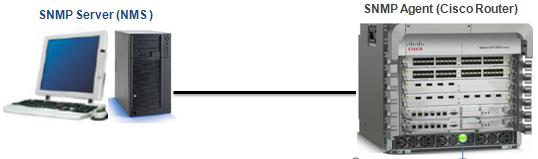
SNMP works on a manager-agent model:
SNMP Manager – software that requests and processes information.
SNMP Agent – runs on Cisco switches and other devices, responding with performance metrics.
MIB (Management Information Base) – a database of manageable objects like CPU load, interface status, and errors.
By leveraging SNMP, IT teams avoid blind spots, detect issues before outages occur, and maintain consistent network uptime.
Part.2 SNMP Versions Explained
SNMP has evolved to improve performance and security:
SNMPv1 – the original protocol, simple but insecure.
SNMPv2c – adds more features and better performance but still relies on community strings without encryption.
SNMPv3 – introduces authentication and encryption, making it the most secure option for enterprise networks.
For Cisco switch deployments, SNMPv3 is strongly recommended to meet modern security requirements.
Part.3 Cisco SNMP Configuration Basics
To enable SNMP on a Cisco switch, follow these steps:
Define a community string (SNMPv2c):
Switch(config)# snmp-server community public RO
This sets a read-only community string.
Set up SNMPv3 with authentication and privacy:
Switch(config)# snmp-server group SNMPv3Group v3 priv
Switch(config)# snmp-server user SNMPv3User SNMPv3Group v3 auth sha AuthPass123 priv aes 128 PrivPass123
This creates a secure SNMPv3 group and user with authentication and encryption.
Verify SNMP configuration:
Switch# show snmp user
Switch# show snmp group
Best practice: Use SNMPv3 wherever possible and restrict SNMP access to trusted management stations only.
Part.4 Monitoring Cisco Switches with SNMP
Once enabled, SNMP provides visibility into:
Interface utilization (bandwidth, errors, drops)
CPU and memory usage
Device uptime and availability
Environmental status (temperature, power supply health)
Common SNMP monitoring tools for Cisco switches include:
SolarWinds NPM – enterprise-grade monitoring and alerting
PRTG Network Monitor – customizable dashboards and thresholds
A: SNMP is for network monitoring and management, while SMTP is for sending and receiving emails.
Q4: How do I set SNMP community strings on a Cisco switch?
A: Use the command snmp-server community STRING RO or RW depending on read-only or read-write permissions.
Q5: Which SNMP version should I use?
A: Always prefer SNMPv3 for its authentication and encryption features.
Conclusion
Configuring SNMP on Cisco switches is more than a checkbox—it’s the foundation for proactive monitoring, faster troubleshooting, and reliable network performance. By implementing SNMPv3 with best practices, IT teams can prevent downtime, strengthen security, and optimize network visibility.
Want to explore more Cisco configuration and monitoring tips? Visit router-switch.com, your trusted source for enterprise networking guides and genuine Cisco hardware.