Solving Warehouse WiFi Coverage and Uptime IssuesDesign reliable warehouse WiFi coverage and uptime with warehouse wifi 6 ap, industrial wireless access points, and warehouse poe switches for racks and docks.
OLT Capacity Planning for GPON Access NetworksPlan OLT capacity for GPON OLT systems and EA5800 capacity planning, optimizing GPON split ratio and OLT uplink design for scalable fiber access.
Enterprise OLT Platform Selection for Fiber AccessDesign enterprise OLT platform strategy for GPON OLT platform, modular OLT chassis, and OLT service boards to scale passive optical LAN and XG-PON evolution.
Scale Data Center Networking Under Long Lead TimesScale data center networking faster under long lead times with data center spine switches, leaf spine data center designs and Cisco UCS fabric interconnects.
Tunnel Video Surveillance VLAN Stability over FiberDesign stable tunnel video surveillance VLANs using optical transport backbone and Arista fiber aggregation for resilient Huawei OptiX OSN CCTV networks.
Fiber vs Copper in Industrial Networks Design GuideCompare fiber vs copper in industrial ethernet, plan hybrid industrial fiber network designs, and select rugged ethernet switches and industrial SFP transceivers.
Most switch replacement projects do not fail because the buyer forgot to ask about port count. They fail because the team upgrades the switch but not the design assumptions around it. A switch refresh is usually triggered by congestion, aging hardware, PoE pressure, uplink limits, support deadlines, Wi-Fi expansion, or a broader campus and branch modernization plan. If those pressures are not reviewed before procurement, the project can look correct on the BOM while still locking the organization into another avoidable replacement cycle too soon.
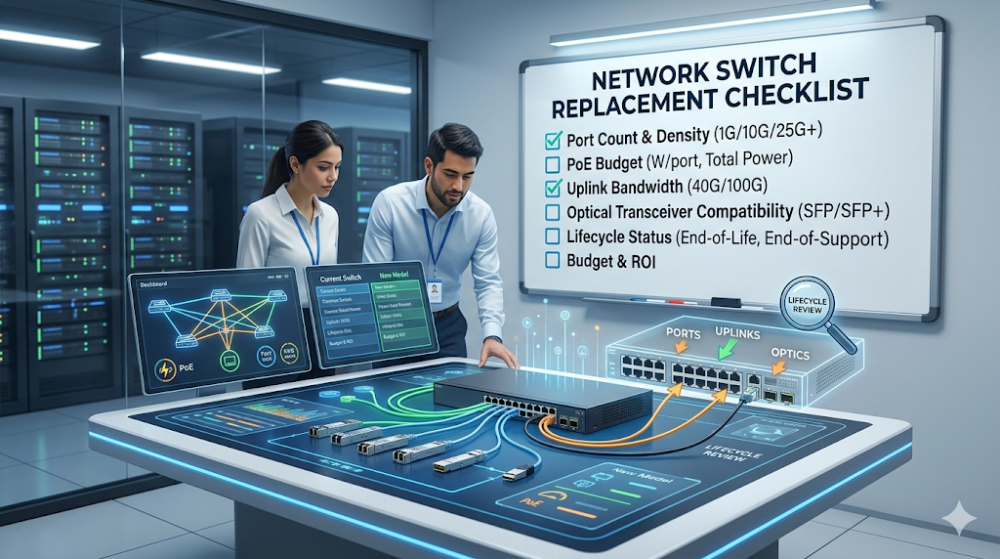
This guide is written for procurement teams, IT leads, and integrators who need a practical network switch replacement checklist before approving an upgrade. The goal is not to provide a generic worksheet with obvious items only. It is to help buyers check the commercial and technical issues that most often change the outcome of a switch refresh, especially around ports, PoE, uplinks, optics, stacking, software lifecycle, and rollout repeatability. If you are replacing switches, the most useful question is not just what new model to buy. It is what the new platform must solve that the old one no longer can.
A good switch replacement checklist starts with the reason for replacement, not with a brand shortlist.
Ports alone are not enough. You should also verify PoE demand, uplink bandwidth, optics compatibility, stacking expectations, and lifecycle timing.
Wi-Fi and powered edge growth often change switch requirements more than buyers expect.
Multi-site refreshes should be evaluated as repeatable standards, not one-off closet fixes.
The safest buying approach is to define what problem the new switch must solve over the next refresh cycle, then compare models against that requirement.
Checklist area
What to review
Why it matters
Replacement trigger
Congestion, EOL/EOS, PoE shortage, uplink limits, Wi-Fi growth, site redesign
Different triggers require different switch classes
Access layer fit
Port count, speed mix, PoE budget, powered-device profile
Prevents underbuilding the new edge
Upstream design
Uplink bandwidth, optics, core or aggregation compatibility
A stronger access switch is wasted if upstream design stays weak
Determines whether the refresh stays manageable over time
Part 2: Confirm why the switch is being replaced
Not every switch refresh is solving the same problem
Some switches are replaced because they are out of support. Others are replaced because PoE demand increased, wireless density changed, uplinks became too small, or the business no longer trusts the existing hardware in production. Those are not the same replacement projects. Buyers who skip this diagnosis often buy a platform that matches the old switch too closely and misses the actual reason the upgrade was approved.
Replacement should be tied to the next operating cycle, not only to current pain
A switch upgrade should not be scoped only around what is broken this quarter. It should also be scoped around what the site will need over the next full operating cycle. That means checking whether the new switch has to support Wi-Fi 6 or Wi-Fi 7 growth, more cameras, more powered edge devices, more 10G uplinks, or a broader move toward campus and branch standardization. If the refresh ignores those pressures, the organization may solve today’s incident and still create tomorrow’s procurement problem.
This is where buyers can save the most money
The most expensive switch replacement is usually not the one with the highest initial quote. It is the one that has to be redone too early because the team replaced hardware without replacing assumptions. Router-Switch can help narrow the right switch class before quoting gets too deep, especially when the project is deciding between keeping cost tight, adding headroom, or standardizing a platform across multiple sites with cleaner stock visibility and alternative-SKU options.
Part 3: Check ports, PoE, uplinks, and optics before model selection
Port count is the obvious item, but port profile is the real one
Do not check only how many ports the switch has. Check what is connected to those ports, how many are actually occupied, how many need PoE, whether any need higher speed, and how many will be added during the next refresh cycle. A 48-port replacement is not automatically a like-for-like design if the user edge, camera layer, and wireless layer have all changed since the original deployment.
Many switch upgrades are really PoE upgrades in disguise. Wi-Fi 6 access points, cameras, phones, and other powered edge devices can make an old access design feel acceptable right up until the powered-device mix changes. Buyers should review aggregate PoE demand per closet or floor, not just per-port support. That is often the line between a refresh that stays stable and one that looks fine until more devices are added.
Uplinks and optics must be checked before the switch is shortlisted
A stronger access switch does not solve much if the uplink path is undersized or if the optics strategy is inconsistent with the rest of the environment. Before selecting a replacement family, review how the switch connects upstream, what optics and cable types are already in use, and whether the new design is expected to preserve that path or improve it. Buyers often underestimate how much compatibility and uplink assumptions influence the real commercial fit of the replacement.
Part 4: Review stacking, software, and lifecycle risk
Stacking and management affect long-term operating cost
For access-layer and branch refreshes, stacking is not just a technical feature. It changes operational simplicity, redundancy behavior, and how easy it is to standardize multiple sites. A switch replacement should therefore check not only throughput and PoE, but also how the switch family will be deployed and managed across the estate.
Software and support timing are part of the buying decision
A switch can look attractive on hardware alone and still be a weak refresh choice if the software lifecycle, support horizon, or licensing model does not align with the project. Buyers should check whether they are solving an end-of-support problem with a platform that gives enough runway, rather than just moving to the next box that happens to be available now.
Lifecycle timing should be normalized across suppliers
If you are comparing more than one vendor or more than one family, do not compare hardware in isolation. Compare how much lifecycle runway, management simplicity, and deployment repeatability each path really gives you. That is where many quote comparisons become misleading. If your team needs help comparing switch families or clarifying acceptable alternatives before RFQ, Router-Switch can help structure the shortlist so you are comparing realistic replacement paths instead of fragmented hardware snapshots.
Part 5: Treat single-site upgrades and rollout programs differently
A single-site replacement can optimize locally
If you are replacing a small number of switches at one site, the design can be more tactical. You may be able to preserve some existing optics, keep the uplink model unchanged, and solve for one local pain point efficiently.
A multi-site replacement should optimize for repeatability
If the organization is upgrading multiple closets, floors, branches, or buildings, the switch decision should be treated as a repeatable standard. In those cases, buyers should care more about deployment consistency, acceptable alternatives, inventory stability, and BOM discipline. Small model-selection errors repeated across many sites become large financial mistakes later.
Do not mix one-site logic with program logic
One of the most common procurement errors is evaluating a multi-site refresh as if it were a one-off closet replacement. Program-level switch buying should be judged by standardization quality and rollout control, not just whether one location can be fixed cheaply. If the refresh is part of a broader modernization effort, Router-Switch’s campus modernization roadmap reference is a useful next read for seeing how access-layer replacement decisions connect to larger campus planning.
Part 6: Common replacement mistakes buyers make
Mistake 1: Replacing the box but not the assumptions
A like-for-like hardware swap can still be the wrong answer if wireless, PoE, traffic, or site role has changed.
Mistake 2: Checking ports but ignoring uplinks
Teams often focus on edge capacity and forget that upstream design may still be the real bottleneck.
Mistake 3: Treating PoE as a minor detail
In many modern access layers, PoE is one of the main reasons a switch replacement is needed at all.
Mistake 4: Standardizing too early on a narrow platform
A switch family that looks affordable for one closet may become expensive when repeated across a larger rollout with the wrong headroom profile.
FAQ
What should I check first before replacing a network switch?
First confirm why the switch is being replaced, congestion, lifecycle pressure, PoE shortage, uplink limits, or site redesign. That reason should shape the whole shortlist.
Is port count the most important item in a switch replacement checklist?
No. Port profile, PoE demand, uplinks, optics, software lifecycle, and rollout scope often matter just as much or more.
Why do switch replacement projects go wrong after procurement?
Because many teams compare hardware models without fully reviewing future load, powered devices, uplinks, lifecycle risk, and rollout repeatability.
Should I replace switches site by site or standardize a family first?
That depends on whether the project is tactical or program-level. Single-site replacements can be more local. Multi-site programs should prioritize repeatability and standardization quality.
What is the best next step after using this checklist?
The best next step is to turn the checklist into a shortlist requirement set, then compare exact switch families and quote structures against that requirement.
Part 7: The next practical step
If you are planning a switch refresh, the next step is to write down the actual replacement trigger, the required port and PoE profile, the uplink and optics assumptions, and whether the project is local or repeatable across multiple sites. That creates a much better buying brief than a simple request for a newer model.
Once that is clear, switch selection becomes far less noisy. Router-Switch can help compare realistic replacement paths, validate stock and lifecycle fit, and reduce the risk of approving a switch platform that solves the immediate issue but leaves the broader upgrade problem unfinished.
Expertise Builds Trust
20+ Years • 200+ Countries • 21500+ Customers/Projects CCIE · JNCIE · NSE7 · ACDX · HPE Master ASE · Dell Server/AI Expert