Solving Warehouse WiFi Coverage and Uptime IssuesDesign reliable warehouse WiFi coverage and uptime with warehouse wifi 6 ap, industrial wireless access points, and warehouse poe switches for racks and docks.
OLT Capacity Planning for GPON Access NetworksPlan OLT capacity for GPON OLT systems and EA5800 capacity planning, optimizing GPON split ratio and OLT uplink design for scalable fiber access.
Enterprise OLT Platform Selection for Fiber AccessDesign enterprise OLT platform strategy for GPON OLT platform, modular OLT chassis, and OLT service boards to scale passive optical LAN and XG-PON evolution.
Scale Data Center Networking Under Long Lead TimesScale data center networking faster under long lead times with data center spine switches, leaf spine data center designs and Cisco UCS fabric interconnects.
Tunnel Video Surveillance VLAN Stability over FiberDesign stable tunnel video surveillance VLANs using optical transport backbone and Arista fiber aggregation for resilient Huawei OptiX OSN CCTV networks.
Fiber vs Copper in Industrial Networks Design GuideCompare fiber vs copper in industrial ethernet, plan hybrid industrial fiber network designs, and select rugged ethernet switches and industrial SFP transceivers.
As a seasoned network engineer and IT infrastructure expert, I know that the backbone of any robust enterprise operation is its network. Network switches silently orchestrate the flow of data, enabling access to critical applications, seamless communications, and rapid file transfers. Yet, abnormal traffic patterns, intermittent port failures, and PoE issues can quickly degrade performance. This is why network switch monitoring is essential.
Choosing the right switch monitoring tools can be daunting, with many solutions available. This guide equips network administrators, IT operations professionals, and procurement decision-makers to select and implement the best tools and strategies for comprehensive network switch monitoring in 2025.
Business Continuity: Detect and fix issues before they escalate, minimizing downtime.
Fault Troubleshooting: Quickly pinpoint problems with port usage, CPU/memory load, or flow data.
Resource Optimization: Identify under- or over-utilized ports and redistribute resources efficiently.
Enhanced Security: Spot unusual network behavior early and reduce unauthorized access risks.
Regulatory Compliance: Provide proof of monitoring for sensitive data handling.
Key Metrics to Monitor:
Port status and utilization
Traffic flow and patterns
CPU and memory usage
PoE status and power budget
Power supply stability
Errors, discards, and packet issues
Device temperature and software versions
Part 2: Key Features to Look For in Switch Monitoring Tools
When evaluating switch monitoring tools, consider:
Multi-vendor Support: Manage Cisco, Juniper, Aruba, HP, Dell, and other devices from a single dashboard.
Pros: Deep Cisco monitoring, flow analysis, configuration management.
Cons: Not fully free; quote-based pricing.
Other notable tools: LibreNMS, Pandora FMS, LogicMonitor, Site24x7, Fortra Intermapper, AdRem NetCrunch, Cisco Prime LMS.
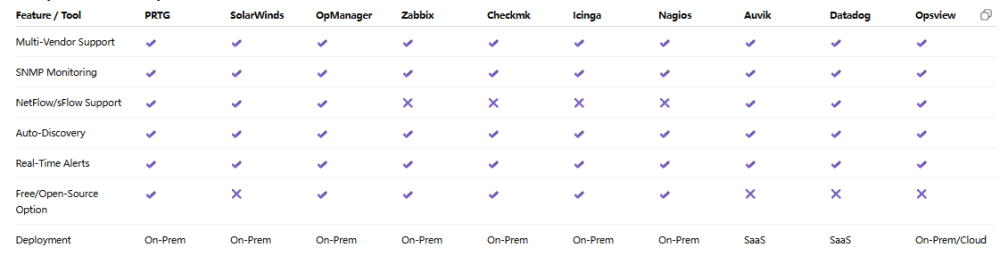
Comparison Table
Part 4: Best Practices and Conclusion
Regularly Check Port Status & Traffic: Review dashboards and reports to catch trends or underutilization.
Configure SNMP & Syslog Properly: Enable SNMPv3, gather logs, and set traps for critical events.
Intelligent Alerting & Log Archiving: Threshold-based alerts, integrate with email/SMS/Slack/Teams, and store logs securely.
Capacity Planning & Trend Analysis: Use historical data for port, CPU, and memory trends to plan upgrades proactively.
Network switch monitoring is essential for high-performing, secure, and resilient enterprise networks. Free or paid, open-source or proprietary, today’s tools automate monitoring, provide actionable insights, and alert teams to potential issues. Coupled with best practices, these tools enable IT teams to maintain optimal performance, security, and business continuity.
For enterprise networking procurement, consider Router-Switch.com for competitive quotes on Cisco, Juniper, and Aruba equipment, along with configuration guides to support your infrastructure.
FAQ
Q1: How do I monitor Cisco switches for free?
A1: Use open-source tools like Nagios Core, Zabbix, or Checkmk Raw Edition for SNMP-based monitoring. Cisco SPAN, CCA, and CNA can also be used for small deployments.
Q2: Which tools support multi-vendor monitoring?
A2: PRTG, SolarWinds NPM, OpManager, Zabbix, Checkmk, Icinga, Auvik, Datadog. Support for Cisco, Juniper, Aruba, Dell, HP, Huawei, and more.
Q3: Can I track PoE and port utilization?
A3: Yes. Tools like PRTG and Checkmk monitor port traffic and PoE budget per port and per switch.
Q4: Is SNMP monitoring safe?
A4: Yes, if using SNMPv3 with authentication and encryption. Avoid older versions (v1/v2c) for sensitive networks.
A7: Depends on network size, budget, and expertise. PRTG for flexibility and free options; SolarWinds NPM for enterprise; Zabbix/Icinga/Nagios Core for open-source.
Q8: Cisco management tools?
A8: SPAN, CCA/CNA for small deployments, Cisco Prime LMS for large deployments. Multi-vendor tools also support Cisco monitoring.