Solving Warehouse WiFi Coverage and Uptime IssuesDesign reliable warehouse WiFi coverage and uptime with warehouse wifi 6 ap, industrial wireless access points, and warehouse poe switches for racks and docks.
OLT Capacity Planning for GPON Access NetworksPlan OLT capacity for GPON OLT systems and EA5800 capacity planning, optimizing GPON split ratio and OLT uplink design for scalable fiber access.
Enterprise OLT Platform Selection for Fiber AccessDesign enterprise OLT platform strategy for GPON OLT platform, modular OLT chassis, and OLT service boards to scale passive optical LAN and XG-PON evolution.
Scale Data Center Networking Under Long Lead TimesScale data center networking faster under long lead times with data center spine switches, leaf spine data center designs and Cisco UCS fabric interconnects.
Tunnel Video Surveillance VLAN Stability over FiberDesign stable tunnel video surveillance VLANs using optical transport backbone and Arista fiber aggregation for resilient Huawei OptiX OSN CCTV networks.
Fiber vs Copper in Industrial Networks Design GuideCompare fiber vs copper in industrial ethernet, plan hybrid industrial fiber network designs, and select rugged ethernet switches and industrial SFP transceivers.
Imagine unboxing a brand-new security appliance during a midnight deployment at a branch office in Frankfurt. The local ISP has delivered a high-speed fiber-optic handoff via a Single-Mode Fiber (SMF) LC connector. You open the box, pull out the compact desktop unit, and are suddenly hit with a cold, hard physical reality: the firewall has ten ports, but every single one of them is a copper RJ45 interface. There is not a single SFP cage on the chassis.
This is the classic architectural trap of the Fortinet FortiGate 60F. Many network administrators and procurement officers purchase this highly popular next-generation firewall (NGFW) assuming that "enterprise-grade" automatically implies native fiber connectivity. In this deep-dive architectural guide, we will demystify the FortiGate 60F SFP compatibility paradox, explore how to engineer high-performance fiber uplinks using FortiLink and external transceivers, analyze the underlying ASIC pipeline, and provide copy-paste CLI configurations to resolve common deployment pain points.
Part 1: Architectural and ASIC Overview of the Fortinet FortiGate 60F
At the heart of the Fortinet FortiGate 60F lies Fortinet's proprietary System-on-a-Chip 4 (SOC4) architecture. Unlike traditional branch firewalls that rely on generic x86 CPUs to handle both control plane decisions and data plane packet forwarding, the SOC4 integrates a RISC-based CPU with dedicated Content Processor 9 (CP9) and Network Processor 6 Lite (NP6Lite) hardware accelerators.
The NP6Lite acts as an inline ASIC pipeline, offloading IPv4/IPv6 unicast routing, NAT, IPsec VPN encryption/decryption, and multicast traffic. The CP9 handles resource-intensive cryptographic tasks and deep packet inspection (DPI) outside the main packet flow. This dual-ASIC design allows the unit to achieve a staggering 10 Gbps firewall throughput and 700 Mbps of full Threat Protection throughput.
However, the physical layer (PHY) of the SOC4 on this specific model is hardwired exclusively to copper transceivers. The ten physical interfaces on the chassis are allocated as follows:
2x GE RJ45 WAN Ports
1x GE RJ45 DMZ Port
5x GE RJ45 Internal Ports
2x GE RJ45 FortiLink Ports (Default configuration)
The SFP Compatibility Paradox
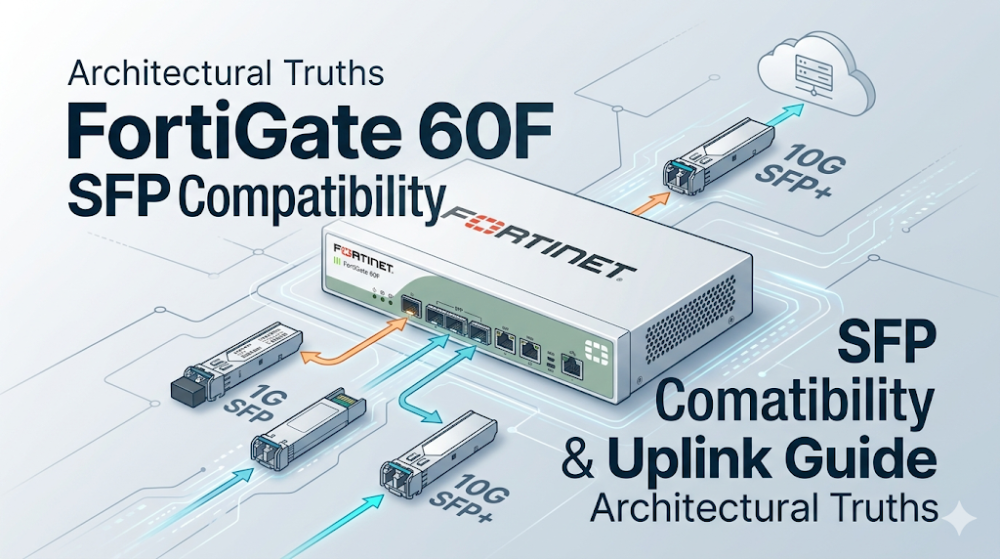
Because there are no physical SFP slots on the chassis, achieving FortiGate 60F SFP compatibility requires one of three architectural workarounds:
Active Media Conversion: Utilizing an external, enterprise-grade copper-to-fiber media converter. While functional, this introduces an unmanaged point of failure and increases port-to-port latency.
FortiLink Switch Extension: Connecting the firewall via its dedicated FortiLink ports to a managed FortiSwitch (such as the FortiSwitch 124F-FPOE), which features native SFP/SFP+ slots. The switch ports are then managed directly from the FortiGate GUI/CLI as if they were local interfaces.
BOM Escalation: Upgrading the hardware specification to the FortiGate 80F, which features shared media ports (RJ45/SFP combo ports) that natively accept a FortiGate 60F uplink transceiver equivalent.
A common issue reported in network engineering communities (such as Reddit's r/networking) involves clients losing internet access behind a newly deployed branch firewall, even though the firewall itself can successfully ping external gateways.
On the SOC4 platform, this is frequently caused by stateful inspection mismatches or TCP half-closed session timeouts. When an application abruptly terminates a connection without a proper four-way TCP handshake, the session remains in a half-closed state. If the firewall's session table fills up, or if the NP6Lite ASIC continues to offload a stale session, subsequent client traffic is silently dropped.
To diagnose and resolve this, engineers must interface with the FortiOS CLI to adjust the TCP half-closed timer and clear stale sessions:
# Step 1: View the current global TCP session timers
get system global | grep tcp

# Step 2: Reduce the TCP half-closed timeout to free up session table space
config system global
    set tcp-halfclosed-timer 120
    set tcp-halfopen-timer 60
    set tcp-timewait-timer 10
end

# Step 3: Identify and clear stale sessions offloaded to the NP6Lite ASIC
diagnose sys session filter dport 443
diagnose sys session list
# Clear the filtered sessions to force client re-negotiation
diagnose sys session clear
Part 2: Hardware Specifications and Uplink Sizing Guide
When designing a branch network, selecting the correct hardware variant is critical to avoiding performance bottlenecks. The table below provides a detailed comparison of the FortiGate 60F specs against its storage-enabled sibling (61F) and the step-up model (80F) which natively supports SFP uplinks.
Hardware Specification
FortiGate 60F (FG-60F)
FortiGate 61F (FG-61F)
FortiGate 80F (FG-80F)
ASIC Architecture
SOC4 (NP6Lite / CP9)
SOC4 (NP6Lite / CP9)
SOC4 (NP6XLite / CP9)
Onboard Storage
None (System RAM only)
128 GB SSD (Local Logging)
None (System RAM only)
Physical WAN Ports
2x GE RJ45
2x GE RJ45
2x GE RJ45
Shared SFP Combo Ports
None (0)
None (0)
2x Shared RJ45/SFP
Firewall Throughput
10 Gbps (1518-byte UDP)
10 Gbps (1518-byte UDP)
10 Gbps (1518-byte UDP)
IPS Throughput
1.4 Gbps
1.4 Gbps
1.4 Gbps
NGFW Throughput
1.0 Gbps
1.0 Gbps
1.0 Gbps
Threat Protection
700 Mbps
700 Mbps
900 Mbps
Implementing the FortiLink Switch Extension Architecture
If your deployment demands fiber connectivity but budget constraints dictate the use of the Fortinet FortiGate 60F, the recommended architectural design is to extend the firewall's switch fabric using FortiLink. By connecting a FortiSwitch to the designated FortiLink ports (typically ports 9 and 10 on the FG-60F), you gain access to the switch's SFP ports directly within the FortiOS management plane.
To configure this architecture and verify the transceiver diagnostics of a connected SFP module, use the following CLI sequence:
# Step 1: Enable FortiLink split-interface on the FortiGate 60F
config system interface
    edit "fortilink"
        set vdom "root"
        set ip 169.254.1.1 255.255.255.0
        set allowaccess ping fabric
        set type aggregate
        set member "port9" "port10"
        set lldp-transmission enable
        set lldp-reception enable
    next
end

# Step 2: Authorize the newly discovered FortiSwitch
config switch-controller managed-switch
    edit "S124FPTX23004812"
        set authorized yes
    next
end

# Step 3: Query the SFP transceiver diagnostics on the managed switch port
# This command extracts real-time optical power, bias current, and temperature
diagnose sys switch-controller switch-info transceiver S124FPTX23004812 port25
When sourcing a FortiGate 60F uplink transceiver for the downstream FortiSwitch, ensure you select the correct optical standard:
FN-TRAN-SZ: 1000BASE-SX SFP module for Multi-Mode Fiber (MMF), operating at 850nm up to 550 meters.
FN-TRAN-LX: 1000BASE-LX SFP module for Single-Mode Fiber (SMF), operating at 1310nm up to 10 kilometers.
Part 3: Sourcing, BOM Optimization, and Risk Mitigation in Germany
Deploying network infrastructure within Germany's highly competitive industrial and financial sectors requires strict adherence to project timelines and rigorous risk mitigation. Whether you are a system integrator (SI) in Munich or an IT director in Frankfurt, procurement delays can result in severe contractual penalties.
Bypassing Supply Chain Bottlenecks
Traditional distribution channels often impose lead times of 6 to 8 weeks for enterprise security hardware. To mitigate this risk, smart procurement teams optimize their Bill of Materials (BOM) by leveraging Router-switch's extensive physical supply chain. With over $20 million in on-shelf inventory distributed across global warehouses, Router-switch guarantees same-week dispatch to Germany, ensuring your deployment remains on schedule.
By bypassing multiple layers of regional middleman markups, SIs and SMEs can secure direct bulk-purchase discounts. To optimize your procurement process, you can explore the Fortinet FortiGate 60F Pricing and Availability page for real-time stock levels and wholesale quotes.
Hardware Authenticity and Post-Deployment Protection
In high-security environments, hardware integrity is non-negotiable. Every unit shipped through Router-switch comes with a 100% original genuine guarantee, featuring serial numbers (S/N) that are fully verifiable in Fortinet's official support databases prior to deployment.
To safeguard your investment against hardware failures without the premium overhead of traditional vendor contracts, Router-switch offers:
Complimentary 3-Year RS Care Extended Warranty: Providing long-term peace of mind.
Rapid RMA Standby Replacement: In the rare event of a hardware fault, a replacement unit is dispatched immediately—before the defective unit is returned—minimizing your Mean Time to Repair (MTTR).
Free 1-on-1 CCIE Consultancy: Access to elite network architects to validate your BOM, ensuring you don't mistakenly order RJ45-only firewalls when native SFP interfaces are required.
Q1: Can I plug an SFP transceiver directly into the FortiGate 60F?
No. The Fortinet FortiGate 60F is equipped exclusively with physical RJ45 copper ports. It does not feature any native SFP or SFP+ cages. If you require direct fiber connectivity on the firewall chassis itself, you must upgrade to the FortiGate 80F, which includes shared RJ45/SFP combo ports.
Q2: How do I connect a fiber ISP uplink to my FortiGate 60F?
There are two primary methods:
FortiLink Switch Integration (Recommended): Connect a managed FortiSwitch (e.g., FortiSwitch 124F) to the FortiGate via FortiLink copper ports, and insert your SFP transceiver into the switch's SFP ports.
Media Converter: Use an external active media converter to convert the fiber signal to copper RJ45, which then plugs into WAN1 or WAN2 on the FortiGate 60F.
Q3: What is the difference between the FortiGate 60F and the FortiGate 61F?
The physical port layout and performance metrics of both models are identical. The sole difference is that the FortiGate 61F includes an onboard 128 GB SSD for local log storage, packet captures, and WAN optimization caching, whereas the FortiGate 60F relies on system memory or remote logging (such as FortiAnalyzer or FortiCloud).
Q4: Does FortiOS support third-party SFP transceivers on connected FortiSwitches?
By default, FortiSwitches managed via FortiLink may flag third-party transceivers. However, you can enable support for third-party modules via the FortiSwitch CLI (accessed through the FortiGate) using the following command:
config switch physical-port
    edit
        set allow-unsupported-transceiver enable
    next
end
Q5: How does Router-switch ensure rapid delivery to Germany?
Router-switch maintains a $20M+ inventory of enterprise networking and security hardware. This allows us to bypass the standard 6-8 week lead times of traditional distributors, offering same-week dispatch to Germany with fully verifiable serial numbers and a complimentary 3-Year RS Care warranty.
Expertise Builds Trust
20+ Years • 200+ Countries • 21500+ Customers/Projects CCIE · JNCIE · NSE7 · ACDX · HPE Master ASE · Dell Server/AI Expert