Solving Warehouse WiFi Coverage and Uptime IssuesDesign reliable warehouse WiFi coverage and uptime with warehouse wifi 6 ap, industrial wireless access points, and warehouse poe switches for racks and docks.
OLT Capacity Planning for GPON Access NetworksPlan OLT capacity for GPON OLT systems and EA5800 capacity planning, optimizing GPON split ratio and OLT uplink design for scalable fiber access.
Enterprise OLT Platform Selection for Fiber AccessDesign enterprise OLT platform strategy for GPON OLT platform, modular OLT chassis, and OLT service boards to scale passive optical LAN and XG-PON evolution.
Scale Data Center Networking Under Long Lead TimesScale data center networking faster under long lead times with data center spine switches, leaf spine data center designs and Cisco UCS fabric interconnects.
Tunnel Video Surveillance VLAN Stability over FiberDesign stable tunnel video surveillance VLANs using optical transport backbone and Arista fiber aggregation for resilient Huawei OptiX OSN CCTV networks.
Fiber vs Copper in Industrial Networks Design GuideCompare fiber vs copper in industrial ethernet, plan hybrid industrial fiber network designs, and select rugged ethernet switches and industrial SFP transceivers.
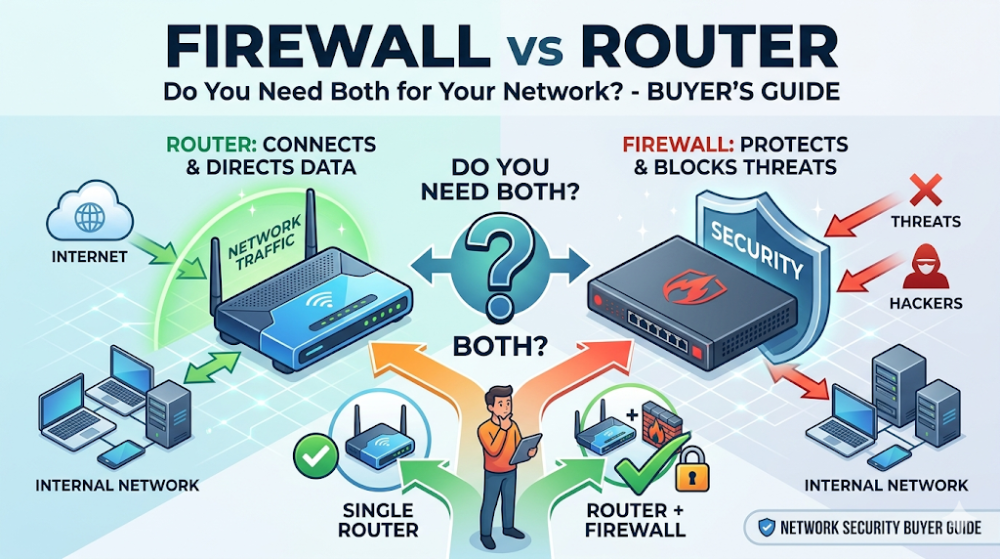
Many buyers treat firewalls and routers as interchangeable or assume one can fully replace the other. In reality, they serve different roles at the network edge. A router moves traffic between networks and finds the best path. A firewall inspects traffic and blocks what should not pass. Some environments need both. Others can use a single device that combines routing and security. The wrong decision usually comes from buying what looks simpler without understanding what the network actually needs to protect.
This guide is written for procurement teams, IT managers, and small business owners who are unsure whether they need a firewall, a router, or both. The goal is not to explain deep networking theory. It is to help buyers match the edge setup to their security requirements, budget, and growth plan so they do not underprotect a sensitive environment or overspend on security they do not need.
A router connects networks and directs traffic. It does not inspect traffic for threats by default.
A firewall inspects traffic and enforces security rules. It does not replace the routing function, though many firewalls include basic routing.
You need both if your environment handles sensitive data, faces compliance requirements, or connects multiple sites. The router handles traffic flow. The firewall handles security policy.
A combined firewall-router may be enough for small offices with basic needs. But it is not a substitute for dedicated security in regulated or high-risk environments.
The safest buying path is to define what you are protecting, from what, and how complex the traffic patterns are before choosing between separate devices or an all-in-one unit.
Device
Primary role
What it does not do by default
Router
Connects networks, directs traffic, finds paths
Deep traffic inspection, threat blocking, application control
Firewall
Inspects traffic, blocks threats, enforces policy
Complex routing decisions, WAN optimization, path redundancy
Combined device
Basic routing + basic security in one unit
Advanced routing or enterprise-grade security depth
Part 2: What a router actually does
A router is a traffic director, not a security guard
A router's job is to connect different networks and find the most efficient path for data to travel. It handles IP addressing, NAT, and basic connectivity between your local network and the internet or between multiple sites. A standard router does not inspect the content of traffic for threats. It looks at where traffic is going, not whether it is safe.
When a router is enough
A standalone router may be sufficient for very small environments with minimal security needs, no compliance requirements, and no sensitive data. Home offices, temporary sites, or test labs sometimes fall into this category. But for most business environments, a router alone leaves the network exposed because it does not filter malicious traffic.
When a router is not enough
If the environment handles customer data, financial records, healthcare information, or any regulated data type, a router alone is not adequate security. It also falls short when the network faces regular exposure to the internet, hosts public-facing services, or connects remote workers. In these cases, something must inspect traffic, and that is the firewall's role.
A firewall inspects traffic based on rules. It can block unauthorized access, filter by application, detect intrusions, and enforce security policies. Modern firewalls go beyond simple port blocking. They inspect packet content, identify malware, and control access based on user identity and behavior.
When a firewall is essential
Firewalls are essential in any environment where data protection matters. That includes businesses with customer databases, payment processing, healthcare records, intellectual property, or compliance obligations. They are also critical for multi-site networks, remote access setups, and any environment where untrusted traffic touches the internal network.
When a firewall alone may be overkill
A dedicated enterprise firewall can be expensive and complex to manage. For a very small office with basic internet use, no sensitive data, and no compliance requirements, a full-featured firewall may be more than necessary. In these cases, a combined router-firewall device or a simple security-enabled router may provide enough protection without the cost and complexity.
Part 4: When you need both
Sensitive data and compliance requirements demand both
If the business handles regulated data or faces compliance audits, separating routing and security into dedicated devices is usually the right approach. The router handles traffic engineering and connectivity. The firewall handles security policy and threat inspection. This separation makes it easier to audit, update, and troubleshoot each function independently.
Multi-site and complex networks need dedicated routing
When the network spans multiple locations, uses VPNs, or requires traffic prioritization, a dedicated router provides the routing intelligence that a combined device may lack. Adding a dedicated firewall ensures that security policy is enforced consistently across all traffic, regardless of which path it takes.
Performance and reliability improve with separation
Dedicated devices usually handle higher traffic volumes and more complex rules without degradation. A combined device doing both routing and deep security inspection can become a bottleneck as the network grows. Buyers planning for growth should consider whether a combined device will scale or whether separate devices will be needed within the next refresh cycle.
Part 5: When a combined device is enough
Small offices with basic needs
For small offices with a handful of users, basic internet access, and no sensitive data, a combined firewall-router or security-enabled router is often sufficient. These devices provide NAT, basic firewall rules, and simple VPN support in one unit. They are easier to manage and more affordable than separate devices.
Budget-constrained environments
When budget is tight and the risk profile is low, a combined device can deliver adequate protection without the cost of two dedicated appliances. Buyers should be honest about the risk profile and compliance needs. If the environment is truly low-risk, overspending on dedicated security may not be justified.
Simplicity matters for teams without dedicated security staff
Managing separate routers and firewalls requires networking and security expertise. Small teams without dedicated IT staff often benefit from a single device that is easier to configure and monitor. The trade-off is reduced capability, but for some environments that trade-off is acceptable.
Part 6: Common buyer mistakes
Mistake 1: Thinking a router is enough security
A router directs traffic but does not inspect it for threats. Relying on a router alone for security leaves the network exposed.
Mistake 2: Buying a firewall without understanding routing needs
A firewall handles security but may not provide the routing features a complex network needs. Buyers should confirm that the chosen device or combination covers both routing and security requirements.
Mistake 3: Choosing a combined device for a high-security environment
Combined devices are convenient but usually lack the depth of dedicated security appliances. High-risk environments should use dedicated firewalls.
Mistake 4: Ignoring growth when making the decision
A combined device may work today but become a bottleneck tomorrow. Buyers should consider whether the environment will grow in users, sites, or security requirements before choosing.
FAQ
Do I need a firewall if I have a router?
Yes, if your environment handles sensitive data, faces compliance requirements, or connects to the internet. A router does not inspect traffic for threats. A firewall does.
Can a firewall replace a router?
Many firewalls include basic routing, but they usually do not replace a dedicated router in complex networks. For simple setups, a firewall with routing capabilities may be sufficient.
What is the difference between a router and a firewall?
A router directs traffic between networks. A firewall inspects traffic and blocks threats based on security rules.
Should small businesses buy separate routers and firewalls?
Not always. Small businesses with basic needs and low risk may be fine with a combined device. Those with sensitive data or compliance needs should consider separate devices.
What is the best next step before buying?
Define what you are protecting, what threats you face, how complex your network is, and whether you expect growth. Then match the device choice to those requirements.
Part 7: The next practical step
If you are deciding between a firewall, a router, or both, the next useful step is to define your security requirements, network complexity, and growth plan. That means asking what data you are protecting, what compliance rules apply, how many sites and users you have, and how much security depth you actually need.
Once that is clear, the choice becomes straightforward. Router-Switch can help compare firewall and router options, evaluate combined devices, and validate whether the quoted solution matches your real requirements. If you are unsure whether you need separate devices or a combined unit, the fastest path is to define the requirement set first and then compare products against it.
Expertise Builds Trust
20+ Years • 200+ Countries • 21500+ Customers/Projects CCIE · JNCIE · NSE7 · ACDX · HPE Master ASE · Dell Server/AI Expert