Solving Warehouse WiFi Coverage and Uptime IssuesDesign reliable warehouse WiFi coverage and uptime with warehouse wifi 6 ap, industrial wireless access points, and warehouse poe switches for racks and docks.
OLT Capacity Planning for GPON Access NetworksPlan OLT capacity for GPON OLT systems and EA5800 capacity planning, optimizing GPON split ratio and OLT uplink design for scalable fiber access.
Enterprise OLT Platform Selection for Fiber AccessDesign enterprise OLT platform strategy for GPON OLT platform, modular OLT chassis, and OLT service boards to scale passive optical LAN and XG-PON evolution.
Scale Data Center Networking Under Long Lead TimesScale data center networking faster under long lead times with data center spine switches, leaf spine data center designs and Cisco UCS fabric interconnects.
Tunnel Video Surveillance VLAN Stability over FiberDesign stable tunnel video surveillance VLANs using optical transport backbone and Arista fiber aggregation for resilient Huawei OptiX OSN CCTV networks.
Fiber vs Copper in Industrial Networks Design GuideCompare fiber vs copper in industrial ethernet, plan hybrid industrial fiber network designs, and select rugged ethernet switches and industrial SFP transceivers.
When buyers evaluate network security, three technologies appear on nearly every shortlist: firewalls, intrusion detection systems (IDS), and intrusion prevention systems (IPS). The confusion is understandable. All three protect the network, all three monitor traffic, and many modern devices combine two or even all three functions into a single appliance. But the differences matter when it comes to procurement, deployment, and what each technology actually does for your security posture.
This guide is written for procurement teams, IT managers, and security leads who need to understand what each technology does, whether they need all three, and how to prioritize security spending. The goal is not a technical deep-dive. It is a buyer-side explanation of the real differences, the practical trade-offs, and how to build a security stack that matches your risk profile and budget.
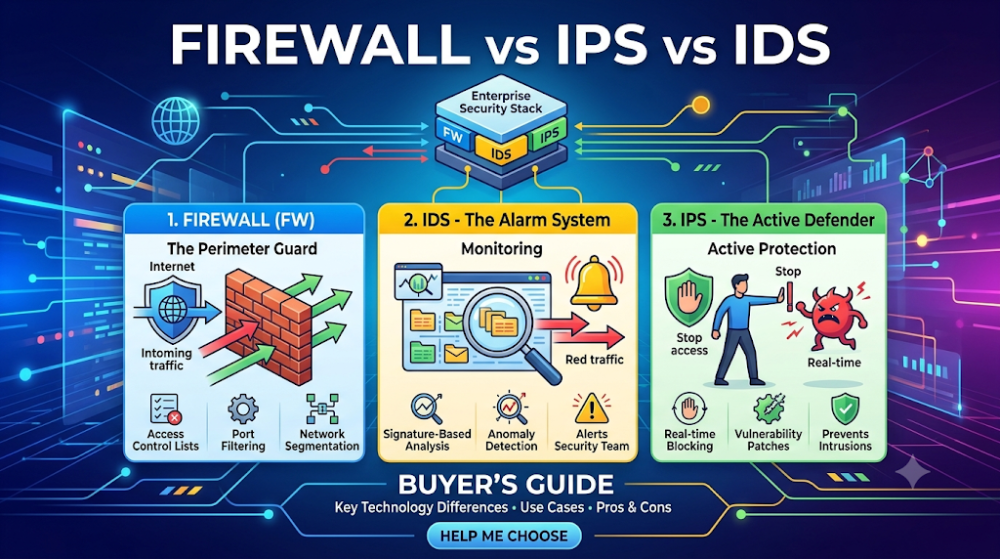
A firewall is a traffic filter. It decides what traffic is allowed into or out of your network based on rules. It is the first line of defense.
An IDS is a monitoring system. It watches network traffic for suspicious patterns and alerts you when it finds something wrong. It does not block anything.
An IPS is an active blocker. It watches traffic like an IDS, but when it detects a threat, it blocks it automatically.
Modern firewalls often include IPS functionality. Many next-generation firewalls (NGFWs) combine firewall and IPS in one device.
IDS is becoming less common as a standalone device. Most organizations get sufficient detection from their IPS, firewall logs, and SIEM tools.
Technology
What it does
Action
Buyer priority
Firewall
Filters traffic by rules
Allow / block
Essential for every network
IDS
Monitors for threats
Alert only
Supplemental for compliance
IPS
Detects and blocks threats
Block automatically
High for regulated industries
Part 2: What a firewall actually does
A firewall is a gatekeeper
A firewall examines network traffic against a set of predefined rules and decides whether to allow or block it. At its simplest, it might block all traffic from the internet except responses to requests initiated from inside the network. At its most advanced, a next-generation firewall (NGFW) inspects the actual content of traffic, identifies applications, enforces user-based policies, and blocks known malicious files.
Firewalls are essential and universal
Every network needs a firewall. It is not optional. Whether you are a small office with a single internet connection or a global enterprise with multiple data centers, a firewall is the foundation of your security perimeter. Buyers should think of the firewall as the minimum viable security purchase. Everything else, IPS, IDS, and advanced threat detection, builds on top of this foundation.
NGFWs combine multiple functions
Modern next-generation firewalls from vendors like Cisco, Fortinet, and Palo Alto Networks include application awareness, intrusion prevention, URL filtering, and malware detection. This convergence means that for many organizations, a single NGFW provides both firewall and IPS functionality. Buyers should verify what is included in their chosen firewall before purchasing a separate IPS.
Part 3: What an IDS actually does
An IDS watches and alerts
An intrusion detection system (IDS) monitors network traffic for suspicious patterns that match known attack signatures or anomalous behavior. When it detects something suspicious, it generates an alert for a security analyst to investigate. It does not block the traffic. Its job is visibility, not protection.
IDS is useful for compliance and forensics
IDS shines in environments where compliance requires detailed logging and monitoring, or where security teams need deep visibility into network behavior for forensic analysis. It provides a record of what happened, when, and how, which is valuable after a security incident.
IDS creates alert fatigue if not managed
The main downside of IDS is that it generates alerts without taking action. In busy networks, this can lead to alert fatigue, where security teams become overwhelmed by the volume of notifications and start ignoring them. IDS requires dedicated staff to monitor, investigate, and respond to alerts. Without that staff, an IDS adds noise without value.
Part 4: What an IPS actually does
An IPS blocks threats automatically
An intrusion prevention system (IPS) does everything an IDS does, scanning traffic for threats and suspicious patterns. The difference is that when an IPS detects a threat, it blocks it automatically. It does not wait for a human analyst to review the alert. This makes IPS an active defense layer rather than a monitoring tool.
IPS reduces response time
The main advantage of IPS is speed. When a new exploit or attack pattern appears, an IPS can block it immediately without waiting for a firewall rule update or human intervention. For organizations that cannot afford a delay between detection and response, IPS provides automated protection that reduces the window of vulnerability.
IPS can block legitimate traffic
The main risk of IPS is false positives. An overly aggressive IPS might block legitimate traffic, disrupting business operations. Most IPS devices allow tuning of sensitivity and policies, but finding the right balance between security and availability requires ongoing management. Buyers should factor this operational overhead into their decision.
Part 5: How they work together
The standard layered approach
In a typical enterprise security stack, the firewall sits at the perimeter, filtering traffic based on rules. The IPS sits inline behind or alongside the firewall, inspecting allowed traffic for malicious content and blocking threats the firewall missed. The IDS may sit at a span port or tap, monitoring traffic for visibility and logging without interfering with flow.
Convergence simplifies the stack
Modern NGFWs often include IPS functionality, which means many organizations no longer need a separate IPS device. Some advanced platforms also include behavioral analytics and threat intelligence feeds that reduce the need for a standalone IDS. Buyers should evaluate their chosen firewall's capabilities before assuming they need three separate devices.
SIEM ties it all together
Whether you use separate devices or a converged platform, a security information and event management (SIEM) system collects logs from firewalls, IPS, and IDS into a single view. This correlation is where the real security value comes from. Alerts from individual devices are useful, but understanding the full attack chain requires seeing events across the entire stack.
Part 6: Do you need all three?
Most organizations need a firewall and some form of IPS
For the majority of enterprise networks, the minimum security stack is a next-generation firewall with integrated IPS. This covers perimeter filtering and active threat blocking in a single device. Most modern firewalls from Cisco, Fortinet, and Palo Alto include IPS as a standard or licensable feature.
IDS is optional unless compliance requires it
Standalone IDS is increasingly optional. Organizations that need deep monitoring for compliance or forensic purposes may still deploy IDS, but many get sufficient visibility from firewall logs, IPS alerts, and SIEM correlation. If your compliance framework does not explicitly require IDS, you may not need a separate device.
Small offices may need only a firewall
For small offices with simple networks and limited security staff, a basic firewall with simple content filtering may be sufficient. Adding IPS and IDS without the staff to manage them creates complexity without improving security.
Part 7: Buying decisions and common mistakes
Mistake 1: Buying three separate devices when one NGFW would suffice
Many buyers assume they need a firewall, an IPS, and an IDS. Modern NGFWs combine the first two, and IDS functionality is often redundant if you have good logging and SIEM. Evaluate convergence before buying separate appliances.
Mistake 2: Buying advanced security tools without staff to manage them
IPS and IDS require ongoing tuning, rule updates, and alert review. Buying these tools without dedicating staff to manage them results in false positives, ignored alerts, and wasted budget.
Mistake 3: Ignoring the overlap between firewall and IPS
If your firewall already includes IPS, buying a separate IPS creates redundancy. Verify what your chosen firewall includes before adding more devices.
Mistake 4: Treating IDS as a replacement for IPS
IDS alerts but does not block. If your goal is to stop attacks, not just know about them, you need IPS or a firewall with IPS capability.
FAQ
Can a firewall replace an IPS?
Modern next-generation firewalls often include IPS functionality. If your firewall has IPS, you may not need a separate IPS device. Verify your firewall's capabilities before purchasing.
Do I need IDS if I have IPS?
Usually not. IPS provides both detection and blocking. IDS adds visibility but creates more alerts. Most organizations get sufficient monitoring from IPS logs and SIEM correlation.
Which should I buy first: firewall, IPS, or IDS?
Buy the firewall first. It is the foundation of network security. Then evaluate whether your chosen firewall includes IPS. IDS is the last priority unless compliance requires it.
Are NGFWs worth the extra cost?
For most enterprises, yes. NGFWs combine firewall, IPS, application control, and threat intelligence in one device, which simplifies management and often costs less than separate appliances.
What is the best next step before buying?
Define your security requirements, compliance obligations, and available staff. Then evaluate whether a converged NGFW meets your needs or whether separate devices are justified.
Part 8: The next practical step
If you are evaluating network security, the next useful step is to audit what you already have and what you actually need. That means confirming whether your current firewall includes IPS, whether compliance requires standalone IDS, and whether your team has the capacity to manage multiple security devices. Once those are clear, you can build a security stack that protects your network without wasting budget on redundant tools.
Router-Switch can help compare firewall platforms, validate whether integrated IPS meets your requirements, and check availability for the security appliances that fit your environment. If you are unsure how to build your security stack, the fastest path is to define your risk profile and compliance needs first, then match tools to those requirements.
Expertise Builds Trust
20+ Years • 200+ Countries • 21500+ Customers/Projects CCIE · JNCIE · NSE7 · ACDX · HPE Master ASE · Dell Server/AI Expert