Solving Warehouse WiFi Coverage and Uptime IssuesDesign reliable warehouse WiFi coverage and uptime with warehouse wifi 6 ap, industrial wireless access points, and warehouse poe switches for racks and docks.
OLT Capacity Planning for GPON Access NetworksPlan OLT capacity for GPON OLT systems and EA5800 capacity planning, optimizing GPON split ratio and OLT uplink design for scalable fiber access.
Enterprise OLT Platform Selection for Fiber AccessDesign enterprise OLT platform strategy for GPON OLT platform, modular OLT chassis, and OLT service boards to scale passive optical LAN and XG-PON evolution.
Scale Data Center Networking Under Long Lead TimesScale data center networking faster under long lead times with data center spine switches, leaf spine data center designs and Cisco UCS fabric interconnects.
Tunnel Video Surveillance VLAN Stability over FiberDesign stable tunnel video surveillance VLANs using optical transport backbone and Arista fiber aggregation for resilient Huawei OptiX OSN CCTV networks.
Fiber vs Copper in Industrial Networks Design GuideCompare fiber vs copper in industrial ethernet, plan hybrid industrial fiber network designs, and select rugged ethernet switches and industrial SFP transceivers.
Cisco Small Form-factor Pluggable (SFP) modules are critical, hot-swappable transceivers commonly used in enterprise and data center networks. Because of their high value and widespread use, counterfeit, gray market, or unauthorized modules can pose serious risks to network stability, security, and long-term support.
Before deploying SFP modules, network engineers and procurement teams should verify their authenticity. This guide walks through practical methods, potential risks, and what to do if a module isn’t genuine—while highlighting ways to ensure smooth, reliable procurement.
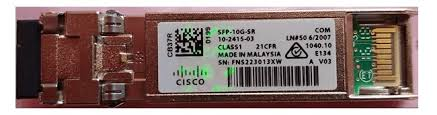
SFP serial numbers often indicate the manufacturing location:
CTH: Celestica - Thailand
FOC: Foxconn - Shenzhen, China
JAB: Jabil - Florida
JPE: Jabil - Malaysia
JSH: Jabil - Shanghai, China
TAU: Solectron - Texas
PEN: Solectron - Malaysia
Unknown codes (e.g., “SMT”) may suggest non-Cisco manufacturing.
Part 3: Procurement Tips and Next Steps
1. Stick to Authorized Cisco Products
Always source SFPs from authorized Cisco resellers. This ensures reliability, valid warranty coverage, and access to support.
2. Report Suspicious Items
Suspected counterfeit or diverted modules should be reported to Cisco Brand Protection. They investigate and help mitigate risks to your network.
3. Partner With Trusted Suppliers
For verified Cisco SFPs, Router-switch offers original inventory and expert guidance. Leveraging a trusted supplier ensures smooth deployment and reduces the risk of downtime.
Part 4: Frequently Asked Questions (FAQ)
Q1: How to check Cisco SFP module?
Check for holographic indicators, use commands like show inventory or sh idprom interface SFP_port, and validate the serial number via Cisco tools.
Q2: Do SFP modules have serial numbers?
Yes, every Cisco SFP module has a unique serial number.
Q3: How to get the serial number?
Use show inventory or sh interface transceiver detail in Cisco IOS/NX-OS.
Q3: How to know if an SFP is faulty?
A Cisco device may alert if a non-genuine module is inserted. Detailed fault checks require analyzing transceiver data with commands like sh interface transceiver detail.
Takeaway: Always verify SFP authenticity before deployment. Doing so prevents security issues, ensures reliable operation, and maintains warranty coverage. For hassle-free procurement of genuine Cisco modules, Router-switch provides verified stock and professional support, helping your network stay secure and fully operational.
Expertise Builds Trust
20+ Years • 200+ Countries • 21500+ Customers/Projects CCIE · JNCIE · NSE7 · ACDX · HPE Master ASE · Dell Server/AI Expert