Solving Warehouse WiFi Coverage and Uptime IssuesDesign reliable warehouse WiFi coverage and uptime with warehouse wifi 6 ap, industrial wireless access points, and warehouse poe switches for racks and docks.
OLT Capacity Planning for GPON Access NetworksPlan OLT capacity for GPON OLT systems and EA5800 capacity planning, optimizing GPON split ratio and OLT uplink design for scalable fiber access.
Enterprise OLT Platform Selection for Fiber AccessDesign enterprise OLT platform strategy for GPON OLT platform, modular OLT chassis, and OLT service boards to scale passive optical LAN and XG-PON evolution.
Scale Data Center Networking Under Long Lead TimesScale data center networking faster under long lead times with data center spine switches, leaf spine data center designs and Cisco UCS fabric interconnects.
Tunnel Video Surveillance VLAN Stability over FiberDesign stable tunnel video surveillance VLANs using optical transport backbone and Arista fiber aggregation for resilient Huawei OptiX OSN CCTV networks.
Fiber vs Copper in Industrial Networks Design GuideCompare fiber vs copper in industrial ethernet, plan hybrid industrial fiber network designs, and select rugged ethernet switches and industrial SFP transceivers.
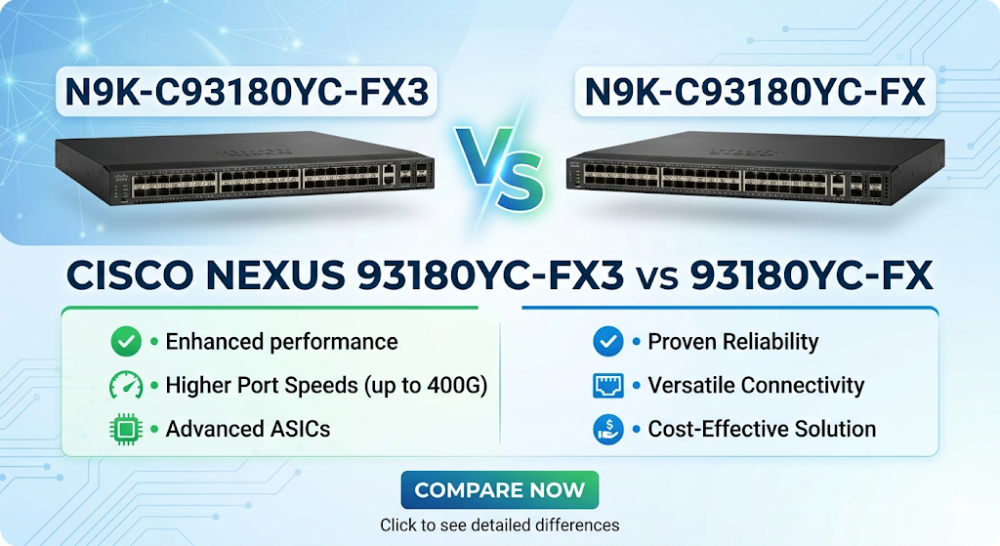
When you are performing a midnight vSAN migration or scaling out an EVPN-VXLAN fabric, the last thing you want to see is silent packet drops or a sudden burst of port flapping on your leaf switches. In high-density 10G/25G/100G environments, choosing between the Cisco Nexus N9K-C93180YC-FX and its successor, the N9K-C93180YC-FX3, is not just a matter of comparing port counts—it is a deep architectural decision involving ASIC pipelines, packet buffer serialization, and transceiver compatibility.
Both switches belong to the highly successful Cisco Nexus 9300 series switch family, but they represent different hardware generations. Making the wrong choice can lead to unexpected performance bottlenecks, transceiver compatibility headaches, or thermal management issues in your server racks.
The fundamental differentiator in the Cisco Nexus 93180YC-FX3 vs 93180YC-FX comparison lies within the silicon. While both switches are designed for top-of-rack (ToR) leaf deployments, they utilize different generations of Cisco's proprietary Cloud Scale Application-Specific Integrated Circuits (ASICs).
The ASIC Evolution: Tahoe vs. Gibson
The older N9K-C93180YC-FX is powered by the first-generation Cloud Scale "Tahoe" ASIC (built on a 16nm process). Tahoe introduced cost-effective VXLAN routing, basic telemetry, and smart buffering. However, as modern workloads scaled, Tahoe faced limitations in handling highly dynamic microbursts and concurrent advanced features like line-rate MACsec encryption across all ports simultaneously.
In contrast, the N9K-C93180YC-FX3 leverages the newer "Gibson" ASIC (built on a highly efficient 7nm process). This die-shrink and architectural redesign yield several critical advantages:
Dynamic Buffer Allocation: Although both switches feature a 40MB packet buffer, the Gibson ASIC in the FX3 utilizes an intelligent "Smart Buffer" architecture. It dynamically allocates buffer space per port-group based on real-time traffic patterns, significantly reducing packet drops during TCP incast events.
Line-Rate MACsec & SyncE: The FX3 supports hardware-based MACsec encryption and Synchronous Ethernet (SyncE) natively across all downlink and uplink ports without performance degradation. The older FX model has limitations regarding which ports can run MACsec concurrently at maximum throughput.
Telemetry and Visibility: The FX3 ASIC provides flow-table telemetry at a much granular level, allowing network operators to detect microbursts lasting only a few microseconds.
Real-World Community Pain Points: Interface Counter & FEC Mismatches
Network engineers on Reddit and community forums have documented specific hardware quirks when deploying these models.
One notable issue on the N9K-C93180YC-FX3 is an interface counter bug where the switch periodically reports impossible traffic rates (e.g., "3Tbps on a 25G interface") without actual packet drops. This is typically caused by an ASIC counter polling mismatch in older NX-OS software releases, which requires upgrading to a deferred maintenance release or adjusting the polling interval.
Another frequent headache is Forward Error Correction (FEC) mismatches. When connecting 25G SFP28 transceivers between the FX/FX3 and third-party NICs (like Mellanox ConnectX-5/6), the ports may flap or fail to link up. The FX3's Gibson ASIC features an updated auto-negotiation state machine, but manual FEC configuration is often required to stabilize the link.
Part 2: Hardware Specifications and Performance Sizing Guide
When sizing your data center fabric, you must evaluate physical port flexibility, power consumption, and forwarding performance. The table below outlines the key hardware differences between these two prominent members of the Cisco Nexus 9300 series switch family.
Specification / Feature
Cisco Nexus N9K-C93180YC-FX
Cisco Nexus N9K-C93180YC-FX3
ASIC Generation
Tahoe (16nm)
Gibson (7nm)
Downlink Ports
48 x 1/10/25 Gbps SFP28
48 x 1/10/25 Gbps SFP28
Uplink Ports
6 x 40/100 Gbps QSFP28
6 x 40/100 Gbps QSFP28
Switching Capacity
3.6 Tbps
3.6 Tbps
Forwarding Rate
1.2 Bpps
1.4 Bpps
Packet Buffer
40 MB (Shared)
40 MB (Smart/Dynamic)
MAC Address Table
Up to 256,000 entries
Up to 256,000 entries
MACsec Support
Supported on select ports
Supported on all ports (Line-rate)
SyncE Support
No
Yes
Typical Power Draw
~210W
~480W (Due to enhanced feature set)
Port Breakout Capabilities
A common question in enterprise deployments is whether these switches support breakout configurations on the 6 QSFP28 uplink ports.
The N9K-C93180YC-FX supports breaking down the 100G QSFP28 ports into 4x10G or 4x25G on ports 49 to 54, but with certain allocation restrictions depending on the NX-OS version.
The N9K-C93180YC-FX3 offers more flexible breakout support, allowing you to run 4x10G, 4x25G, or even 2x50G configurations across all uplink ports, making it highly adaptable for connecting to legacy core switches or high-density compute nodes.
Thermal and Fan Behavior
Another real-world issue reported by network administrators is the "fans going 100% 24/7" symptom on the Nexus 9300 series. This behavior is often triggered by inserting non-HPE/non-Cisco certified transceivers that do not report temperature metrics correctly, causing the NX-OS thermal algorithm to default to maximum cooling for self-preservation. The FX3 has updated fan profiles, but proper transceiver selection remains critical.
CLI Diagnostic and Configuration Workaround
To troubleshoot port flapping, configure FEC manually, and verify the thermal/fan status on either switch, use the following copy-paste-ready NX-OS CLI commands:
# Step 1: Verify the current FEC status on a flapping 25G interface
show interface ethernet 1/1 brief
show interface ethernet 1/1 fec

# Step 2: Manually force Reed-Solomon FEC (RS-FEC) to match a third-party NIC
configure terminal
interface ethernet 1/1
  fec rs
  no shutdown
exit

# Step 3: Check for microbursts and buffer drops on the interface
show queuing interface ethernet 1/1

# Step 4: Diagnose fan speeds and thermal sensor readings to resolve 100% fan speed issues
show environment fan
show environment temperature
If you are planning a network refresh or expanding your current leaf-spine architecture, you can optimize your procurement by exploring the Cisco Nexus 93180YC-FX3 Price and Inventory Status to compare real-time availability and commercial options.
Part 3: Sourcing, BOM Optimization, and Risk Mitigation
Selecting the right switch is only half the battle; sourcing it without disrupting your project timeline or blowing your budget is the real challenge. Network architects and procurement managers frequently face long lead times and high markup costs when dealing with traditional distribution channels.
Overcoming Lead Time Bottlenecks
Traditional distributor lead times for a new Cisco Nexus 9300 series switch can stretch from 6 to 8 weeks, risking project delay fines and missed deployment windows. Router-switch mitigates this risk through its robust physical supply chain, maintaining over $20 million in on-shelf inventory across multiple global warehouses. This allows for same-week dispatch, ensuring your critical infrastructure upgrades remain on schedule.
Flat Supply Chain and BOM Optimization
By bypassing 2-3 layers of regional middleman markups, Router-switch's flat supply chain enables System Integrators (SIs) and Small-to-Medium Enterprises (SMEs) to secure direct bulk-purchase discounts. Whether you need a single N9K-C93180YC-FX for a legacy environment or a cluster of N9K-C93180YC-FX3 switches for a greenfield EVPN-VXLAN fabric, you receive competitive pricing without sacrificing quality.
Comprehensive Risk Mitigation: RS Care & CCIE Support
Post-deployment hardware failures can lead to catastrophic downtime. While traditional channels push expensive support contracts, Router-switch provides a comprehensive safety net:
100% Original Genuine Guarantee: Every switch shipped has its serial number (S/N) fully verified in the vendor's official database before dispatch.
Free 1-on-1 CCIE Consultancy: Access expert guidance for configuration, interoperability checks, and design validation.
Complimentary 3-Year RS Care Warranty: Enjoy peace of mind with an extended warranty that includes Rapid RMA standby replacement—shipping the replacement unit first to minimize your Mean Time to Repair (MTTR).
To explore broader enterprise networking options and compare alternative platforms, check out our comprehensive catalog of Cisco Switches Solutions.
Part 4: Frequently Asked Questions (FAQ)
Q1: Can I mix N9K-C93180YC-FX and N9K-C93180YC-FX3 switches in the same EVPN-VXLAN fabric?
Yes. Both switches run Cisco NX-OS and fully support standard EVPN-VXLAN control and data planes. However, keep in mind that the N9K-C93180YC-FX3 has a higher forwarding rate (1.4 Bpps vs 1.2 Bpps) and a more advanced dynamic buffering mechanism. For optimal traffic symmetry and predictable latency, it is recommended to pair identical models within the same leaf pair (VPC domain).
Q2: Why are the fans on my new Nexus 9300 series switch running at 100% constantly?
This is a common issue often related to transceiver monitoring. If the switch detects a transceiver that does not support Digital Optical Monitoring (DOM) or draws power outside standard thresholds, the NX-OS thermal policy defaults to maximum fan speed to prevent localized overheating. Use the show environment fan and show interface transceiver details commands to identify the offending port.
Q3: Does the N9K-C93180YC-FX3 support 1G copper SFP transceivers?
Yes, the downlink ports on the N9K-C93180YC-FX3 support 1G copper SFPs (such as GLC-TE). However, you must configure the port speed manually using the speed 1000 command, as auto-negotiation on SFP28 ports may fail to detect 1G copper connections automatically.
Q4: What is the benefit of the Gibson ASIC in the FX3 over the Tahoe ASIC in the FX?
The Gibson ASIC (7nm) provides significantly better power efficiency per gigabit of throughput, a more advanced "Smart Buffer" architecture to handle microbursts, and native, line-rate MACsec encryption and SyncE support across all ports. The older Tahoe ASIC (16nm) has limited MACsec port density and less granular telemetry capabilities.
Q5: How can I verify that my sourced Cisco Nexus switch is 100% genuine?
Every switch sourced through Router-switch comes with a fully verifiable serial number (S/N). You can verify this S/N directly in Cisco's official database or toolsets. Additionally, Router-switch's strict quality control process ensures that all hardware is thoroughly inspected and certified by CCIE engineers before shipping.
Expertise Builds Trust
20+ Years • 200+ Countries • 21500+ Customers/Projects CCIE · JNCIE · NSE7 · ACDX · HPE Master ASE · Dell Server/AI Expert