Solving Warehouse WiFi Coverage and Uptime IssuesDesign reliable warehouse WiFi coverage and uptime with warehouse wifi 6 ap, industrial wireless access points, and warehouse poe switches for racks and docks.
OLT Capacity Planning for GPON Access NetworksPlan OLT capacity for GPON OLT systems and EA5800 capacity planning, optimizing GPON split ratio and OLT uplink design for scalable fiber access.
Enterprise OLT Platform Selection for Fiber AccessDesign enterprise OLT platform strategy for GPON OLT platform, modular OLT chassis, and OLT service boards to scale passive optical LAN and XG-PON evolution.
Scale Data Center Networking Under Long Lead TimesScale data center networking faster under long lead times with data center spine switches, leaf spine data center designs and Cisco UCS fabric interconnects.
Tunnel Video Surveillance VLAN Stability over FiberDesign stable tunnel video surveillance VLANs using optical transport backbone and Arista fiber aggregation for resilient Huawei OptiX OSN CCTV networks.
Fiber vs Copper in Industrial Networks Design GuideCompare fiber vs copper in industrial ethernet, plan hybrid industrial fiber network designs, and select rugged ethernet switches and industrial SFP transceivers.
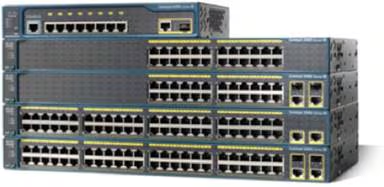
Cisco Catalyst 2960 and 2960-X/XR switches are widely deployed in enterprise networks for their reliability and robust performance. However, managing default usernames and passwords, especially during initial deployment, password recovery, or handling second-hand devices, can be challenging. This guide provides a comprehensive overview of accessing these devices, performing factory resets, and maintaining secure configurations.
Part 1: Understanding Default Credentials for Catalyst 2960 / 2960X
Cisco Catalyst switches behave differently depending on the access method and prior configuration:
Brand New Devices
2960-L Series
Web-Based Setup Wizard: Default username/password is cisco / cisco at 172.16.0.1 or 10.0.0.1/3. Must be changed after setup.
Console Access (CLI): No pre-configured credentials. The switch prompts for initial configuration.
2960-X / 2960-XR Series
Express Setup (Web): Default password is cisco (username ignored) at https://10.0.0.1. Must be changed immediately.
Console Access: No default credentials; CLI prompts for initial configuration.
Second-Hand or Previously Configured Devices
Existing configurations usually prevent default login.
A factory reset or password recovery is required.
Tip: If recovery or deployment needs to be fast, working with a partner like Router-switch can help you quickly verify device models, check real-time stock, and get guidance for configuration and deployment, minimizing downtime.
Part 2: Why Changing Default Passwords is Critical
Default passwords are publicly known, exposing devices to unauthorized access.
Real-world breaches have occurred due to unchanged credentials.
Compliance frameworks often require default credentials to be updated immediately.
Recommendation: Use complex passwords (12+ characters, mixed case, numbers, symbols) and unique usernames.
Part 3: Password Recovery and Factory Reset
Equipment Required
Console cable (RJ-45 to DB-9 or USB mini-B)
Terminal program (PuTTY, Tera Term), 9600 baud, 8N1
Reset via Mode Button
Disconnect network cables to avoid conflicts.
Power on the switch and wait for POST completion.
Hold the Mode button:
2960-L: ~3 seconds until LEDs turn green.
2960-X/XR: ~10 seconds, LEDs blink then stop.
Release the button; switch reboots to an unconfigured state.
Initial configuration via Web or CLI:
2960-L Web: cisco/cisco
2960-X/XR Web: password cisco
CLI: define new credentials
Note: When urgent replacement or quick deployment is required, verified partners like Router-switch can provide accurate inventory, model confirmation, and technical guidance, helping you restore or expand your network efficiently.
Q1: What is the default password for Cisco Catalyst 2960 / 2960X?
2960-L Web: cisco/cisco at 172.16.0.1 or 10.0.0.1/3
2960-X/XR Web: password cisco at https://10.0.0.1 (username ignored)
Console CLI: no preset credentials; define new ones
Q2: How to reset a Cisco Catalyst 2960 switch password?
Press and hold the Mode button (3s for 2960-L, 10s for 2960-X/XR). Switch reboots unconfigured. Set new credentials via Web or CLI.
Q3: What about second-hand switches?
Existing configurations usually block default access. Perform factory reset or consider sourcing replacement units. Router-switch can help provide verified inventory and technical guidance.
Q4: Default login for Huawei switches?
Console: typically no username/password; prompts for first login.
Web: often admin/admin123 or model-specific credentials. Change immediately for security.
For verified inventory, real-time stock, and expert deployment guidance, visit Router-switch to ensure your network setup is fast, secure, and reliable.
Conclusion
Proper management of default usernames and passwordson Catalyst 2960 / 2960X series is essential for secure and efficient network operations. Whether deploying a new switch or recovering an existing one, following correct procedures prevents unauthorized access and ensures compliance with security best practices.
In situations where speed and accuracy are important—such as urgent replacement, second-hand device deployment, or large-scale rollouts—relying on verified inventory, technical guidance, and global stock availability from partners like Router-switch ensures you can complete configuration and deployment smoothly while maintaining security and compliance.
Combining careful password management with reliable procurement and technical support keeps your network infrastructure secure, well-managed, and high-performing.
Expertise Builds Trust
20+ Years • 200+ Countries • 21500+ Customers/Projects CCIE · JNCIE · NSE7 · ACDX · HPE Master ASE · Dell Server/AI Expert