Solving Warehouse WiFi Coverage and Uptime IssuesDesign reliable warehouse WiFi coverage and uptime with warehouse wifi 6 ap, industrial wireless access points, and warehouse poe switches for racks and docks.
OLT Capacity Planning for GPON Access NetworksPlan OLT capacity for GPON OLT systems and EA5800 capacity planning, optimizing GPON split ratio and OLT uplink design for scalable fiber access.
Enterprise OLT Platform Selection for Fiber AccessDesign enterprise OLT platform strategy for GPON OLT platform, modular OLT chassis, and OLT service boards to scale passive optical LAN and XG-PON evolution.
Scale Data Center Networking Under Long Lead TimesScale data center networking faster under long lead times with data center spine switches, leaf spine data center designs and Cisco UCS fabric interconnects.
Tunnel Video Surveillance VLAN Stability over FiberDesign stable tunnel video surveillance VLANs using optical transport backbone and Arista fiber aggregation for resilient Huawei OptiX OSN CCTV networks.
Fiber vs Copper in Industrial Networks Design GuideCompare fiber vs copper in industrial ethernet, plan hybrid industrial fiber network designs, and select rugged ethernet switches and industrial SFP transceivers.
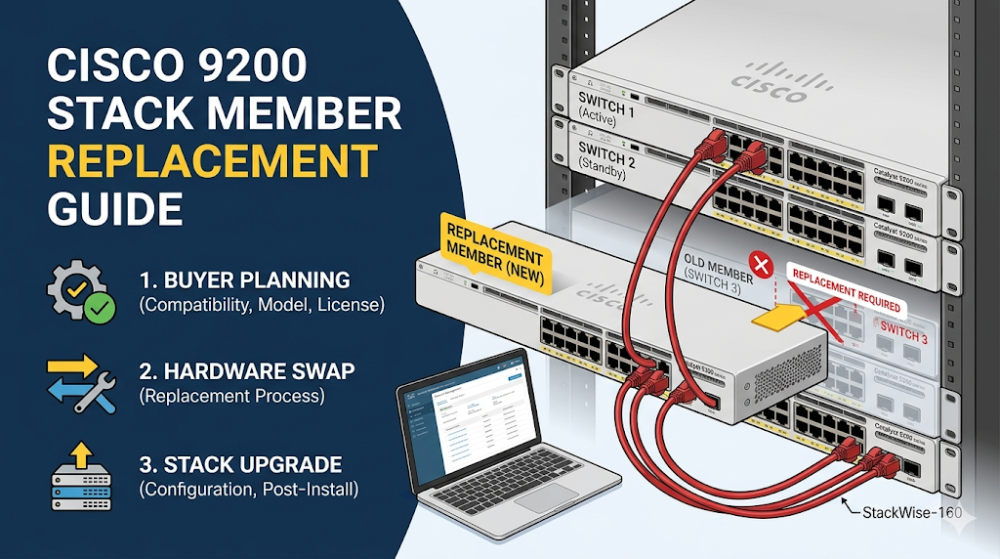
Replacing a Cisco 9200 stack member is a procurement decision, not just a technical procedure. Buyers often assume that any Catalyst 9200 switch can drop into an existing stack, but compatibility rules, software versions, and licensing can all block a clean replacement if they are not verified before purchase. The most expensive mistake is buying a replacement member that looks right on paper but refuses to join the stack or downgrades the entire stack's capabilities. This guide helps buyers plan the replacement correctly from the start.
This article is written for IT managers, procurement teams, and integrators who need to replace or upgrade a Cisco Catalyst 9200 stack member. The goal is not to provide CLI commands. It is to help buyers understand compatibility rules, licensing requirements, and planning steps before requesting quotes, so the replacement member integrates cleanly without forcing an emergency re-purchase.
Not all 9200 models can stack together. A 9200 and a 9200L cannot be mixed in the same stack. Buyers must match the exact model family.
Software version alignment is required. The replacement member must run a compatible IOS-XE version or the stack may reject it.
Licensing must match the existing stack tier. A member with a lower license tier can join but may silently disable features the rest of the stack depends on.
Preparation before the swap reduces risk. Configuring the replacement offline and scheduling a maintenance window is safer than a hot swap without planning.
Always verify compatibility before requesting a quote. The cheapest replacement is not the right replacement if it breaks stack consistency.
Check area
What to verify
Why it matters
Model family
9200 vs 9200L, exact SKU match
9200 and 9200L cannot stack together
Software version
IOS-XE version and feature set
Version mismatch can block stack join
Licensing
Network Essentials vs Advantage, DNA tier
Feature downgrade risk if tiers mismatch
Hardware generation
StackWise-80 vs StackWise-160
Determines stack bandwidth and compatibility
Part 2: Compatibility rules that block replacement
9200 and 9200L are not interchangeable in the same stack
The most common compatibility mistake is assuming that a 9200L can replace a 9200 member, or vice versa. These are separate product families with different stacking architectures. A 9200L uses StackWise-80. A 9200 uses StackWise-160. They cannot form a single stack. Buyers must confirm the exact model family of the failed member before ordering a replacement. If the original member was a 9200L, the replacement must also be a 9200L.
StackWise version determines bandwidth and member limits
StackWise-80 supports up to 80 Gbps stacking bandwidth. StackWise-160 doubles that. Mixing StackWise versions within a stack is not supported. Buyers should verify which StackWise version the existing stack uses and ensure the replacement member matches it exactly. This also affects how many members the stack can support and how traffic behaves during failover.
Uplink and power supply compatibility
Some 9200 models ship with fixed uplinks. Others support modular uplink modules. If the replacement member has different uplink capabilities, the stack may form but the network design may need adjustments. Buyers should check whether the replacement member's uplink configuration matches the existing stack's design requirements.
Part 3: Software and licensing checks before buying
IOS-XE version must be compatible
The replacement member should run the same IOS-XE version as the existing stack, or a version known to be compatible. Cisco publishes release notes that detail version compatibility for stacking. Running a significantly newer or older version can cause the new member to fail stack negotiation, which leaves it isolated and non-functional until the software is corrected.
Licensing tiers affect feature availability
Cisco Catalyst 9200 switches require a network license, either Essentials or Advantage. If the existing stack runs Advantage and the replacement member ships with Essentials, the member may join the stack but operate with reduced features. This can break QoS policies, security settings, or routing behavior that the network depends on. Buyers should confirm the required license tier before purchase and factor licensing cost into the replacement budget.
DNA subscription requirements
Depending on when the original switch was purchased, it may have a Cisco DNA subscription attached. Replacement members may require a new DNA subscription or may be available with different subscription terms. Buyers should clarify whether the replacement needs a new DNA subscription, whether the existing subscription can be transferred, and how this affects long-term operational cost.
Part 4: Planning the swap to avoid downtime
Prepare the replacement member before removing the old one
The safest approach is to unbox, inspect, and pre-configure the replacement member before touching the production stack. This includes verifying hardware completeness, upgrading IOS-XE to the correct version, confirming licensing activation, and loading a base configuration. Preparing offline reduces the time the stack operates with a missing member and catches compatibility issues before they affect production.
Schedule the swap during a maintenance window
While Cisco StackWise supports hot member replacement, unexpected issues can still occur. A maintenance window gives the team time to troubleshoot if the new member does not join cleanly. It also reduces pressure to rush through verification steps that could catch problems early.
Document the current stack state before starting
Buyers should ensure the operations team has a current backup of the stack configuration, a list of member priorities, and a clear understanding of which physical ports and cables will be affected. This documentation is essential if the replacement does not go as planned and a rollback becomes necessary.
Part 5: When replacement is the right decision
Hardware failure is the clearest trigger
Power supply failure, fan errors, persistent port flapping, or boot failures are all clear signals that a stack member needs replacement. In these cases, the decision is not whether to replace but how quickly the replacement can be sourced and installed.
Performance degradation can justify proactive replacement
A member that runs hotter than others, shows increasing error counters, or struggles to keep up during peak traffic may be approaching failure. Replacing it during a planned window avoids the disruption of an unexpected failure during business hours.
Capacity upgrades can drive member replacement
If the stack needs more PoE capacity, additional multigig ports, or stronger uplinks, replacing a member with a higher-capacity model may be the right decision. Buyers should confirm that the new model is stack-compatible and that the existing members can support the upgraded capabilities without creating bottlenecks elsewhere.
Part 6: Common buyer mistakes
Mistake 1: Ordering the wrong model family
A 9200L cannot replace a 9200 member, and vice versa. Always verify the exact model family before ordering.
Mistake 2: Ignoring software version requirements
A replacement member with the wrong IOS-XE version may fail to join the stack entirely. Verify version compatibility before purchase.
Mistake 3: Overlooking licensing tier
A lower license tier can cause feature downgrade that affects the entire stack. Confirm licensing requirements before buying.
Mistake 4: Skipping offline preparation
Preparing the replacement member before the swap reduces downtime and catches configuration issues early. Do not skip this step.
FAQ
Can I mix Cisco 9200 and 9200L in the same stack?
No. The 9200 and 9200L are separate product families with different stacking architectures. They cannot form a single stack.
Do I need the same software version on the replacement member?
Yes, or at least a compatible version. Version mismatches can prevent the new member from joining the stack.
What license does the replacement member need?
The replacement member should match the existing stack's license tier, either Network Essentials or Network Advantage, to avoid feature downgrade.
Can I replace a stack member without downtime?
StackWise supports hot member replacement in most cases, but unexpected issues can occur. Plan the swap during a maintenance window and have a rollback plan ready.
What is the best next step before buying a replacement?
Document the existing member's exact model, software version, and license tier. Verify these details against the replacement before requesting quotes.
Part 7: The next practical step
If you are planning to replace a Cisco 9200 stack member, the next useful step is to document the exact model, software version, license tier, and StackWise version of the existing member. Then verify that the replacement matches all of these requirements before requesting quotes. This preparation turns an emergency purchase into a controlled procurement decision and eliminates the risk of buying a member that cannot join the stack.
Router-Switch can help validate Cisco 9200 stack member compatibility, check current availability, confirm licensing options, and reduce the risk of buying a replacement that creates stack instability. If you are unsure which model fits your stack or what licensing is required, the fastest path is to share your current stack details and let the shortlist be validated against compatibility and availability before the PO is approved.
Expertise Builds Trust
20+ Years • 200+ Countries • 21500+ Customers/Projects CCIE · JNCIE · NSE7 · ACDX · HPE Master ASE · Dell Server/AI Expert