Solving Warehouse WiFi Coverage and Uptime IssuesDesign reliable warehouse WiFi coverage and uptime with warehouse wifi 6 ap, industrial wireless access points, and warehouse poe switches for racks and docks.
OLT Capacity Planning for GPON Access NetworksPlan OLT capacity for GPON OLT systems and EA5800 capacity planning, optimizing GPON split ratio and OLT uplink design for scalable fiber access.
Enterprise OLT Platform Selection for Fiber AccessDesign enterprise OLT platform strategy for GPON OLT platform, modular OLT chassis, and OLT service boards to scale passive optical LAN and XG-PON evolution.
Scale Data Center Networking Under Long Lead TimesScale data center networking faster under long lead times with data center spine switches, leaf spine data center designs and Cisco UCS fabric interconnects.
Tunnel Video Surveillance VLAN Stability over FiberDesign stable tunnel video surveillance VLANs using optical transport backbone and Arista fiber aggregation for resilient Huawei OptiX OSN CCTV networks.
Fiber vs Copper in Industrial Networks Design GuideCompare fiber vs copper in industrial ethernet, plan hybrid industrial fiber network designs, and select rugged ethernet switches and industrial SFP transceivers.
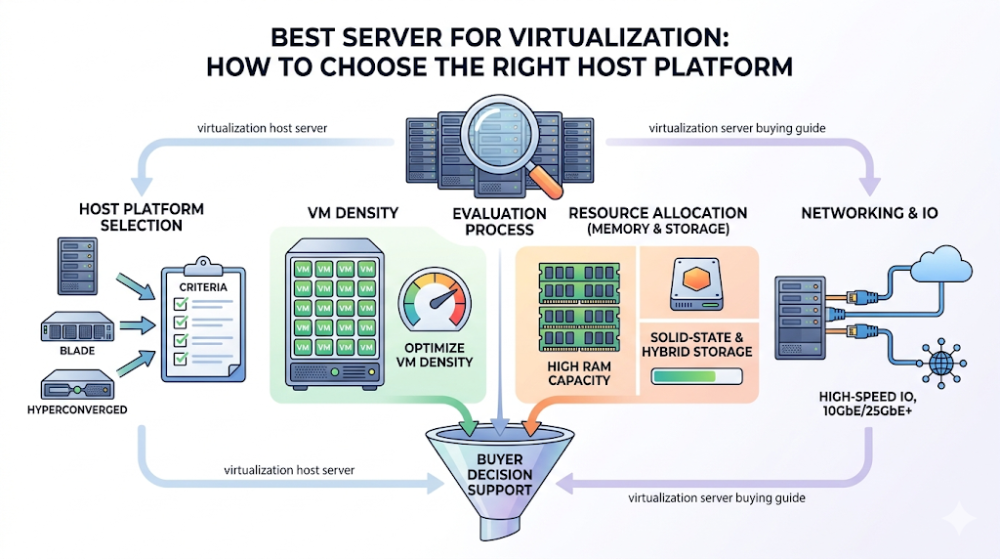
The best server for virtualization is rarely the one with the most cores or the biggest memory ceiling on paper. It is the host platform that fits the workload mix, growth pattern, redundancy model, and operational style of the environment you are actually building. Buyers often get this wrong by treating virtualization like a generic server purchase. In reality, a virtualization host has to balance compute, memory, storage, networking, and expansion logic together. If one of those is badly mismatched, the whole cluster becomes harder to scale and more expensive to operate.
This guide is written for IT managers, procurement teams, integrators, and technical leads choosing a server platform for virtualization. The goal is not to name one universal “best” server. It is to help you select the right host platform by asking the questions that most often change the buying decision, especially around CPU density, memory headroom, storage layout, networking, node role, and cluster growth. If you are sizing virtualization hosts, the right decision usually comes from matching the server to the VM profile and expansion plan, not from buying the highest-looking specification line.
The best server for virtualization is the one that matches your VM profile, not the one with the broadest maximum specifications.
CPU and memory usually drive the shortlist first, because virtualization platforms live or die on consolidation efficiency and memory headroom.
Storage and networking can change the whole answer, especially if the host uses local storage heavily or carries more east-west traffic than expected.
A single host and a scalable cluster should not be bought the same way. Growth assumptions materially change what “best” means.
The safest buying path is to define workload mix, resilience expectations, and expansion horizon before comparing models.
Selection area
What to check
Why it matters for virtualization
CPU profile
Core count, generation, frequency balance, socket strategy
Drives consolidation and workload density
Memory profile
Total capacity, DIMM layout, future expansion headroom
Memory pressure often limits virtualization sooner than CPU
Storage model
Local vs shared storage, drive mix, IOPS sensitivity
Changes whether the host is compute-led or storage-aware
Networking
NIC speed, redundancy, east-west traffic expectations
Can bottleneck cluster performance and migration behavior
Growth path
Standalone node vs repeatable cluster standard
Determines whether the platform stays efficient over time
Part 2: What makes a server good for virtualization
A virtualization host is a balance decision, not a raw-spec decision
A strong virtualization server is one that can host the intended VM mix efficiently while staying predictable under growth. That means enough compute density, enough memory runway, the right storage design, and stable networking for cluster operations. Buyers sometimes assume the best virtualization host is simply the highest-tier server they can afford. But if the workload is light, memory-led, storage-sensitive, or meant to scale horizontally, that assumption can create the wrong cost structure from the beginning.
Virtualization punishes mismatched infrastructure more than general server roles
In ordinary application hosting, a single weak component can sometimes be tolerated. In virtualization, an imbalanced host affects many workloads at once. Underbuilt memory constrains consolidation. Weak networking slows migration and east-west traffic. Poor storage planning can make the host look strong until real VM contention begins. That is why server selection for virtualization should begin with workload behavior, not generic server preference.
The right host platform depends on what kind of environment you are building
A small business consolidating a handful of servers into one node should not buy the same way as an enterprise building a repeatable cluster standard. The first may prioritize balanced value and manageable entry cost. The second may prioritize memory scaling, NIC flexibility, and procurement consistency across multiple nodes. Router-Switch can help sort those paths early, especially when the team is comparing several server families and needs cleaner quote logic, current stock visibility, or nearby alternatives before committing to the wrong host class.
Part 3: How to think about CPU and memory first
CPU should match workload density, not just maximum VM count fantasy
When choosing a virtualization server, buyers often start by asking how many cores they can afford. A better question is what kind of workloads the VMs will actually run. Some environments need high consolidation density with many lighter VMs. Others need fewer but heavier workloads with stronger per-core performance. The best host platform therefore depends on whether the cluster is core-hungry, frequency-sensitive, or mostly constrained elsewhere.
Memory headroom is often the real deciding factor
Many virtualization environments become memory-constrained before CPU becomes the actual blocker. That is why memory capacity, DIMM layout, and future expansion options deserve more weight than many buyers give them. If the host platform cannot scale memory cleanly, the project may end up adding nodes earlier than expected even if compute still looks comfortable.
Buyers should think in host standard terms, not only one-node terms
If the environment will become a cluster, CPU and memory should be evaluated as the future node standard. Consistency matters because uneven hosts make capacity planning and lifecycle replacement harder. This is where a slightly more deliberate server choice can be cheaper over time than a narrowly optimized one-node purchase.
Part 4: Storage and networking decisions that change the host choice
Storage design changes whether the host is compute-led or mixed-role
If the virtualization environment relies mainly on shared storage, the host can often be selected more as a compute-and-memory platform. If local storage plays a bigger role, the server design needs to account for drive layout, capacity, and I/O behavior much more carefully. Buyers often miss this distinction and compare hosts as if all virtualization nodes behave the same way. They do not.
Networking matters more once the environment grows beyond a simple lab or single host
Virtual switch traffic, storage traffic, live migration, backup, and east-west application flows can all change the networking requirements of a virtualization platform. That means NIC speed, port count, and redundancy design are part of the server selection decision, not just afterthoughts. A host that looks fine in isolation can become limiting in a real cluster if the network design was treated too lightly.
Redundancy should be designed into the host choice early
Power supplies, NIC redundancy, boot strategy, and storage resilience all influence whether the host platform fits production virtualization. From a buyer perspective, these items matter because they change not just uptime expectations but also the quote structure. Router-Switch can help clarify which configurations represent true production-ready virtualization builds, which options are overbuilt, and which nearby models are worth considering when the first shortlist does not line up cleanly with budget or availability.
Part 5: Choosing for one host, a cluster, or future expansion
A single-host environment can favor balanced value
If the project is a smaller deployment with limited virtualization scope, the best server may simply be the balanced platform that gives enough CPU, enough memory runway, and dependable redundancy without pushing the budget into an oversized enterprise chassis. In these cases, the goal is not maximum scale. It is sensible consolidation with clean upgrade options.
A cluster environment should favor repeatability and lifecycle control
If the virtualization project is already cluster-oriented, the host platform should be chosen as a repeatable node standard. That means thinking about memory uniformity, NIC design, support lifecycle, and how easily nodes can be added over time. The best platform in this situation is often the one that is easiest to repeat cleanly, not the one that wins a one-box spec contest.
Expansion planning usually separates a smart buy from a short-term buy
Virtualization host decisions often go wrong when buyers optimize for the first deployment only. The better approach is to ask whether the environment is expected to add VMs, add nodes, or increase memory and storage demand over the next refresh cycle. If the answer is yes, platform fit should be judged by how gracefully the host standard expands, not just by first-purchase cost.
Part 6: Common mistakes buyers make when choosing virtualization servers
Mistake 1: Buying the highest-tier chassis without checking workload fit
A bigger server is not automatically a better virtualization server. Oversizing the wrong area can distort the budget without improving the environment proportionally.
Mistake 2: Treating memory like a secondary item
In many virtualization environments, memory headroom is the real capacity governor. Ignoring it leads to early scaling pressure.
Mistake 3: Forgetting storage and networking are part of host design
Virtualization performance is not decided by CPU alone. Storage behavior and network design often determine whether the host feels balanced in real use.
Mistake 4: Choosing one host instead of choosing a node standard
If the environment will grow into a cluster, the right decision is usually the right repeatable platform, not the most impressive single-node build.
FAQ
What is the most important factor in choosing a server for virtualization?
The most important factor is workload fit across CPU, memory, storage, and networking together. No single specification tells the whole story.
Is memory more important than CPU for virtualization?
In many environments, memory becomes the limiting factor sooner than CPU. Both matter, but memory headroom is often underestimated.
Should I choose a server with local storage for virtualization?
That depends on whether the environment relies on shared storage or wants local storage to play a bigger production role. The host choice changes accordingly.
What is the best server form factor for virtualization?
There is no universal answer. Rack servers are often preferred for scalable environments, but the best form factor depends on site constraints, density, and growth expectations.
What is the best next step before asking for quotes?
The best next step is to define VM profile, memory target, storage model, networking expectations, and cluster growth assumptions so suppliers are quoting the right host class.
Part 7: The next practical step
If you are choosing a virtualization server, the next useful step is to turn the project into a host requirement set: what kinds of VMs will run, how memory-heavy they are, whether storage is local or shared, what networking the cluster needs, and how many nodes the environment may become. That is what makes a server comparison useful instead of generic.
Once that is clear, the shortlist gets much cleaner. Router-Switch can help compare virtualization-capable server families, validate configuration fit, check available sourcing paths, and reduce the risk of buying a host platform that looks strong on paper but ages poorly once the environment starts to scale.
Expertise Builds Trust
20+ Years • 200+ Countries • 21500+ Customers/Projects CCIE · JNCIE · NSE7 · ACDX · HPE Master ASE · Dell Server/AI Expert