FAQ banner
Get the Help and Supports!

This help center can answer your questions about customer services, products tech support, network issues.
Select a topic to get started.

ICT Tech Savings Week
2025 MEGA SALE | In-Stock & Budget-Friendly for Every Project

Arista Switch CLI Commands: The Essential Guide for Network Engineers


Arista Networks switches, powered by EOS, are widely used in high-performance and data center environments. For network engineers, IT administrators, and system integrators, mastering Arista Switch CLI commands is critical for efficient configuration, troubleshooting, and management. This guide walks you through essential commands, practical examples, and best practices, with actionable insights for Cisco users transitioning to Arista.

Arista Switch CLI Commands guide

Part 1: Getting Started with Arista EOS CLI

Before diving into configurations, it’s important to understand the CLI modes and basic commands that form the foundation of Arista switch management.

CLI Modes

  • User EXEC Mode: switch>
  • Privileged EXEC Mode: switch# (enter enable)
  • Global Configuration Mode: switch(config)# (enter configure terminal)

switch> enable
switch# configure terminal
switch(config)#

Essential Commands

Category Command Description
Basic cli Enter command line interface
Basic exit Exit current mode
Basic show version Display system info
Verification show run Display running configuration
Saving Config copy running-config startup-config Save running configuration
Saving Config write Shortcut to save
Miscellaneous reload Reboot the switch

Arista’s CLI allows show run in configuration mode directly—no need for do show run like Cisco.

Arista Switch CLI Commands guide

Part 2: Interface and VLAN Configuration

Interfaces and VLANs are the backbone of network segmentation. Arista simplifies interface configuration and VLAN management with flexible commands.

Interface Configuration

switch(config)# interface Ethernet1
switch(config-if-Et1)# description "Uplink to Core"
switch(config-if-Et1)# no shutdown
switch(config-if-Et1)# speed auto 1G full

Configure multiple interfaces at once using ranges, e.g., interface Ethernet1-3 or non-consecutive interface Ethernet1,3.

VLANs

Create VLAN:

switch(config)# vlan 45
switch(config-vlan-45)# name Sales_VLAN
switch(config-vlan-45)# exit

Assign Access Port:

switch(config)# interface Ethernet5
switch(config-if-Et5)# switchport access vlan 15

Configure Trunk Port:

switch(config)# interface Ethernet12
switch(config-if-Et12)# switchport mode trunk
switch(config-if-Et12)# switchport trunk allowed vlan 15,20-22,40,75
switch(config-if-Et12)# switchport trunk allowed vlan add 100-120

Port Channel / LAG Example:

switch(config)# interface Ethernet1-2
switch(config-if-Et1-2)# channel-group 10 mode active

Verify with show port-channel 10.


Part 3: Layer 3 Routing and Advanced Features

Arista switches support advanced L3 capabilities including static routing, VRF, BGP, OSPF, and multicast.

Static and Default Routes

switch(config)# ip route 0.0.0.0/0 192.168.1.1
switch(config)# ip route 10.0.1.0/24 10.0.0.1

VLAN Interfaces for Routing

switch(config)# interface Vlan301
switch(config-if-Vl301)# ip address 30.0.1.254/24

VRF Configuration

switch(config)# vrf definition vrf1
switch(config-vrf-vrf1)# rd 65000:1
switch(config-vrf-vrf1)# exit

switch(config)# interface Vlan301
switch(config-if-Vl301)# vrf forwarding vrf1
switch(config-if-Vl301)# ip address 30.0.1.254/24
switch(config-if-Vl301)# exit

switch(config)# ip route vrf vrf1 40.0.1.0/24 30.0.2.1

Verify with show vrf or show ip route vrf .

BGP & Multicast Example

switch(config)# router multicast
switch(config-router-multicast)# ipv4
switch(config-router-multicast-ipv4)# routing
switch(config-router-pim-sparse)# rp address 10.25.10.15

Enable PIM sparse-mode per interface: interface Ethernet1 ip pim sparse-mode.


Part 4: Security, Management, and Troubleshooting

Securing your Arista switch and efficiently troubleshooting network issues are critical for reliable operations.

User Management

switch(config)# username admin secret YOUR_SECURE_PASSWORD
switch(config)# enable secret YOUR_ENABLE_PASSWORD

LLDP for Device Discovery

switch# show lldp neighbor
switch(config)# no lldp run

Troubleshooting Commands

Category Command Description
Connectivity ping Test connectivity
Connectivity traceroute Trace route
MAC/ARP show mac address-table View MAC table
MAC/ARP show arp View ARP table
System Health show processes cpu CPU usage
System Health show processes memory Memory usage
Logs show log View system logs
Logs show log last five minutes Recent logs
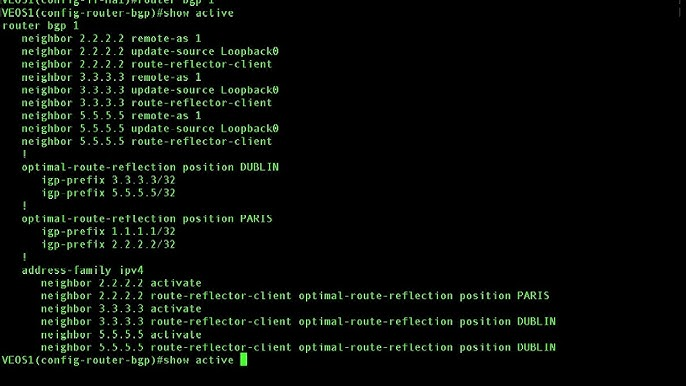
Contextual Config show active Configuration in current hierarchy

Use ? for context-sensitive help when unsure of command options.


Part 5: Arista vs Cisco CLI – Key Differences

  • show run works directly in config mode.
  • Flexible interface ranges: Ethernet1,3,5.
  • Direct CIDR support in network commands.
  • Enhanced logging: show log last X minutes.
  • Open-standard LLDP vs Cisco CDP.
  • show active displays context-specific configuration.

Many Cisco users find the transition to Arista smooth because of these similarities.


FAQ

Q1: How do I save configuration changes?

A1: Use copy running-config startup-config or write in privileged EXEC mode.

Q2: Can I configure multiple interfaces at once?

A2: Yes, use interface Ethernet1-3 for consecutive or interface Ethernet1,3,5 for non-consecutive ports.

Q3: What is show active used for?

A3: Displays configuration relevant to the current command hierarchy.

Q4: Where can I find official Arista documentation and learning resources?

A4: Visit Arista’s official site for EOS guides or check “Arista Warrior” by Gary Donohue.

Q5: Which Arista switches are best for small vs large data centers?

A5: For smaller deployments, the 7050X series is suitable. For large data centers, 7280R or 7500R series offer high performance.

Q6: Where can I purchase Arista switches or licenses?

A6: Visit router-switch.com for switches, licenses, and tailored guidance. Real-time quotes and price comparisons are available on IT-Price.com.

Expert

Expertise Builds Trust

20+ Years • 200+ Countries • 21500+ Customers/Projects
CCIE · JNCIE · NSE7 · ACDX · HPE Master ASE · Dell Server/AI Expert


Categories: Product FAQs Switches Arista