Solving Warehouse WiFi Coverage and Uptime IssuesDesign reliable warehouse WiFi coverage and uptime with warehouse wifi 6 ap, industrial wireless access points, and warehouse poe switches for racks and docks.
OLT Capacity Planning for GPON Access NetworksPlan OLT capacity for GPON OLT systems and EA5800 capacity planning, optimizing GPON split ratio and OLT uplink design for scalable fiber access.
Enterprise OLT Platform Selection for Fiber AccessDesign enterprise OLT platform strategy for GPON OLT platform, modular OLT chassis, and OLT service boards to scale passive optical LAN and XG-PON evolution.
Scale Data Center Networking Under Long Lead TimesScale data center networking faster under long lead times with data center spine switches, leaf spine data center designs and Cisco UCS fabric interconnects.
Tunnel Video Surveillance VLAN Stability over FiberDesign stable tunnel video surveillance VLANs using optical transport backbone and Arista fiber aggregation for resilient Huawei OptiX OSN CCTV networks.
Fiber vs Copper in Industrial Networks Design GuideCompare fiber vs copper in industrial ethernet, plan hybrid industrial fiber network designs, and select rugged ethernet switches and industrial SFP transceivers.
In the Ubiquiti UniFi ecosystem, performing a "Reset" goes beyond simply clearing a password—it’s a critical step in the Adoption Cycle. IT administrators, network engineers, and MSPs managing enterprise, campus, or SMB networks often encounter forgotten SSH credentials, “Managed by Other” errors, or legacy switches needing redeployment. A controlled factory reset ensures you regain operational control without causing downtime, adoption loops, or lost VLAN configurations.
Part 1: Safe Methods to Factory Reset a UniFi Switch
Choosing the right reset method depends on whether the switch is adopted and accessible in your UniFi controller. Improper resets can lead to adoption loops, downtime, or PoE interruptions.
Method 1: Physical Reset Button (Hard Reset)
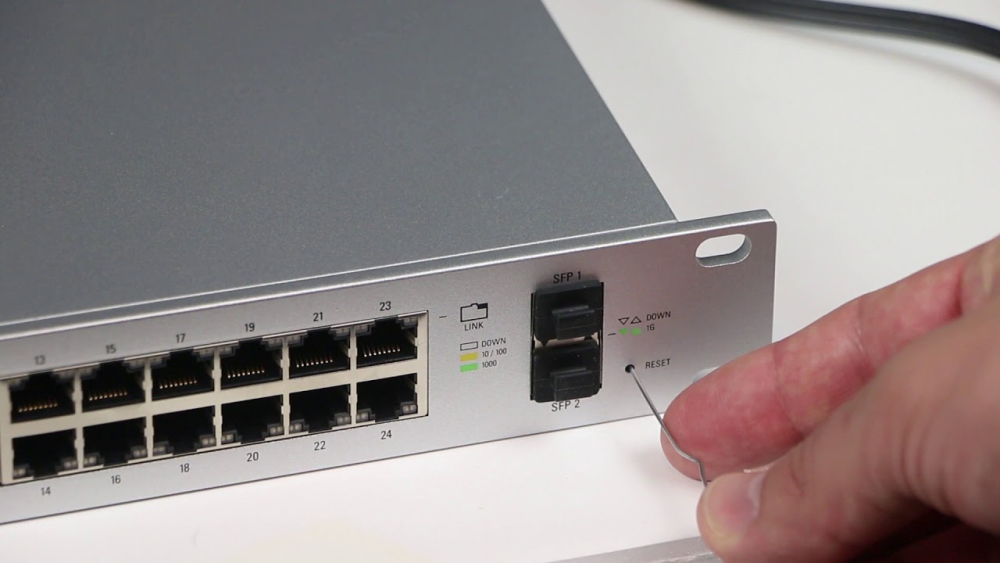
The physical reset button is the go-to option if you’ve forgotten administrative credentials or the switch cannot communicate with the controller.
Locate the Reset Button: All UniFi devices, including switches, have a recessed Reset pinhole, usually near the RJ45 or SFP ports.
Power On: Ensure the switch is powered.
Press and Hold: Use a straightened paperclip to press the button for 10–15 seconds.
LED Indicator: Watch the left status LED: it will turn off, flash White/Blue, and settle on Solid White (Ready to Adopt).
Pro Tip: Do not unplug power during the reset. Interrupting power may corrupt firmware and force TFTP recovery mode.
Method 2: SSH Command Line (Remote/Batch Reset)
For ceiling-mounted or rack-locked devices, SSH offers remote reset capability.
Navigate to Devices > select the switch > Settings > Manage > Forget Device
This removes the switch from the controller database and restores factory defaults, preventing adoption conflicts.
Part 2: Understanding Adoption & Controller Binding
A common frustration is the “Managed by Other” status after a reset.
Physical Reset vs. Application Reset
The physical button wipes config but doesn’t remove controller binding.
Managed by Other
Occurs when the old controller still claims ownership.
Fix
If accessible, always use “Forget” first in the Controller. If locked out, reset via button, then manually adopt:
SSH into the switch
Force adoption to a new controller: set-inform http://:8080/inform
Click 'Adopt' in the controller UI
Sometimes repeating the set-inform command after clicking Adopt is necessary to finalize provisioning.
Part 3: Deployment Planning and Network Continuity
Configuration Loss: VLAN, PoE, LACP
VLANs: All custom VLAN tags and port assignments are lost.
IP Addresses: Switch may revert to default IP (e.g., 192.168.1.2).
PoE Devices: Momentary power loss occurs during reboot (USW-Flex, USW-Lite).
Post-Reset Deployment Steps
Connect the switch to the same network as your UniFi Network Server.
Adopt the switch via the Devices tab in the controller.
Update firmware if prompted (may take ~5 minutes).
Reapply VLANs, port profiles, and network settings.
Decision: Reset or Replace?
If the switch repeatedly fails reset or enters TFTP mode, flash memory may be degraded. For critical sites, replacing the unit can be more cost-effective than continuous troubleshooting. Check Router-switch for USW-Pro-48-PoE, USW-Enterprise-24-PoE, and USW-Flex inventory to avoid deployment delays.
Part 4: FAQ
Q1: How do I force a factory reset on a switch?
Use the physical reset button for hard reset or SSH command syswrapper.sh restore-default if remote access is available. For adopted devices, the "Forget Device" option in UniFi Controller is safest.
Q2: How to factory reset Ubiquiti Edge Switch?
EdgeSwitch devices have a dedicated reset button. Press and hold for 10–15 seconds while powered on. Ensure the device is removed from EdgeOS management if previously configured.
Q3: How to hard reset a network switch?
Locate the physical reset button or use CLI/SSH commands provided by the vendor. Keep the switch powered on throughout the process to prevent firmware corruption.
Q4: How to factory reset UniFi Switch 8 150W?
Press and hold the recessed reset button for 10–15 seconds until the LED flashes White/Blue, indicating a reset to factory defaults. Optionally, use the Controller’s “Forget Device” to prevent adoption conflicts.
Q5: Does resetting a UniFi switch delete VLANs?
Yes, factory reset wipes all configurations. Upon re-adoption, the UniFi Controller automatically re-provisions VLANs and port profiles.
Q6: What is the default password for a UniFi switch?
Before adoption: ubnt / ubnt. After adoption: randomized by the controller. Check under Settings > System > Network Device SSH Authentication.
Q7: My switch shows "Managed by Other" after reset. What do I do?
This occurs if the switch was physically reset but not removed from the controller. Use SSH with previous credentials or re-adopt after performing "Forget Device".
Q8: How do I reset a USW-Flex Mini?
The Flex Mini does not support SSH. Use the physical reset button or Controller “Forget Device” method.
Expertise Builds Trust
20+ Years • 200+ Countries • 21500+ Customers/Projects CCIE · JNCIE · NSE7 · ACDX · HPE Master ASE · Dell Server/AI Expert