Solving Warehouse WiFi Coverage and Uptime IssuesDesign reliable warehouse WiFi coverage and uptime with warehouse wifi 6 ap, industrial wireless access points, and warehouse poe switches for racks and docks.
OLT Capacity Planning for GPON Access NetworksPlan OLT capacity for GPON OLT systems and EA5800 capacity planning, optimizing GPON split ratio and OLT uplink design for scalable fiber access.
Enterprise OLT Platform Selection for Fiber AccessDesign enterprise OLT platform strategy for GPON OLT platform, modular OLT chassis, and OLT service boards to scale passive optical LAN and XG-PON evolution.
Scale Data Center Networking Under Long Lead TimesScale data center networking faster under long lead times with data center spine switches, leaf spine data center designs and Cisco UCS fabric interconnects.
Tunnel Video Surveillance VLAN Stability over FiberDesign stable tunnel video surveillance VLANs using optical transport backbone and Arista fiber aggregation for resilient Huawei OptiX OSN CCTV networks.
Fiber vs Copper in Industrial Networks Design GuideCompare fiber vs copper in industrial ethernet, plan hybrid industrial fiber network designs, and select rugged ethernet switches and industrial SFP transceivers.
As small and medium-sized businesses transition toward hybrid work models, securing corporate wireless access has become a critical infrastructure priority. Employees now use domain-joined laptops across home and office environments, making identity-based network security more important than ever.
The traditional approach of sharing Wi-Fi passwords across employees and guests is no longer sufficient for modern security requirements.
Instead, SMB organizations must shift toward identity-driven access control, endpoint verification, and zero trust security architecture.
The greatest threat to SMB networks is not necessarily external hackers attempting to break Wi-Fi passwords.
The real risk comes from unauthorized devices gaining internal network access.
In traditional flat network architectures:
Employees and guests often share the same network segment
Compromised personal devices can scan internal infrastructure
Malware can move laterally across business systems
Organizations need to ensure that only authorized corporate laptops can connect to internal Wi-Fi networks.
Part 2: SMB Security Challenges
SMB IT teams typically face three major constraints:
Budget limitations
Limited IT staff
Operational simplicity requirements
Organizations often evaluate infrastructure solutions and procurement channels that can provide verified equipment and technical guidance to reduce deployment risk.
Part 3: Fortinet-Centric Security Architecture
Organizations already using Fortinet ecosystems have a strong foundation for secure Wi-Fi design.
Core components include:
FortiGate security gateway
FortiClient Endpoint Management System (EMS)
FortiAP wireless access points
Zero Trust Network Access (ZTNA) policies
Using this architecture, IT teams can build identity-aware security controls across wireless and internal networks.
In many enterprise deployments, infrastructure procurement and deployment validation are as important as hardware selection, which is why some organizations work with specialized infrastructure partners to verify equipment compatibility before production deployment.
Part 4: Certificate-Based Authentication Using 802.1X
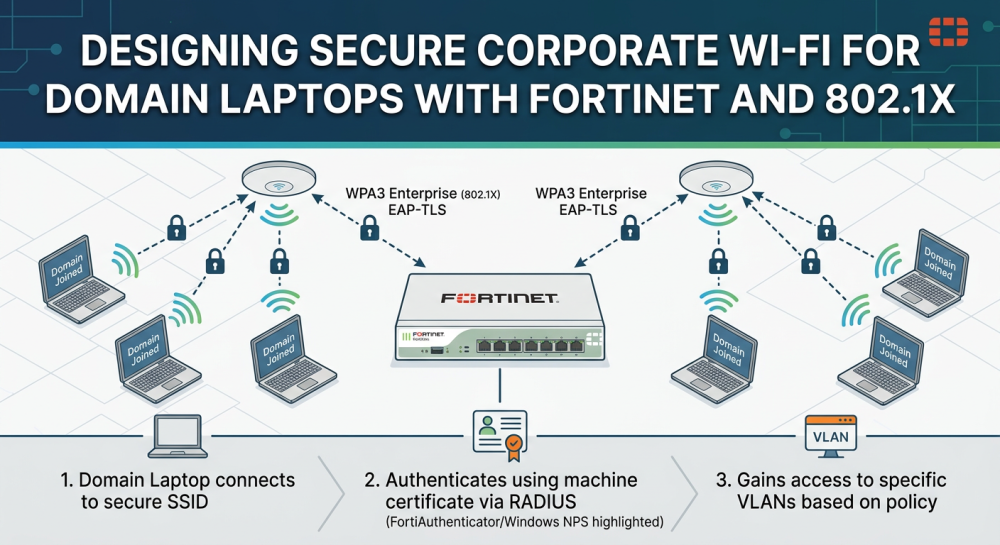
The most secure Wi-Fi authentication method is certificate-based authentication using 802.1X and EAP-TLS.
Authentication Process
Domain-joined laptop receives machine certificate
Device attempts to connect to corporate Wi-Fi
Authentication request is forwarded to RADIUS server
Certificate identity is validated
Network access is granted
Devices without valid certificates are automatically rejected.
Example CLI command to verify software version.
network device authentication verification
Part 5: Leveraging Microsoft Infrastructure
SMB organizations do not need to purchase additional expensive hardware to implement enterprise security.
If using Windows Server environments, organizations can use:
Microsoft Network Policy Server (NPS)
Active Directory certificate services
The authentication flow becomes:
Fortinet Wi-Fi → FortiGate → RADIUS Server → Active Directory validation
Part 6: Dynamic VLAN Assignment
Networks can automatically assign users to VLANs based on identity using RADIUS attributes.
Example segmentation:
User Role
Assigned VLAN
Finance Users
Restricted Financial VLAN
IT Administrators
Management VLAN
Marketing Users
General Corporate VLAN
Dynamic VLAN assignment allows organizations to maintain a single Wi-Fi SSID while enforcing network segmentation.
Part 7: Fortinet Zero Trust Integration
Fortinet security ecosystems support zero trust network models through endpoint compliance verification.
Using FortiClient EMS, organizations can verify:
Device patch levels
Antivirus protection status
Security posture compliance
Only compliant devices are allowed to access internal corporate resources.
Part 8: Choosing the Right Security Model
Method
Complexity
Security Level
PSK Wi-Fi
Low
Basic
VLAN Segmentation
Medium
Moderate
802.1X Authentication
High
Strong
ZTNA + NAC Integration
High
Very Strong
Part 9: Practical Migration Strategy
Phase 1: Network Isolation
Create corporate network
Create guest network
Phase 2: Identity Authentication
Deploy 802.1X
Deploy certificate authentication
Phase 3: Zero Trust Security
Endpoint posture validation
Application-level access policies
Part 10: Business Value of Secure Design
Secure Wi-Fi design improves data protection, compliance readiness, and IT operational control.
Organizations often benefit from working with infrastructure solution providers to validate network design and hardware procurement decisions.
Platforms such as Fortinet provide integrated security management across network layers.
Part 11: Future Trends
Network security is moving toward identity-driven networking and continuous device verification.
The future of SMB networking will focus more on user and device identity rather than traditional network perimeter security.
Learn more infrastructure procurement options from Router-switch or pricing comparison tools like IT-Price.
Expertise Builds Trust
20+ Years • 200+ Countries • 21500+ Customers/Projects
CCIE · JNCIE · NSE7 · ACDX · HPE Master ASE · Dell Server/AI Expert