Solving Warehouse WiFi Coverage and Uptime IssuesDesign reliable warehouse WiFi coverage and uptime with warehouse wifi 6 ap, industrial wireless access points, and warehouse poe switches for racks and docks.
OLT Capacity Planning for GPON Access NetworksPlan OLT capacity for GPON OLT systems and EA5800 capacity planning, optimizing GPON split ratio and OLT uplink design for scalable fiber access.
Enterprise OLT Platform Selection for Fiber AccessDesign enterprise OLT platform strategy for GPON OLT platform, modular OLT chassis, and OLT service boards to scale passive optical LAN and XG-PON evolution.
Scale Data Center Networking Under Long Lead TimesScale data center networking faster under long lead times with data center spine switches, leaf spine data center designs and Cisco UCS fabric interconnects.
Tunnel Video Surveillance VLAN Stability over FiberDesign stable tunnel video surveillance VLANs using optical transport backbone and Arista fiber aggregation for resilient Huawei OptiX OSN CCTV networks.
Fiber vs Copper in Industrial Networks Design GuideCompare fiber vs copper in industrial ethernet, plan hybrid industrial fiber network designs, and select rugged ethernet switches and industrial SFP transceivers.
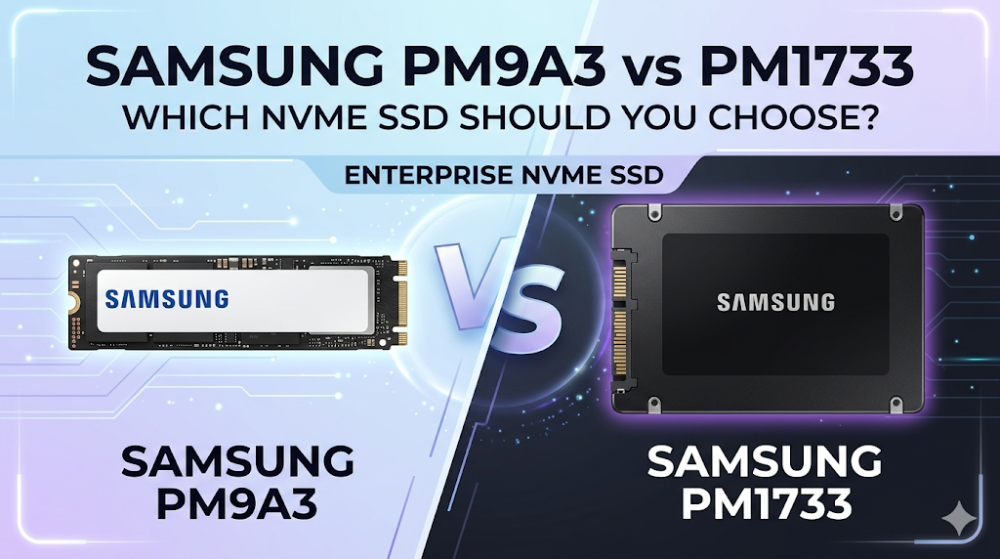
Imagine executing a live migration of a multi-terabyte PostgreSQL database cluster across your virtualization hosts, only to experience sudden path-failover timeouts and silent I/O stalls. In high-density enterprise storage architectures, selecting the wrong NVMe SSD tier can lead to catastrophic performance bottlenecks or complete data path loss. Storage architects and system integrators frequently face this exact dilemma when choosing between the Samsung PM9A3 and the Samsung PM1733. While both are high-performance PCIe Gen4 enterprise SSDs, they are engineered for fundamentally different deployment topologies, reliability standards, and workload profiles.
This deep technical guide analyzes the architectural differences, silicon pipelines, form factors, and performance characteristics of the Samsung PM9A3 and PM1733 to help you make an informed procurement decision for your next data center expansion.
Architectural Silicon Deep Dive: Controller Pipelines and Dual-Port High Availability
At the heart of the Samsung PM9A3 vs PM1733 comparison lies a fundamental divergence in controller architecture and data path redundancy.
The Samsung PM9A3 is built upon Samsung's proprietary Elpis controller (or closely related enterprise variants), paired with 128-layer (V6) TLC V-NAND. It is optimized as a single-port PCIe Gen4 x4 drive. This design is highly efficient for scale-out cloud environments, hyperconverged infrastructure (HCI) nodes, and boot drives where host-level software redundancy (such as Ceph, vSAN, or MinIO) handles node and path failures.
In contrast, the Samsung PM1733 utilizes the enterprise-class Samsung Voyager controller, designed specifically for mission-critical enterprise storage arrays. The defining architectural feature of the PM1733 is its dual-port NVMe SSD capability. It can operate in a single-port PCIe Gen4 x4 configuration or split into dual-port PCIe Gen4 x2 / x2 paths.
In high-availability (HA) storage controllers and dual-controller SAN arrays, dual-porting is non-negotiable. If Host Controller A experiences a hardware failure or PCIe link degradation, Host Controller B maintains uninterrupted access to the PM1733 via the secondary physical path. If you attempt to deploy the PM9A3 in a dual-controller storage shelf, you will lack the physical wiring and controller logic required for path failover, leading to single-point-of-failure vulnerabilities.
Furthermore, the PM1733 features enhanced hardware-based encryption engines and more robust power-loss protection (PLP) capacitor arrays designed to flush larger DRAM cache allocations to non-volatile NAND during sudden power-off events.
Form Factors and Thermal Dynamics: M.2, E1.S, U.2, and U.3 Deployments
Physical integration and thermal management are critical when deploying a PCIe Gen4 enterprise SSD in high-density server chassis.
The PM9A3 offers exceptional versatility in form factors:
M.2 (22110): Ideal for server boot drives and space-constrained edge devices.
E1.S (EDSFF): The modern standard for 1U cloud servers, offering superior thermal dissipation and hot-swap capabilities.
U.2 (2.5-inch): The traditional enterprise standard, compatible with standard NVMe backplanes.
The PM1733 focuses on high-power, high-throughput form factors:
U.3 (2.5-inch): Natively supports U.3 tri-mode backplanes, which can dynamically route SAS, SATA, and NVMe signals through a single slot using Broadcom MegaRAID or HBA controllers. The PM1733's U.3 design is backward compatible with standard U.2 slots, but requires careful pinout verification on the host backplane.
HHHL (Half-Height, Half-Length AIC): A PCIe add-in card form factor that plugs directly into standard PCIe slots, offering maximum airflow and thermal headroom.
Data center SSD power consumption and thermal dissipation profiles differ significantly between these drives. The PM9A3 is engineered for power efficiency, drawing approximately 11W to 13.5W under active write workloads. This lower thermal footprint makes it highly suitable for high-density 1U servers where airflow is restricted.
The PM1733, designed for maximum performance, can draw up to 20W (U.3) or 24W (HHHL) under sustained mixed workloads. This requires robust system-level cooling and structured fan speed profiles to prevent thermal throttling. If your server chassis cannot deliver at least 300 LFM (Linear Feet per Minute) of airflow per drive slot, the PM1733 may experience thermal throttling under heavy write cycles, degrading performance to protect the controller silicon.
Performance and Workload Sizing: IOPS, Latency, and QoS Profiles
When evaluating an enterprise NVMe SSD comparison, raw sequential speeds only tell part of the story. The true differentiator in enterprise environments is Quality of Service (QoS) latency consistency under heavy, concurrent random I/O.
The PM9A3 is optimized for read-intensive workloads (rated at 1 Drive Write Per Day, or 1 DWPD). It delivers up to 1,100K IOPS for random reads and up to 200K IOPS for random writes. It excels in web serving, content delivery networks (CDN), read-heavy virtualization pools, and boot operations.
The PM1733 is a higher-tier drive designed for mixed-use and write-intensive enterprise applications. While also rated at 1 DWPD (or up to 3 DWPD in its sibling model, the PM1735), its controller handles concurrent read/write operations with significantly lower latency jitter. The PM1733 delivers up to 1,500K IOPS for random reads and up to 250K IOPS for random writes.
More importantly, the PM1733 features superior NVMe namespace management, allowing storage administrators to partition the drive into multiple logical namespaces with dedicated hardware queues. This prevents "noisy neighbor" performance degradation in multi-tenant cloud environments.
Technical Specifications: PM9A3 vs. PM1733 Direct Comparison
The following table outlines the key hardware specifications and performance metrics of the Samsung PM9A3 and PM1733:
Specification / Feature
Samsung PM9A3
Samsung PM1733
PCIe Generation
PCIe Gen4 x4
PCIe Gen4 x4 (or Dual-Port x2/x2)
NVMe Version
NVMe 1.4
NVMe 1.4
Form Factors
M.2 (22110), E1.S, U.2 (2.5")
U.3 (2.5"), HHHL (AIC)
NAND Flash Type
Samsung 128-Layer V6 TLC V-NAND
Samsung V-NAND TLC
Sequential Read (Max)
Up to 6,900 MB/s
Up to 7,000 MB/s
Sequential Write (Max)
Up to 4,100 MB/s
Up to 3,800 MB/s
Random Read (4KB)
Up to 1,100,000 IOPS
Up to 1,500,000 IOPS
Random Write (4KB)
Up to 200,000 IOPS
Up to 250,000 IOPS
Dual-Port Support
No (Single-Port Only)
Yes (Active-Active / Active-Passive)
Endurance (DWPD)
1 DWPD (5 Years)
1 DWPD (5 Years)
Typical Power (Active)
11W - 13.5W
16W - 20W (U.3), up to 24W (HHHL)
Field Troubleshooting and CLI Operations: Namespace Provisioning and Health Monitoring
In enterprise Linux environments, storage engineers must frequently interact with NVMe drives directly to diagnose performance anomalies, format drives to optimal sector sizes, or manage namespaces.
A common community pain point is the U.2 vs U.3 SSD backplane configuration mismatch. If a PM1733 (U.3) is inserted into an older U.2-only backplane without tri-mode support, the drive may fail to link up or drop to PCIe x1 speeds.
To diagnose link speeds, format namespaces to native 4KB sectors (which avoids read-modify-write overhead on databases), and monitor thermal metrics, you can use the standard nvme-cli utility.
Below is a production-ready bash script for diagnosing and provisioning Samsung enterprise SSDs:
#!/bin/bash
# Enterprise NVMe Diagnostic and Provisioning Script
# Target: Samsung PM9A3 / PM1733

set -e

# 1. List all connected NVMe devices
echo "=== Listing Connected NVMe Devices ==="
sudo nvme list

# Define target device (Modify as per your system topology, e.g., /dev/nvme0)
TARGET_DEV="/dev/nvme0"

# 2. Retrieve Controller Information (Identify Model and Dual-Port capability)
echo "=== Retrieving Controller Information for ${TARGET_DEV} ==="
sudo nvme id-ctrl ${TARGET_DEV} | grep -E "mn|fr|subnqn"

# 3. Check Smart Log for Thermal Throttling and Media Errors
echo "=== Checking SMART Health Log ==="
sudo nvme smart-log ${TARGET_DEV} | grep -E "temperature|critical_warning|media_errors|percentage_used"

# 4. Format Drive to 4KB LBA Format (Optimizes database performance and prevents write amplification)
# WARNING: This operation is highly destructive. Ensure backups are complete.
echo "=== Checking Supported LBA Formats ==="
sudo nvme id-ns ${TARGET_DEV} --namespace-id=1 | grep -E "LBA Format"

# To format the drive to 4KB sector size (typically LBA Format 1 or 2 depending on firmware):
# Uncomment the line below to execute:
# sudo nvme format ${TARGET_DEV} --namespace-id=1 --lbaf=1 --force

# 5. Verify Multipath Status (For PM1733 Dual-Port Deployments)
if command -v multipath &> /dev/null; then
    echo "=== Verifying Multipath Configuration (PM1733 Dual-Port) ==="
    sudo multipath -ll | grep -i "nvme" || echo "No active NVMe multipath devices found."
else
    echo "Multipath tools not installed. Skipping dual-port path verification."
fi
Strategic Procurement and Lifecycle Management: Mitigating Supply Chain Bottlenecks
Selecting the ideal SSD is only half the battle; securing the hardware without stalling your deployment timeline is the other. In the current enterprise hardware landscape, traditional distribution channels often quote lead times of 6 to 8 weeks for high-capacity enterprise NVMe SSDs. These delays can lead to project slippage and SLA penalties.
To optimize your storage procurement and bypass these bottlenecks, you can explore the comprehensive Samsung Enterprise SSD Inventory and Pricing on Router-switch. By maintaining a robust, flat supply chain that bypasses multiple layers of regional middleman markups, Router-switch enables system integrators, SMEs, and enterprise clients to secure direct bulk-purchase discounts.
With over $20M+ in multi-warehouse on-shelf stock, Router-switch guarantees same-week dispatch on critical storage components, ensuring your data center expansion remains on schedule. Every single drive shipped carries a 100% original genuine guarantee, with serial numbers (S/N) fully verifiable in the manufacturer's official database prior to shipment.
To mitigate post-deployment operational risks, Router-switch provides free 1-on-1 CCIE and storage architect consultancy to assist with compatibility verification (such as U.2 vs U.3 backplane mapping). Additionally, purchases are backed by a complimentary 3-Year RS Care extended warranty featuring a Rapid RMA standby replacement program—shipping replacement hardware first to minimize your Mean Time to Repair (MTTR) in the event of a drive failure.
Frequently Asked Questions
Can I use the Samsung PM9A3 in a dual-controller SAN storage array?
No. The Samsung PM9A3 is a single-port NVMe SSD. Dual-controller SAN arrays require dual-port NVMe SSDs like the Samsung PM1733 to enable active-active or active-passive path failover. Using a single-port drive in these environments will prevent the secondary controller from accessing the drive, creating a single point of failure.
What is the difference between U.2 and U.3, and is the PM1733 compatible with both?
U.3 is an evolutionary standard built upon U.2. It uses the same physical connector but redefines the pinouts to allow SAS, SATA, and NVMe signals to run over the same pins on a tri-mode backplane. The Samsung PM1733 is natively a U.3 drive. While it is backward compatible with standard U.2 host slots, you must ensure your host controller and backplane wiring support U.3-to-U.2 mapping to avoid link detection issues.
Why does the PM1733 consume more power than the PM9A3?
The PM1733 features a more powerful enterprise controller (Voyager) designed to handle dual-port operations, larger DRAM cache allocations, and higher random write IOPS under sustained mixed workloads. This advanced processing capability requires more power, drawing up to 20W-24W compared to the PM9A3's highly efficient 11W-13.5W envelope.
How do I resolve firmware update failures on Samsung enterprise SSDs in VMware ESXi?
Firmware updates on enterprise SSDs under ESXi can fail due to driver conflicts with the native VMware NVMe driver. To resolve this, use the esxcli command line to temporarily switch to the community or vendor-specific NVMe driver, or perform the firmware update out-of-band using a bootable Linux utility or the server's lifecycle controller (e.g., Dell iDRAC or HPE iLO).
Expertise Builds Trust
20+ Years • 200+ Countries • 21500+ Customers/Projects CCIE · JNCIE · NSE7 · ACDX · HPE Master ASE · Dell Server/AI Expert