Solving Warehouse WiFi Coverage and Uptime IssuesDesign reliable warehouse WiFi coverage and uptime with warehouse wifi 6 ap, industrial wireless access points, and warehouse poe switches for racks and docks.
OLT Capacity Planning for GPON Access NetworksPlan OLT capacity for GPON OLT systems and EA5800 capacity planning, optimizing GPON split ratio and OLT uplink design for scalable fiber access.
Enterprise OLT Platform Selection for Fiber AccessDesign enterprise OLT platform strategy for GPON OLT platform, modular OLT chassis, and OLT service boards to scale passive optical LAN and XG-PON evolution.
Scale Data Center Networking Under Long Lead TimesScale data center networking faster under long lead times with data center spine switches, leaf spine data center designs and Cisco UCS fabric interconnects.
Tunnel Video Surveillance VLAN Stability over FiberDesign stable tunnel video surveillance VLANs using optical transport backbone and Arista fiber aggregation for resilient Huawei OptiX OSN CCTV networks.
Fiber vs Copper in Industrial Networks Design GuideCompare fiber vs copper in industrial ethernet, plan hybrid industrial fiber network designs, and select rugged ethernet switches and industrial SFP transceivers.
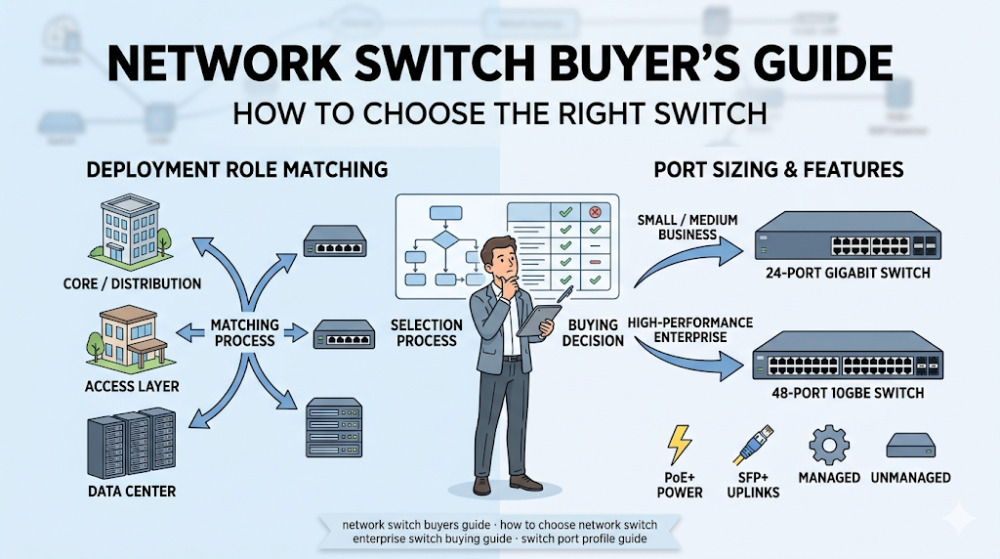
Most network switch buying errors do not happen because the buyer chose the wrong brand. They happen because the buyer started with a brand shortlist before understanding what the deployment actually needs. A switch that looks good on paper can still be the wrong answer if it mismatches the site size, traffic pattern, powered-device mix, uplink design, or growth plan. That is why the most useful switch buying guide is not a product catalog. It is a decision framework that helps buyers map their environment to the right switch class before comparing exact models.
This guide is written for procurement teams, IT managers, integrators, and technical leads who need to choose a network switch but are not sure which class, port profile, or feature set actually matters for their project. The goal is not to recommend one universal model. It is to help you define the requirements that narrow the shortlist quickly, especially around access vs aggregation role, port count and speed, PoE needs, uplink bandwidth, stacking, management, and budget discipline. If you are asking what network switch you need, the better question is usually what kind of site, workload, and growth pattern the switch must support.
The right switch is the one that fits the deployment role, not the one with the most features or the most familiar logo.
Access, aggregation, and core layers need different switch classes. Buying a core-grade switch for a small access closet is usually overkill. Buying an access switch for aggregation load is usually a mistake.
Port count alone is not enough. Port speed, PoE demand, uplink capacity, and future headroom usually matter more.
PoE changes the budget and the power plan. If the switch will power APs, cameras, or phones, the PoE budget and class become first-class selection criteria.
The safest buying path is to define role, port profile, PoE, uplinks, and growth before opening a product catalog.
Decision factor
What to check
Why it matters
Deployment role
Access layer, aggregation, or core
Determines performance class and feature set
Port profile
Count, speed mix, PoE needs
Affects BOM accuracy and future expansion
Uplink design
Speed, redundancy, fiber vs copper
Can bottleneck the whole design if wrong
Stacking and management
Single-switch or stackable, cloud or on-prem management
Changes operational cost and rollout logic
Part 2: Start with the deployment role, not the brand
Access, aggregation, and core are not interchangeable
A buyer who starts by asking which brand to buy often skips the more important question: what is the switch supposed to do in the network. Access switches face endpoints. Aggregation switches move traffic between access and core. Core switches carry the highest-volume east-west and north-south flows. Those roles demand different throughput, buffer, redundancy, and feature profiles. A switch chosen for the wrong role may work on day one and become a bottleneck or management burden later.
The right sequence is role first, then feature set, then brand
Once the role is clear, the buyer can define port count, speed mix, PoE class, uplink bandwidth, stacking, redundancy, and management model. Only then does brand comparison become meaningful. Teams that reverse this order often end up with a switch that is technically functional but strategically mismatched.
Where Router-Switch can help
If your team has already defined the role but needs help narrowing the right switch family or comparing models across brands, Router-Switch can validate the shortlist against current availability, quote structure, and whether nearby alternatives should be considered before the PO is approved.
Part 3: How to size ports, speed, and PoE
Port count is the starting point, not the ending point
Buyers often begin by counting how many devices need a cable. That is necessary but not sufficient. The real port profile question is how many ports, at what speed, with what PoE demand, and with how much headroom for growth. A 48-port switch is not automatically the right answer if only 24 ports are needed today and the other 24 are speculative. Conversely, a 24-port switch can be the wrong answer if the closet is likely to add cameras, APs, or IoT devices within the next refresh cycle.
Speed mix matters more as endpoints get faster
Not every port needs to be multigig, but more buyers are finding that a small number of high-speed ports changes the whole switch decision. If the deployment includes high-performance workstations, Wi-Fi 6 or 7 APs, or storage-adjacent clients, the access layer may need a speed mix that is not purely 1G. Buyers should check whether the switch can support the required speed profile without forcing an entire chassis upgrade.
PoE is a budget and power question, not just a checkbox
PoE needs can change a switch from a simple connectivity purchase into a power-planning project. Buyers should confirm not just whether the switch supports PoE, but whether it supports the right PoE class for the endpoints, and whether the total power budget matches the full closet load. If the switch will power a mix of APs, cameras, and phones, aggregate power demand should be calculated before the model is selected. If you are unsure how PoE changes the switch shortlist, Router-Switch can help compare PoE-capable families and check whether the quoted model really covers the powered-device mix.
Part 4: Uplinks, stacking, and management that change the choice
Uplinks are where many access designs quietly fail
A switch with strong edge ports but weak uplinks creates the same user experience as an underpowered switch. Buyers should confirm uplink speed, count, and redundancy before finalizing the model. This is especially true in environments where multiple high-speed clients are active at the same time, or where the upstream path is shared by many switches.
Stacking changes how the switch behaves as part of a system
For multi-switch sites, stacking is not just a convenience feature. It changes failover behavior, management simplicity, and how easily the environment can grow. Buyers should decide early whether they need stackable switches, and if so, which stacking model fits their operational workflow.
Management preference can narrow the brand list quickly
Some teams prefer cloud-managed switches. Others require on-premises management for compliance or latency reasons. This preference often narrows the viable switch families faster than any spec comparison. Buyers should confirm management requirements before comparing models, because a technically acceptable switch with the wrong management model can still be rejected by operations.
Part 5: Matching switch class to real environments
Small branch and office environments usually need simplicity first
In smaller sites, the best switch is often the one that is easy to deploy, easy to manage, and easy to replace. Feature overkill adds cost and complexity that the site will never use. Buyers in this segment should focus on port count, PoE match, and reliable uplinks more than on advanced features.
Campus and multi-floor environments need repeatability and scale
For larger environments, the switch decision should be treated as a standardization choice. Consistent models, consistent management, and consistent power planning reduce operational friction. Buyers should choose a switch family that scales across many closets without creating model fragmentation.
Data center and high-density edge environments need performance headroom
In high-density or latency-sensitive environments, the switch must be evaluated on throughput, buffer, latency, and redundancy. Port count is still important, but performance under load and failover behavior usually matter more.
Part 6: Common buying mistakes
Mistake 1: Buying by brand habit instead of role fit
A familiar brand is not automatically the right platform for the deployment. Role fit should come first.
Mistake 2: Counting ports but ignoring speed and PoE
A port count match does not guarantee a design match. Speed mix and power budget often change the real answer.
Mistake 3: Undersizing uplinks
Weak uplinks make strong edge ports irrelevant. Buyers should check upstream capacity as carefully as downstream.
Mistake 4: Ignoring management model
The best switch on paper can still be the wrong answer if the operations team cannot manage it effectively.
FAQ
How do I know what network switch I need?
Start by defining the deployment role, port profile, speed mix, PoE needs, uplink design, and management preference. That framework usually narrows the shortlist faster than any product comparison.
Does port count matter more than port speed?
Not always. Port count determines how many devices connect. Port speed determines whether those devices perform well under load. Both matter, but speed mix is often underestimated.
Should I prioritize PoE in switch selection?
Yes, if the switch will power APs, cameras, or phones. PoE class and total power budget should be treated as first-class selection criteria in those cases.
What is the best switch for a small office?
The best small-office switch is usually the simplest one that covers port count, PoE, and uplink needs without adding unnecessary complexity or cost.
What is the best next step after reading this guide?
The best next step is to write down the role, port profile, PoE requirements, uplink expectations, and growth assumptions, then compare switch families against that requirement set.
Part 7: The next practical step
If you are choosing a network switch and are not sure where to start, the next useful step is to stop browsing product pages and start defining the requirement set. That means confirming the deployment role, counting real ports with real speed needs, calculating PoE load, checking uplink capacity, and deciding whether the environment will grow into a multi-switch design.
Once that is clear, switch selection becomes much faster and less noisy. Router-Switch can help compare switch families, validate availability, check quote alignment, and reduce the risk of buying a switch that is technically acceptable but strategically wrong for the project.
Expertise Builds Trust
20+ Years • 200+ Countries • 21500+ Customers/Projects CCIE · JNCIE · NSE7 · ACDX · HPE Master ASE · Dell Server/AI Expert