Solving Warehouse WiFi Coverage and Uptime IssuesDesign reliable warehouse WiFi coverage and uptime with warehouse wifi 6 ap, industrial wireless access points, and warehouse poe switches for racks and docks.
OLT Capacity Planning for GPON Access NetworksPlan OLT capacity for GPON OLT systems and EA5800 capacity planning, optimizing GPON split ratio and OLT uplink design for scalable fiber access.
Enterprise OLT Platform Selection for Fiber AccessDesign enterprise OLT platform strategy for GPON OLT platform, modular OLT chassis, and OLT service boards to scale passive optical LAN and XG-PON evolution.
Scale Data Center Networking Under Long Lead TimesScale data center networking faster under long lead times with data center spine switches, leaf spine data center designs and Cisco UCS fabric interconnects.
Tunnel Video Surveillance VLAN Stability over FiberDesign stable tunnel video surveillance VLANs using optical transport backbone and Arista fiber aggregation for resilient Huawei OptiX OSN CCTV networks.
Fiber vs Copper in Industrial Networks Design GuideCompare fiber vs copper in industrial ethernet, plan hybrid industrial fiber network designs, and select rugged ethernet switches and industrial SFP transceivers.
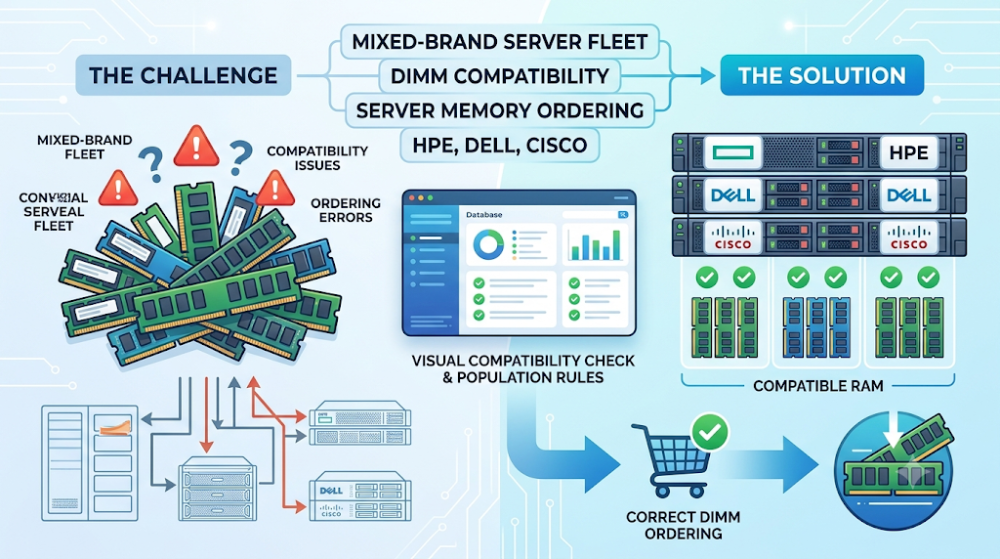
Organizations that run multiple server brands face a unique procurement challenge. A memory module that works perfectly in an HPE ProLiant may fail to initialize in a Dell PowerEdge, even when the capacity, speed, and form factor appear identical. Buyers who treat memory as a generic commodity often discover this problem only after the modules arrive and the server refuses to boot.
Mixed-brand server fleets require a disciplined approach to memory ordering. Each manufacturer has its own qualification lists, population rules, voltage requirements, and firmware expectations. What is standard for one platform may be unsupported or even harmful for another.
This article explains how procurement teams can avoid wrong DIMM orders in mixed-brand environments. It covers platform-specific requirements, population rules, common ordering mistakes, and practical steps to validate memory before placing an order.
Never assume that DIMMs are interchangeable across server brands. HPE, Dell, Cisco, Lenovo, and Supermicro each maintain their own qualification lists and population rules.
Always check the server vendor's memory compatibility guide before ordering. The guide specifies supported module types, capacities, speeds, and valid population configurations.
Match voltage, rank, and buffer type across all modules in the same server. Mixing different voltage or buffer types can cause boot failures or performance degradation.
Use the exact part number including suffix when ordering for qualified-part platforms. Some servers enforce qualified-part checks and reject generic alternatives.
Document memory configurations by server model and serial number. This prevents ordering the wrong modules during upgrades or replacements in mixed fleets.
Mixing different HPE spare part numbers in the same bank
Dell PowerEdge
Strict population rules by slot and channel
Ignoring the supported memory configuration guide
Cisco UCS
Qualified-part enforcement on managed platforms
Using non-qualified generic modules
Lenovo ThinkSystem
Specific module types per generation
Ordering DDR4 for DDR5-only platforms
Supermicro
Flexible but requires validated modules
Assuming any module works due to open platform design
Part 2: Why mixed-brand fleets complicate memory ordering
Different qualification standards
Each server manufacturer validates memory modules against its own test protocols. A module that passes Dell's validation may not have been tested by HPE or Cisco. This means a generic module with the right electrical specs may still fail in a platform that requires vendor-qualified parts.
Population rule variations
Memory population rules vary significantly between platforms. Some servers require modules to be installed in specific slots first. Others require matched pairs or quads. Still others have restrictions on mixing different capacities or ranks within the same channel. A configuration that works in one server may violate the rules of another.
Voltage and timing differences
Different server generations support different memory voltages. A 1.35V low-voltage module may not be compatible with a platform that requires 1.2V standard voltage. Timing parameters also vary, and some servers are more sensitive to timing mismatches than others.
Part 3: Platform-specific memory requirements
HPE ProLiant
HPE requires that memory modules installed in the same bank use the same spare part number. The User Guide and Maintenance and Service Guide specify compatible modules for each server generation. HPE also maintains strict population rules that vary by platform, including requirements for matched pairs and specific slot ordering.
Dell publishes a Supported Memory Configuration Guide for each PowerEdge generation. This guide details valid module types, population sequences, and mixed-capacity rules. Dell servers typically enforce population order strictly, and installing modules in the wrong slots can cause initialization failures.
Cisco UCS
Cisco UCS platforms often enforce qualified-part validation. Non-qualified memory may cause boot warnings or failures, particularly on servers with active support contracts. Cisco maintains qualification lists that include specific firmware revisions and part numbers.
Lenovo ThinkSystem
Lenovo ThinkSystem servers require specific module types per generation. DDR4 and DDR5 modules are not interchangeable, and mixing different memory technologies within the same platform is not supported. Lenovo provides configuration tools that validate memory selections before ordering.
Supermicro
Supermicro platforms are generally more flexible but still require validated modules. The company's validated memory lists include tested configurations for each motherboard and server model. Buyers should not assume that any module will work simply because Supermicro supports third-party components.
Part 4: Population rules and configuration constraints
Slot ordering and fill sequence
Most servers require memory slots to be filled in a specific order. This is usually documented in the server's manual or quick start guide. Filling slots out of order can prevent the server from recognizing all installed memory or cause it to downclock to a lower speed.
Matched pairs and quads
Many servers require memory modules to be installed in matched pairs or quads for optimal performance. A single module in a slot that expects a matched set may not be recognized, or the server may disable advanced memory modes like interleaving.
Capacity and rank mixing
Some platforms allow mixing different capacities within certain limits. Others require all modules to be identical. Rank mixing is similarly restricted on some platforms. The server's memory configuration guide is the authoritative source for these rules.
Part 5: Validation steps before ordering
Step 1: Identify the exact server model and generation
Memory compatibility varies by server generation, not just brand. An HPE ProLiant DL380 Gen10 has different memory requirements than a Gen11. Always verify the exact model and generation before checking compatibility.
Step 2: Check the vendor's memory compatibility guide
Every major server vendor publishes memory compatibility or configuration guides. These documents list supported module types, capacities, speeds, and valid population configurations. They are the definitive source for ordering decisions.
Step 3: Match the exact part number including suffix
For platforms that enforce qualified-part checks, order the exact part number listed in the compatibility guide, including all suffixes. A base part number match is not sufficient when the platform validates at the suffix level.
Step 4: Verify population rules for the planned configuration
Before ordering, confirm that the planned module count and capacity mix comply with the server's population rules. This includes slot order, matched pair requirements, and channel balancing.
Step 5: Document the configuration for future reference
Record the exact part numbers, population configuration, and server serial numbers for each system. This documentation simplifies future upgrades and prevents repeat ordering mistakes.
Part 6: Common buyer mistakes
Mistake 1: Treating memory as a generic commodity
Memory modules with the same capacity and speed are not necessarily interchangeable. Qualification status, population rules, and firmware requirements vary by platform.
Mistake 2: Ignoring population rules
Installing modules in the wrong slots or mixing unsupported configurations is a common cause of boot failures and degraded performance.
Mistake 3: Ordering based on brand alone
A module from a reputable manufacturer may still fail if it is not qualified for the specific server platform. Qualification status matters more than brand recognition.
Mistake 4: Mixing module types within the same server
Mixing RDIMM and LRDIMM, different voltages, or different ranks within the same server often causes initialization failures or forces the memory subsystem to downclock.
FAQ
Can I use the same DIMMs in HPE and Dell servers?
Generally no. Each vendor maintains its own qualification lists and population rules. A module qualified for HPE may not be supported in Dell and vice versa.
What happens if I install non-qualified memory in a Cisco UCS server?
The server may generate warnings, disable certain features, or fail to boot. Cisco UCS platforms with active support contracts typically require qualified memory.
Do I need to fill all memory slots?
No, but you must follow the population rules for partially filled configurations. Most servers require specific slots to be filled first.
Can I mix different capacities in the same server?
Some platforms allow it within specific rules. Others require all modules to be identical. Check the server's memory configuration guide before mixing capacities.
Where can I find the memory compatibility guide for my server?
Check the server vendor's support website. Dell, HPE, Cisco, and Lenovo all publish memory compatibility and configuration guides for each server generation.
Part 7: How to turn this into a buying decision
Mixed-brand server fleets require a structured approach to memory procurement. The key is to treat each server as a unique platform with its own requirements, rather than assuming that memory is interchangeable across brands.
Before ordering, identify the exact server model and generation, check the vendor's memory compatibility guide, match the exact qualified part number, verify population rules, and document the configuration. These steps prevent the most common memory ordering mistakes and ensure that the modules work as expected when installed.
If your organization manages a mixed-brand server fleet and you need help validating memory compatibility or sourcing qualified modules, Router-Switch can help check compatibility across HPE, Dell, Cisco, Lenovo, and Supermicro platforms. The fastest path to a successful order is confirming the platform requirements first, then matching the modules to those requirements.
Expertise Builds Trust
20+ Years • 200+ Countries • 21500+ Customers/Projects CCIE · JNCIE · NSE7 · ACDX · HPE Master ASE · Dell Server/AI Expert