Solving Warehouse WiFi Coverage and Uptime IssuesDesign reliable warehouse WiFi coverage and uptime with warehouse wifi 6 ap, industrial wireless access points, and warehouse poe switches for racks and docks.
OLT Capacity Planning for GPON Access NetworksPlan OLT capacity for GPON OLT systems and EA5800 capacity planning, optimizing GPON split ratio and OLT uplink design for scalable fiber access.
Enterprise OLT Platform Selection for Fiber AccessDesign enterprise OLT platform strategy for GPON OLT platform, modular OLT chassis, and OLT service boards to scale passive optical LAN and XG-PON evolution.
Scale Data Center Networking Under Long Lead TimesScale data center networking faster under long lead times with data center spine switches, leaf spine data center designs and Cisco UCS fabric interconnects.
Tunnel Video Surveillance VLAN Stability over FiberDesign stable tunnel video surveillance VLANs using optical transport backbone and Arista fiber aggregation for resilient Huawei OptiX OSN CCTV networks.
Fiber vs Copper in Industrial Networks Design GuideCompare fiber vs copper in industrial ethernet, plan hybrid industrial fiber network designs, and select rugged ethernet switches and industrial SFP transceivers.
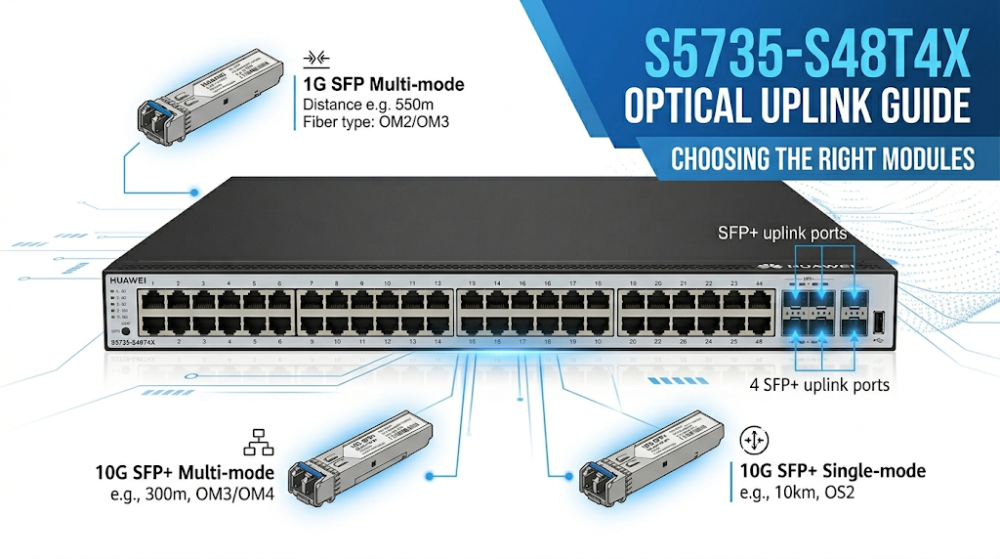
The Huawei S5735-S48T4X is a 48-port gigabit access switch with four 10G SFP+ uplink ports. Once the switch itself is selected, the next decision buyers face is choosing the right optical modules for those uplinks. The wrong module can cause link failures, performance degradation, or unnecessary cost overruns. This guide explains which SFP and SFP+ modules are compatible, when third-party alternatives are viable, and how to avoid the most common compatibility mistakes.
Part 1: S5735-S48T4X Port Overview — What You're Working With
The S5735-S48T4X provides 48 fixed 10/100/1000BASE-T RJ45 ports for endpoint connectivity and four 10G SFP+ uplink ports for upstream aggregation. Those four SFP+ ports are the only optical interfaces on the switch, and they support both 1G SFP and 10G SFP+ modules through auto-negotiation.
Key port facts:
Port Type
Quantity
Supported Modules
Max Speed
10/100/1000BASE-T
48
RJ45 copper only
1 Gbps
SFP+ uplink
4
SFP (1G) / SFP+ (10G)
10 Gbps
Because the SFP+ ports are downward-compatible with 1G SFP modules, buyers sometimes install 1G modules to save cost when 10G upstream bandwidth is not yet needed. This is technically supported, but there are caveats covered in Part 3.
Part 2: Supported Optical Module Types
Huawei publishes a supported module list for the S5735-S series. The SFP+ uplinks on the S5735-S48T4X accept the following module categories:
All of these modules follow the MSA (Multi-Source Agreement) standard form factor, which is why third-party alternatives exist. However, form-factor compatibility does not guarantee full operational compatibility on Huawei switches. As Huawei's official documentation states, switches must use modules that have been certified for use on Huawei platforms; non-certified modules cannot ensure transmission reliability, and Huawei will not provide support for problems caused by them.
Part 3: Original vs. Third-Party Modules — Compatibility Reality
This is where most buyers hesitate. Original Huawei modules are priced at a premium. Third-party modules from established optics vendors can cost 50–80% less. The real question is: will they work?
The Technical Reality
Huawei switches do not physically block non-Huawei modules. The SFP+ cages are MSA-standard. However, Huawei's switch software reads the EEPROM memory on each module to identify vendor information, part numbers, and compliance data.
What happens when you insert a third-party module:
Best case: The module is recognized, link comes up, no alarms. This is common with reputable third-party vendors who program their EEPROMs to be broadly compatible and who run actual switch-platform testing.
Common case: The module works but displays as "Unknown" or triggers a transceiver unsupported alarm. The link still operates normally, but this creates operational noise that IT teams may not want to manage.
Worst case: The module is not recognized, the port remains down, or error counters climb due to encoding mismatches. In multi-vendor network environments, module compatibility is one of the most common causes of deployment delays and support calls.
When Third-Party Is Usually Safe
Short-distance multimode links (OM3/OM4) within a single building
Non-mission-critical access-layer uplinks where a quick swap is possible
Lab or staging environments
When the third-party vendor explicitly tests against Huawei platforms and can provide test documentation
When Original Modules Are Worth the Premium
Long-distance single-mode links where signal quality margins matter
Production environments where any alarm creates operational noise
Projects with strict vendor-compliance requirements
When Huawei warranty support is active and must not be jeopardized
Bottom line: Third-party modules can work when sourced from vendors who perform platform-specific compatibility testing, but they introduce a variable that original modules do not. For projects where link stability is critical or where operational teams lack time to troubleshoot optics, original modules are the lower-risk choice.
Part 4: Module Selection Quick Reference
Use this table to match your deployment scenario to the right module. Save or share this with your technical team before ordering.
Scenario
Distance
Fiber Type
Recommended Module
Alternative
Risk Level
Data center uplink
< 100 m
OM3/OM4 MMF
SFP-10G-SR
Third-party 10GBASE-SR (tested)
Low
Campus cross-building
500 m – 2 km
OS2 SMF
SFP-10G-LR
eSFP-GE-LX (1G, budget path)
Low
Remote branch uplink
10 km
OS2 SMF
eSFP-GE-LX-SM1310
Third-party 1000BASE-LX (tested)
Medium
Metro/WAN link
40–80 km
OS2 SMF
SFP-10G-ER / SFP-10G-ZR
None recommended
High — use original
Temporary/staging
< 100 m
Copper
eSFP-GE-T
Standard Ethernet cable
Low
Same-rack switch link
< 7 m
Direct attach
SFP+ DAC cable
Third-party DAC (tested)
Low
Part 5: Third-Party Supplier Verification Checklist
If you are considering third-party modules, do not rely on the seller's word alone. Ask these five questions before placing the order:
1. Do you test this exact module on Huawei S5735-series switches?
Generic "compatible" claims are not enough. Reputable vendors maintain switch-specific test beds and can confirm recognition, link-up, and alarm behavior on the actual platform. If the vendor cannot name the Huawei switch models they test against, that is a warning sign.
2. Can you provide the EEPROM coding specification?
Huawei switches read vendor ID and part-number data from the module's EEPROM. A compatible third-party module must encode this information correctly. Ask whether the vendor programs the EEPROM for Huawei compatibility or uses generic MSA coding. The former is more reliable.
3. What is your return policy for unrecognized modules?
Even with testing, a module may behave differently in your specific environment. A vendor with a no-questions-asked return or exchange policy for compatibility issues reduces your risk. Avoid vendors who treat optical modules as non-returnable once opened.
4. Do you provide DOM/DDM support documentation?
Digital Optical Monitoring (DOM) lets the switch read optical power, temperature, and voltage from the module. Some third-party modules work for data transmission but do not report DOM data, which breaks monitoring dashboards. Confirm whether DOM is supported and tested on Huawei platforms.
5. Can you supply a test sample before the full BOM?
For projects ordering 20+ modules, a single-pair test before the main order is standard practice among experienced buyers. Vendors who refuse sample orders or charge full price for test units may not have confidence in their own compatibility claims.
If a vendor answers "yes" to at least three of these five questions, the third-party path is likely viable. If they answer "no" to three or more, the risk probably outweighs the cost savings.
Part 6: Common Pitfalls and How to Avoid Them
Pitfall 1: Buying SFP Modules for the RJ45 Ports
The 48 access ports are fixed RJ45. They do not accept SFP modules. Some buyers assume all 52 ports are SFP-capable. Only the four uplink ports accept optical modules.
Pitfall 2: Mixing Multimode and Single-Mode Fiber
An SR module (multimode) inserted into a single-mode fiber run will not establish a stable link, and vice versa. Always confirm the fiber type already installed in the building before ordering modules.
Pitfall 3: Ignoring Distance Margins
A 10 km module on a 9.5 km fiber run works. A 10 km module on an 11 km run does not. Measure actual fiber distance — including patch panels and slack — before finalizing the module choice.
Pitfall 4: Ordering Copper SFP for 10G Need
The eSFP-GE-T copper module is limited to 1G. If your upstream core switch is expecting 10G, this module creates a speed mismatch. Use it only when 1G is truly sufficient.
Pitfall 5: Buying Modules Without Pre-Validation
For projects using third-party optics, the safest approach is to order a single pair for testing before committing to the full BOM. This avoids discovering incompatibility after dozens of modules have already been installed. For teams without lab infrastructure to test optics, working with a supplier who can pre-verify module recognition on the target switch model removes this risk entirely.
Part 7: Multi-Site Deployment — Why Module Standardization Matters
For integration projects with 10, 50, or 100+ sites, module selection is not just a per-site technical decision. It is a maintenance strategy.
When different sites use different module brands — or even different part numbers from the same brand — the spare-parts strategy becomes complicated. A technician visiting a remote site needs to know exactly which module to bring. If Site A uses Huawei original SR modules and Site B uses third-party SR modules from Vendor X, the spare pool doubles and the troubleshooting variables multiply.
Experienced integrators usually standardize on one module specification across all sites, even if the per-unit cost is slightly higher. The savings in sparing, training, and incident response time usually outweigh the upfront price difference. If third-party modules are chosen for cost reasons, the best practice is to select a single third-party vendor and use that same vendor across the entire deployment — not mix and match based on whichever supplier was cheapest on a given order.
For teams managing multi-site rollouts, confirming module compatibility before the first site goes live prevents a pattern where early sites use one module type and later sites discover a better (or cheaper) alternative, creating an inconsistent fleet that is harder to maintain over the contract life.
FAQ
Does the S5735-S48T4X support 25G or 40G modules?
No. The four uplink ports are 10G SFP+ only. They do not support SFP28 (25G) or QSFP+ (40G) modules.
Can I use DAC (Direct Attach Copper) cables instead of optical modules?
Yes, if the DAC cable is SFP+ compatible and the distance is very short (typically under 7 meters). DAC is common for switch-to-switch connections within the same rack. Ensure the DAC is rated for your switch vendor or tested for broad compatibility.
Will using third-party modules void my Huawei warranty?
Huawei's warranty covers the switch hardware itself. If a third-party module causes a port failure, Huawei may decline warranty coverage for that specific port. For full warranty protection, original modules are the safer choice. Huawei's official documentation also states that non-certified modules cannot ensure transmission reliability and that Huawei is not liable for problems caused by them.
How can I check if a module is recognized by the switch?
After inserting the module, log into the switch CLI and run display transceiver interface brief or display transceiver diagnosis interface. If the module vendor, part number, and optical parameters appear, the module is recognized. If the output shows "Unknown" or no data, the module may still work but is not fully identified.
What is the difference between eSFP and SFP+?
eSFP is Huawei's term for standard 1G SFP modules. SFP+ is the 10G form factor. The S5735-S48T4X supports both in its uplink ports, but the 1G module will only run at 1G speed even in an SFP+ cage.
Should I standardize on one module vendor across all switches in a project?
Yes, whenever possible. Standardizing on one module type — whether original or a single tested third-party vendor — simplifies sparing, reduces troubleshooting variables, and makes future expansion predictable. For multi-site projects, standardization becomes even more important because it reduces spare-part inventory and technician training requirements.
If you have already confirmed which module type fits your fiber run, the next practical step is verifying whether that exact model is available with tested compatibility for the S5735-S48T4X. Send your BOM to Router-Switch for a module-by-module compatibility verification before you order, and we will confirm recognition, stock, and lead time alongside your switch quote.
Expertise Builds Trust
20+ Years • 200+ Countries • 21500+ Customers/Projects CCIE · JNCIE · NSE7 · ACDX · HPE Master ASE · Dell Server/AI Expert