Solving Warehouse WiFi Coverage and Uptime IssuesDesign reliable warehouse WiFi coverage and uptime with warehouse wifi 6 ap, industrial wireless access points, and warehouse poe switches for racks and docks.
OLT Capacity Planning for GPON Access NetworksPlan OLT capacity for GPON OLT systems and EA5800 capacity planning, optimizing GPON split ratio and OLT uplink design for scalable fiber access.
Enterprise OLT Platform Selection for Fiber AccessDesign enterprise OLT platform strategy for GPON OLT platform, modular OLT chassis, and OLT service boards to scale passive optical LAN and XG-PON evolution.
Scale Data Center Networking Under Long Lead TimesScale data center networking faster under long lead times with data center spine switches, leaf spine data center designs and Cisco UCS fabric interconnects.
Tunnel Video Surveillance VLAN Stability over FiberDesign stable tunnel video surveillance VLANs using optical transport backbone and Arista fiber aggregation for resilient Huawei OptiX OSN CCTV networks.
Fiber vs Copper in Industrial Networks Design GuideCompare fiber vs copper in industrial ethernet, plan hybrid industrial fiber network designs, and select rugged ethernet switches and industrial SFP transceivers.
Virtual Local Area Networks (VLANs) are essential for network segmentation, security, performance, and scalability. This guide provides a step-by-step walkthrough on how to configure VLAN on Cisco switch, covering VLAN creation, assigning ports to VLAN Cisco switches, configuring trunk ports, best practices, and VLAN troubleshooting Cisco switch methods. Mastering these configurations ensures efficient and secure network management for IT professionals, SMBs, and enterprise environments.
Part 1: Understanding VLANs and Their Importance
VLANs segment traffic, enhance security, and simplify management across SMBs and enterprise environments.
What is a VLAN?
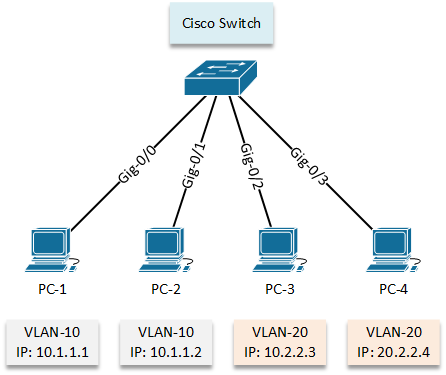
A Virtual Local Area Network (VLAN) logically segments ports on a switch, creating multiple isolated broadcast domains. This allows grouping hosts even if they are physically separated, ensuring traffic only reaches devices within the same VLAN. VLANs primarily operate at Layer 2. Every Cisco switch has a default VLAN 1.
Why VLANs are Crucial for Modern Networks
VLANs facilitate efficient network management across locations, maximize hardware investment, and improve performance, security, and scalability for growing organizations.
VLANs and Network Performance
Segmenting broadcast domains reduces unnecessary traffic, minimizing congestion and optimizing bandwidth use—especially in high-traffic environments.
VLANs and Network Security
VLANs isolate sensitive data and allow granular access control, preventing unauthorized cross-VLAN access and enhancing overall network security.
VLANs and Network Scalability
Adding new VLANs or extending segments is easy without moving hardware. This flexibility supports organizational growth and dynamic departmental changes.
Part 2: Essential Cisco Switch VLAN Configuration Steps
Follow these steps for Cisco Catalyst VLAN setup using CLI, from VLAN creation to trunk configuration. For Cisco 9300 switches, refer to our detailed VLAN configuration guide on Cisco 9300 for platform-specific notes.
Accessing the Cisco Switch CLI
Device> enable
Device# configure terminal
Creating and Naming a VLAN
Device(config)# vlan 10
Device(config-vlan)# name HR_Department
Device(config-vlan)# exit
Part 3: Advanced Considerations and Best Practices
After configuring VLANs, it's important to consider advanced settings and best practices. These steps enhance security, simplify management, and prevent common mistakes. Implementing these practices ensures your VLAN setup is stable, scalable, and secure.
Default behavior: All ports in VLAN 1, DTP enabled. Override defaults consciously for security and proper functionality.
VLAN Configuration Files
vlan.dat: Stores normal-range VLANs (1–1005).
running-config: Stores interface configurations and extended-range VLANs (1006–4094).
Normal-Range vs Extended-Range VLANs
Normal-Range VLANs (1–1005): Common, stored in vlan.dat.
Extended-Range VLANs (1006–4094): For large networks, stored in running-config with VTP v1/v2.
Documentation
Record VLAN assignments, purpose, IP subnets, trunk/native VLANs. Improves maintenance and onboarding. For practical examples, you can also refer to our Cisco 9300 VLAN configuration guide for lab-ready scenarios.
Part 4: Verification and Troubleshooting VLAN Configurations
After configuring VLANs, verification and troubleshooting are critical. This ensures your network runs smoothly and traffic flows as intended.
Verification Steps
Device# show vlan brief
Device# show interfaces trunk
Device# show interfaces switchport
Device# show interfaces status
Device# show mac address table interface
Device# show running-config interface
Troubleshooting Common VLAN Issues
No connectivity within VLAN: Check port assignment, VLAN status, IP config, physical connection.
No connectivity between VLANs: Requires Layer 3 routing (router or SVI).
Mastering VLANs enhances security, performance, and scalability. From VLAN creation, port assignments, to advanced trunking, this guide equips IT professionals to build resilient networks. For platform-specific guidance, refer to Cisco 9300 VLAN setup guide.
Check Cisco Catalyst switch availability at router-switch.com and compare pricing via it-price.com to start your VLAN deployment today.