Solving Warehouse WiFi Coverage and Uptime IssuesDesign reliable warehouse WiFi coverage and uptime with warehouse wifi 6 ap, industrial wireless access points, and warehouse poe switches for racks and docks.
OLT Capacity Planning for GPON Access NetworksPlan OLT capacity for GPON OLT systems and EA5800 capacity planning, optimizing GPON split ratio and OLT uplink design for scalable fiber access.
Enterprise OLT Platform Selection for Fiber AccessDesign enterprise OLT platform strategy for GPON OLT platform, modular OLT chassis, and OLT service boards to scale passive optical LAN and XG-PON evolution.
Scale Data Center Networking Under Long Lead TimesScale data center networking faster under long lead times with data center spine switches, leaf spine data center designs and Cisco UCS fabric interconnects.
Tunnel Video Surveillance VLAN Stability over FiberDesign stable tunnel video surveillance VLANs using optical transport backbone and Arista fiber aggregation for resilient Huawei OptiX OSN CCTV networks.
Fiber vs Copper in Industrial Networks Design GuideCompare fiber vs copper in industrial ethernet, plan hybrid industrial fiber network designs, and select rugged ethernet switches and industrial SFP transceivers.
As enterprise environments, auditoriums, and higher education campuses increasingly adopt AV-over-IP technologies like Shure Dante and AES67, the need for reliable, high-performance audio and video transmission is crucial. For IT/AV administrators and network engineers, ensuring seamless integration and flawless performance is essential. However, this integration introduces complexity, especially when high-bandwidth, low-latency multicast traffic must pass through enterprise firewalls like Fortinet FortiGate.
This guide explores the challenges of multicast traffic in Dante networks, focusing on FortiOS 7.4.x and providing best practices for designing robust multicast networks that prevent audio dropouts and ensure smooth AV-over-IP workflows.
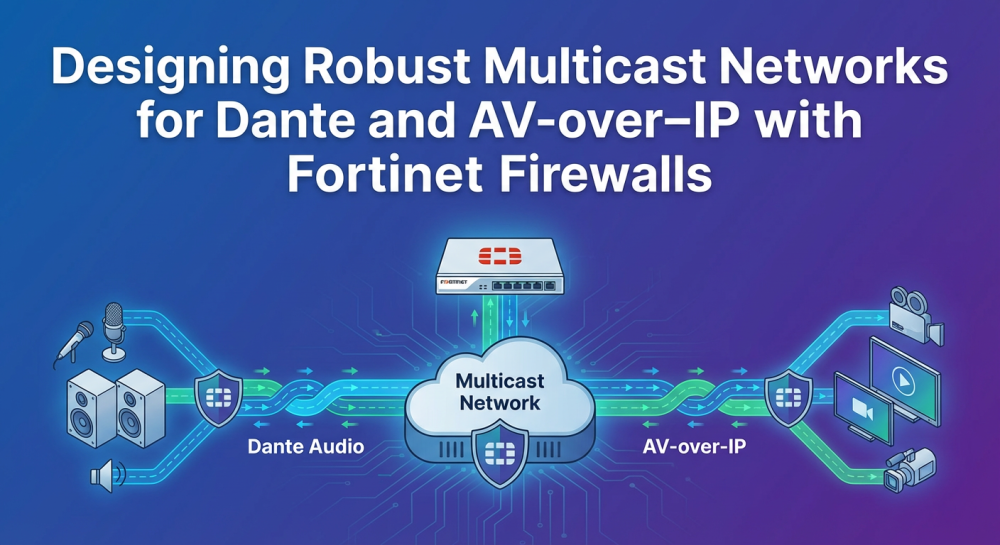
Part 1: Typical Dante and AV-over-IP Network Topologies Behind FortiGate
When designing a multicast network for Dante and other AV-over-IP systems, the FortiGate firewall must be strategically placed to handle multicast traffic without disrupting audio streams. In enterprise networks, Dante devices often reside on isolated VLANs to ensure security, while core switches and FortiGate firewalls manage multicast traffic distribution.
A typical setup might look like this:
Core Switches to distribute multicast traffic.
FortiGate Firewalls for traffic management and security.
AV-over-IP Devices like Shure Dante connected via managed switches.
To ensure smooth AV workflows, multicast traffic must be allowed to pass through FortiGate without interference. This requires configuring the firewall to handle IGMP and multicast group addresses appropriately.
Part 2: Multicast Requirements for Dante, AES67, and PTP in Enterprise Networks
Dante and AES67 rely heavily on multicast for audio distribution. Multicast enables the efficient delivery of audio to multiple receivers without flooding the network with unnecessary traffic.
Key multicast requirements for these systems include:
IGMP Snooping to prevent multicast traffic from flooding all ports.
Precision Time Protocol (PTP) for synchronization across devices.
Multicast Group Addresses such as 239.255.0.0/16 for audio streams and 224.0.1.129-132 for PTP synchronization.
When routing Dante multicast traffic across Layer 3 boundaries, network devices like FortiGate firewalls must be configured to manage multicast policies and ensure PTP synchronization remains intact.
Part 3: FortiOS 7.4.x: Policy, Hairpin, and Multicast Changes That Break AV Workflows
FortiOS 7.4.x introduced several changes to firewall behavior that can disrupt Dante AV-over-IP workflows, especially in large-scale deployments. These changes affect hairpin traffic, multicast handling, and IGMP policies, which may break existing configurations.
Key Challenges in FortiOS 7.4.x:
Multicast Policy Changes: Default changes in multicast policies can block essential audio streams.
Hairpin Traffic Handling: Changes to hairpin traffic rules can affect traffic that loops back within the same subnet or passes through the firewall.
Port-Specific Issues: Ports like 4321 (Dante audio) and 5004 (PTP) need to be explicitly allowed.
Network engineers must ensure these changes are addressed by reviewing and adjusting firewall policies under Policy & Objects > Multicast Policy.
Part 4: Best Practices for FortiGate Configuration for Shure Dante and Similar AV Systems
Proper configuration of the FortiGate firewall is essential for enabling multicast traffic while securing the network. Here are best practices for configuring FortiGate to work with Dante and other AV-over-IP systems:
Best Practices:
Enable IGMP Snooping and Querier: Enable IGMP snooping to prevent multicast flooding and ensure only relevant receivers get the audio streams. You may also configure FortiGate as the IGMP querier.
Create Multicast Policies: Explicitly define multicast policies in FortiOS to allow Dante multicast ranges like 239.255.0.0/16 for audio and 224.0.1.129-132 for PTP synchronization.
Prioritize QoS for Dante Traffic: Configure switches to prioritize DSCP tags for Dante traffic. Ensure Energy Efficient Ethernet (EEE) is disabled on all ports handling Dante traffic.
Enable PIM for Layer 3 Routing: Enable Protocol Independent Multicast (PIM) on FortiGate to handle multicast traffic across multiple subnets.
By following these best practices, you can avoid disruptions and ensure smooth, low-latency audio performance.
Part 5: Network Design Recommendations: When to Use Switches vs Firewalls in the AV Path
While FortiGate firewalls are essential for securing the network, they should not be responsible for handling multicast traffic directly. Here’s when to use switches vs firewalls:
Network Design Tips:
Switches: Use managed switches to handle Dante multicast traffic. These devices are optimized for low-latency, high-bandwidth traffic and can efficiently distribute multicast data.
Firewalls: Use FortiGate firewalls to secure the network and enforce policies. Firewalls should manage traffic at the perimeter and ensure multicast traffic is allowed through, but switches should handle the actual transmission.
Minimize hairpin traffic and optimize routing paths for multicast streams.
Conclusion
Designing a robust multicast network for Dante and other AV-over-IP systems requires a detailed understanding of multicast protocols, FortiGate firewall configuration, and network design best practices. By following these best practices and ensuring the proper configuration of both FortiGate firewalls and network switches, you can prevent audio dropouts and maintain a smooth AV workflow.
For businesses looking to upgrade their AV-over-IP infrastructure, Router-Switch offers a wide selection of Fortinet FortiGate firewalls, enterprise-grade switches, and expert CCIE support to ensure your network operates without disruption.
FAQ
Q1.How do I configure multicast traffic on FortiGate?
To configure multicast on FortiGate, enable IGMP snooping on your multicast VLANs, and explicitly define policies to allow traffic on the necessary multicast ports. Ensure FortiGate is configured as the IGMP querier where applicable.
Q2.What is the role of FortiGate in AV-over-IP networks?
FortiGate firewalls provide essential security for AV-over-IP networks by managing traffic, enforcing policies, and ensuring multicast traffic is allowed to pass through without disruption.
Q3.How can I prevent audio dropouts in Dante systems?
Ensure FortiGate is configured to handle multicast traffic and that switches are optimized to prioritize Dante traffic using DSCP tags. Additionally, disable Energy Efficient Ethernet (EEE) to avoid synchronization issues.
Q4.Can Router-Switch.com help with FortiGate configuration?
Yes, Router-Switch provides expert CCIE support to help with FortiGate configuration, Dante network design, and troubleshooting. Let our experts assist you in building a robust AV-over-IP network.
Expertise Builds Trust
20+ Years • 200+ Countries • 21500+ Customers/Projects CCIE · JNCIE · NSE7 · ACDX · HPE Master ASE · Dell Server/AI Expert