Solving Warehouse WiFi Coverage and Uptime IssuesDesign reliable warehouse WiFi coverage and uptime with warehouse wifi 6 ap, industrial wireless access points, and warehouse poe switches for racks and docks.
OLT Capacity Planning for GPON Access NetworksPlan OLT capacity for GPON OLT systems and EA5800 capacity planning, optimizing GPON split ratio and OLT uplink design for scalable fiber access.
Enterprise OLT Platform Selection for Fiber AccessDesign enterprise OLT platform strategy for GPON OLT platform, modular OLT chassis, and OLT service boards to scale passive optical LAN and XG-PON evolution.
Scale Data Center Networking Under Long Lead TimesScale data center networking faster under long lead times with data center spine switches, leaf spine data center designs and Cisco UCS fabric interconnects.
Tunnel Video Surveillance VLAN Stability over FiberDesign stable tunnel video surveillance VLANs using optical transport backbone and Arista fiber aggregation for resilient Huawei OptiX OSN CCTV networks.
Fiber vs Copper in Industrial Networks Design GuideCompare fiber vs copper in industrial ethernet, plan hybrid industrial fiber network designs, and select rugged ethernet switches and industrial SFP transceivers.
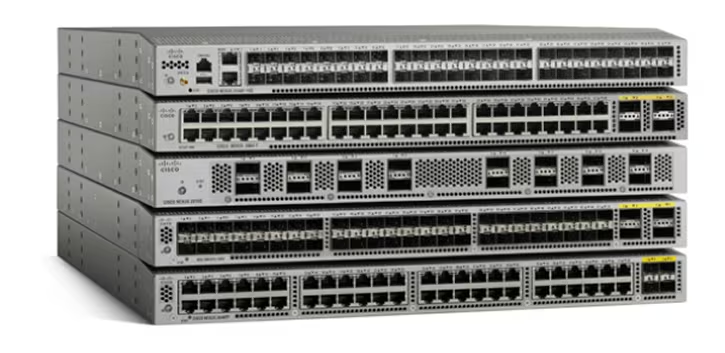
For more than a decade, the Cisco Nexus 3000 Series has been a reliable workhorse in data centers—especially in top-of-rack (ToR), low-latency trading environments, and fixed-port deployments. But as many of the most widely used models now approach or have already entered Cisco’s End-of-Life (EoL) and End-of-Support (EoS) cycle, IT teams are facing a critical moment:
How long can you safely run Nexus 3000 hardware, and what does a realistic migration path to Nexus 9000 look like?
This guide breaks down the major EoL dates, the operational risks of extending Nexus 3000 beyond support, and the most practical strategies for upgrading to Cisco Nexus 9000—a platform designed to meet today’s 25G/100G/400G data center standards.
Part 1: Cisco Nexus 3000 End-of-Support Timeline & Key Risks
Although the Nexus 3000 family technically still includes models labeled “Available,” the majority of the commonly deployed units are already in their EoS cycle, and several are nearing their Last Date of Support (LDoS).
By 2025–2026, many Nexus 3000 devices will be fully unsupported, creating operational blind spots that no modern data center can afford.
What Happens When You Continue Running Unsupported Nexus 3000 Switches?
1. Security vulnerabilities remain unpatched
Cisco’s recent advisories often apply to both Nexus 3000 and 9000 series, covering issues like:
IS-IS Denial of Service
PIMv6 DoS
NX-OS sensitive log information exposure
Once a device passes its LDoS, no additional patches are issued, and these risks remain permanently open.
2. Increased likelihood of hardware failures
Multiple Field Notices (FNs) have affected both the 3000 and 9000 platforms, including:
SSD read-only mode causing reloads
eUSB failures
BIOS/firmware mismatches leading to unexpected reboots
Post-LDoS, Cisco no longer provides part replacements or root-cause analysis.
3. End of SmartNet and TAC support
When SmartNet expires and cannot be renewed:
TAC assistance becomes unavailable
OS upgrades stop
Licensing and certificate expiration issues may become unfixable
This is the most direct operational impact and often the point when organizations are forced into emergency replacements.
Part 2: Why Cisco Nexus 9000 Is the Recommended Migration Path
Cisco’s long-term roadmap makes it clear: the Nexus 9000 Series is the successor to the Nexus 3000 portfolio.
If you’re already mapping out your refresh cycle, many teams start validating available stock and checking serial authenticity early in the process—especially since Nexus 9000 demand is high and lead times can vary between distributors.
It supports both NX-OS standalone mode and ACI fabric, offering flexibility for traditional environments and full SDN architectures.
Why the Nexus 9000 Series is the right upgrade
Designed for 25G / 100G / 400G modern data center throughput
Uses next-generation ASICs, including Cisco Silicon One
Receives frequent security patches and NX-OS updates
Compatible with ACI automation workflows
Supported by Cisco’s full lifecycle, licensing, and security ecosystem
Nexus 3000 vs Nexus 9000: What You Gain by Migrating
Feature
Nexus 3000 (Legacy)
Nexus 9000 (Modern)
Port Speeds
Mostly 10G/40G
25G / 100G / 400G
ASIC Architecture
Older fixed designs
Modern Cisco/Broadcom ASICs
Operating Modes
NX-OS only
NX-OS + ACI
Lifecycle
Mostly EoL/EoS
Active lifecycle
Security Updates
Ending or ended
Regular, ongoing
In short: The Nexus 9000 gives you current performance, modern architecture, and long-term support—everything the aging 3000 series can no longer guarantee.
Part 3: Migration Planning and Procurement Strategy
Upgrading a ToR layer or refreshing low-latency infrastructure requires coordinated planning across firmware, configuration, and inventory.
Unlike Catalyst IOS XE workflows (install add activate commit), NX-OS upgrades must follow platform-specific procedures. Teams should:
Use the correct Upgrade and Downgrade Guides for models like Nexus 3048, 3524, and 3548
Validate BIOS and firmware versions to avoid known instability issues
Review Field Notices for SSD/eUSB faults before migration
Audit current running-config and remove deprecated commands
This process is essential for ensuring a seamless migration or cutover.
Procurement Planning for End-of-Life Switches
Because Nexus 3000 availability varies a lot by region, many buyers double-check real stock and warranty status with distributors before finalizing a migration quote—using platforms like Router-switch or IT-Price to verify serials and compare lead times.
1. Supply constraints
Many Nexus 3000 models are already End-of-Sale, meaning:
No new manufacturing
Limited available stock
Market pricing may fluctuate
2. Leverage Cisco TMP (Trade Migration Program)
If you are transitioning to Nexus 9000, Cisco TMP allows you to trade in old hardware to offset the cost of new units.
3. Avoid last-minute replacements
Once LDoS hits, failures turn into downtime. Planning ahead prevents emergency procurement cycles.
Frequently Asked Questions (FAQ)
Q1: What does Cisco End-of-Life mean?
End-of-Life (EoL) is Cisco’s official process for retiring a product. The key milestone is the Last Date of Support (LDoS)—after this, all Cisco support, SmartNet, and TAC services end.
Q2: How do I update firmware on Nexus switches?
Firmware updates require using platform-specific NX-OS Upgrade/Downgrade Guides. Examples include:
Cisco Nexus 3600 Series NX-OS Upgrade and Downgrade Guide
Technical notes specific to Nexus 3048, 3548, and others
The process differs significantly from Catalyst upgrades.
Q3: How do I factory reset a Cisco Nexus 3000?
Cisco’s documentation provides password recovery and configuration reset workflows, but does not include a full factory-reset command set for all models. The reset process varies by platform.
Q4: Should I upgrade to Nexus 9000?
If your Nexus 3000 model is already EoS or approaching LDoS in 2024–2026, the answer is yes. Nexus 9000 provides long-term support, better performance, stronger security updates, and a significantly longer lifecycle.
Expertise Builds Trust
20+ Years • 200+ Countries • 21500+ Customers/Projects
CCIE · JNCIE · NSE7 · ACDX · HPE Master ASE · Dell Server/AI Expert