Solving Warehouse WiFi Coverage and Uptime IssuesDesign reliable warehouse WiFi coverage and uptime with warehouse wifi 6 ap, industrial wireless access points, and warehouse poe switches for racks and docks.
OLT Capacity Planning for GPON Access NetworksPlan OLT capacity for GPON OLT systems and EA5800 capacity planning, optimizing GPON split ratio and OLT uplink design for scalable fiber access.
Enterprise OLT Platform Selection for Fiber AccessDesign enterprise OLT platform strategy for GPON OLT platform, modular OLT chassis, and OLT service boards to scale passive optical LAN and XG-PON evolution.
Scale Data Center Networking Under Long Lead TimesScale data center networking faster under long lead times with data center spine switches, leaf spine data center designs and Cisco UCS fabric interconnects.
Tunnel Video Surveillance VLAN Stability over FiberDesign stable tunnel video surveillance VLANs using optical transport backbone and Arista fiber aggregation for resilient Huawei OptiX OSN CCTV networks.
Fiber vs Copper in Industrial Networks Design GuideCompare fiber vs copper in industrial ethernet, plan hybrid industrial fiber network designs, and select rugged ethernet switches and industrial SFP transceivers.
This article is written for IT administrators and network engineers seeking clarification on initial access procedures for Cisco Meraki switches (MS Series), and how they differ from traditional Cisco devices.
Part 1: The Meraki Cloud-First Paradigm
Cisco Meraki switches are cloud-managed devices. Unlike traditional Cisco IOS or Industrial Ethernet (IE) switches that rely on local setup (console, SSH, or Express Setup with default passwords), Meraki devices are primarily configured and managed through the Meraki Dashboard, a centralized web-based management platform.
Traditional Cisco (IE / Catalyst): Use Express Setup via http://192.168.1.254, with default credentials (username blank, password cisco).
Meraki MS Series: Default login is not for full configuration, but for accessing the Local Status Page for diagnostics. Configuration is pushed from the cloud once the device is claimed in the Dashboard.
This fundamental difference often leads to confusion: Where is the Meraki default login?
Part 2: Default Login Behavior of Meraki Switches
Meraki switches do not rely on persistent local credentials for configuration. Instead:
Primary Management: The Meraki Dashboard account credentials (organization admin login) are the authoritative method for configuring VLANs, routing, security policies, and monitoring.
Local Status Page: Each Meraki switch has a built-in local web page for diagnostics and basic IP configuration.
Default Username: admin
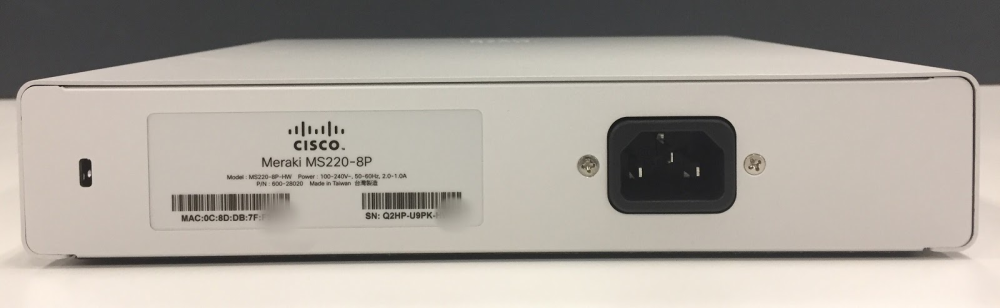
Default Password: Device Serial Number (printed on the product label and visible in Dashboard)
Meraki MX (Firewall/Security Appliance) Contrast: Some Meraki devices, such as MX firewalls, use a fixed default (admin / meraki) for their management port.
Part 3: First-Time Setup and Claiming in the Dashboard
Physical Connection: Connect the switch to a network with internet access so it can contact the Meraki cloud.
Device Claiming: Log in to the Meraki Dashboard, enter the switch serial number, and claim the device into your organization.
Provisioning: The Dashboard pushes all configuration (VLANs, port settings, QoS policies, etc.) down to the switch.
Unlike traditional switches, you do not log into the switch itself for full setup—all configuration is handled from the Dashboard.
Part 4: Local Access and Troubleshooting Options
While Meraki is cloud-first, local access remains important for troubleshooting:
Accessing the Local Status Page
Connect a computer directly to the switch on the same subnet.
Determine the switch’s local IP (via Dashboard or arp -a).
Open the IP address in a browser.
Log in with:
Username: admin
Password: Device Serial Number
The status page allows:
Running ping and traceroute
Setting or verifying IP/subnet/VLAN configuration
Checking cloud connectivity
⚠️ Note: This interface does not replace Dashboard management—its role is limited to diagnostics.
Part 5: Password Reset and Device Recovery
Dashboard Password Reset
If you lose your Dashboard credentials, follow Meraki’s standard cloud account recovery steps.
Local Credential Recovery
If local status page credentials (serial number–based) are lost or changed:
Factory Reset: Hold the reset button until the LED changes state. This erases local configuration and returns the switch to its original state, ready to reconnect to the cloud. Traditional Cisco Contrast:
Cisco SG350X → Default CLI login: cisco / cisco, system forces new password at first login.
Part 6: Security Best Practices
Change Default Local Credentials: Replace the serial-number default with a strong password if local access is required.
Secure the Dashboard Account: Enable multi-factor authentication (MFA) and role-based access control (RBAC).
Restrict Local Access: Limit local status page availability to trusted management VLANs or specific IPs.
Document Configuration Changes: Keep records of any local troubleshooting changes to avoid conflicts with Dashboard-managed configuration.
Use Local Access Only When Needed: Treat the status page as a last-resort tool during outages; rely on Dashboard for routine operations.
Part 7: Comparison Table
Device Type
Access Method
Default Username
Default Password
Notes
Meraki MS (Switch)
Local Status Page (IP in browser)
admin
Device Serial Number
Diagnostics only
Meraki MX (Security)
Management Port
admin
meraki
Default subnet 192.168.128.0/24
Cisco IE (IE1000/IE4000)
Express Setup (192.168.1.254)
(blank)
cisco
Must set new password
Cisco SG350X
CLI/GUI
cisco
cisco
Forces new password
FAQ
Q1: Does a Cisco Meraki switch have a default username and password?
Yes. For the local status page, the default is admin / device serial number. Full configuration is only available through the Meraki Dashboard using cloud credentials.
Q2: How do I configure a Meraki switch for the first time?
You do not log into the switch directly. Instead, claim the device in your Meraki Dashboard using its serial number. The Dashboard then provisions the switch.
Q3: Can I use a Meraki switch without the Dashboard?
Not fully. Local access only provides diagnostics and limited IP settings. Configuration requires Dashboard connectivity.
Q4: What if I forget my Meraki Dashboard password?
Use Meraki’s cloud account recovery options. For local access, if credentials are lost, reset the device to factory defaults.
Conclusion
Cisco Meraki switches represent a paradigm shift from device-level default passwords to cloud-first access control. While the local status page (admin / serial number) exists for troubleshooting, the Meraki Dashboard is the primary interface for setup, management, and security.
Need Cisco Meraki hardware for your enterprise network? Router-switch provides genuine Meraki equipment with real-time inventory and competitive pricing. Use it-price.com to instantly check availability and quotes—ensuring faster deployments and cost-effective sourcing.
Expertise Builds Trust
20+ Years • 200+ Countries • 21500+ Customers/Projects CCIE · JNCIE · NSE7 · ACDX · HPE Master ASE · Dell Server/AI Expert