Solving Warehouse WiFi Coverage and Uptime IssuesDesign reliable warehouse WiFi coverage and uptime with warehouse wifi 6 ap, industrial wireless access points, and warehouse poe switches for racks and docks.
OLT Capacity Planning for GPON Access NetworksPlan OLT capacity for GPON OLT systems and EA5800 capacity planning, optimizing GPON split ratio and OLT uplink design for scalable fiber access.
Enterprise OLT Platform Selection for Fiber AccessDesign enterprise OLT platform strategy for GPON OLT platform, modular OLT chassis, and OLT service boards to scale passive optical LAN and XG-PON evolution.
Scale Data Center Networking Under Long Lead TimesScale data center networking faster under long lead times with data center spine switches, leaf spine data center designs and Cisco UCS fabric interconnects.
Tunnel Video Surveillance VLAN Stability over FiberDesign stable tunnel video surveillance VLANs using optical transport backbone and Arista fiber aggregation for resilient Huawei OptiX OSN CCTV networks.
Fiber vs Copper in Industrial Networks Design GuideCompare fiber vs copper in industrial ethernet, plan hybrid industrial fiber network designs, and select rugged ethernet switches and industrial SFP transceivers.
When it comes to securing and optimizing a Cisco network, few tools are as powerful—and often misunderstood—as Access Control Lists (ACLs). Whether you’re a beginner searching “What is access list in Cisco?” or an enterprise engineer trying to troubleshoot why an application is being blocked, ACLs play a critical role in keeping your infrastructure safe and efficient.
In this guide, we’ll break down everything you need to know about Cisco ACLs: from the basics of standard and extended lists, to advanced configuration examples, to real-world troubleshooting tips that save hours of downtime. By the end, you’ll not only understand how to configure an access list in Cisco devices—you’ll know how to apply ACLs strategically in enterprise networks without breaking business-critical traffic.
Part1. Introduction to Cisco Access Lists (ACLs)
Access Control Lists (ACLs) are one of the foundational tools in Cisco networking. They allow administrators to control traffic flow, filter packets, and improve network security.
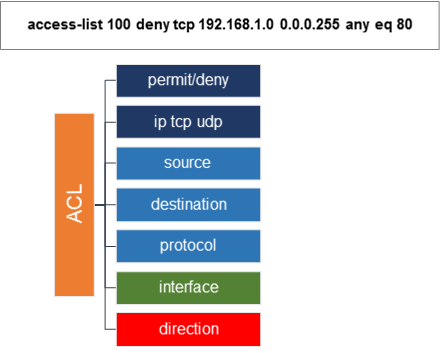
At the most basic level, an ACL is a set of rules applied to a router or switch interface. These rules define whether traffic is permitted or denied based on parameters such as IP address, protocol type, or port number.
Why ACLs matter:
For small networks: ACLs act as lightweight firewalls, helping to block unwanted traffic.
For enterprises: ACLs enforce compliance, segment traffic between VLANs, and add another security layer beyond dedicated firewalls or security appliances.
In short, ACLs are not just a technical concept. They are a practical tool that supports both security and performance in modern ICT environments.
Part2. Types of Cisco ACLs Explained
Cisco offers several ACL types to fit different use cases. Understanding these is crucial before writing your first configuration.
1. Standard ACLs
Match only the source IP address.
Best for simple filtering (e.g., allowing only a subnet to access a management interface).
Range: 1–99 and 1300–1999.
Example:
access-list 10 permit 192.168.10.0 0.0.0.255
interface GigabitEthernet0/1
 ip access-group 10 in
2. Extended ACLs
Match source + destination IP, protocol, and port.
Useful for fine-grained control (e.g., allow HTTP but block Telnet).
Range: 100–199 and 2000–2699.
Example:
access-list 101 permit tcp 192.168.10.0 0.0.0.255 any eq 80
access-list 101 deny tcp any any eq 23
interface GigabitEthernet0/1
 ip access-group 101 in
3. Named ACLs
Easier to manage because they use a name instead of a number.
Support both standard and extended logic.
Example:
ip access-list extended BLOCK_TELNET
 deny tcp any any eq 23
 permit ip any any
4. IPv6 ACLs
Similar to IPv4 extended ACLs but tailored for IPv6.
Applied with ipv6 traffic-filter.
Example:
ipv6 access-list IPV6_FILTER
 permit tcp 2001:db8:1::/64 any eq 443
 deny ipv6 any any
interface GigabitEthernet0/1
 ipv6 traffic-filter IPV6_FILTER in
Part3. Step-by-Step Cisco ACL Configuration Guide
A structured workflow ensures ACLs do not accidentally block critical traffic.
Step 1. Define the ACL Rules
Decide what traffic you want to allow and what to deny. Always start with business requirements.
Step 2. Write the ACL in Global Config Mode
Router(config)# access-list 110 permit tcp 192.168.1.0 0.0.0.255 host 10.10.10.10 eq 443
Router(config)# access-list 110 deny ip any any
Step 3. Apply the ACL to an Interface
Router(config)# interface GigabitEthernet0/0
Router(config-if)# ip access-group 110 in
Step 4. Verify the Configuration
Router# show access-lists
Router# show run | include access-group
Step 5. Document the Rules
Use remarks to make ACLs easier to understand.
access-list 110 remark Allow internal HTTPS to Web Server
Pro tip: Always test ACLs in a lab or staging environment before pushing to production.
Part4. Cisco ACL Troubleshooting and Verification
Even experienced engineers encounter ACL issues. Common problems include:
Implicit Deny All Every ACL ends with an invisible deny all. If you don’t add an explicit permit, all traffic may be blocked.
Rule Order ACLs are processed top to bottom. Place specific rules first, then broader rules.
Direction Misunderstanding in = traffic entering the interface. out = traffic leaving the interface.
4. Useful Troubleshooting Commands
show ip interface
show access-lists
debug ip packet
Example Case
Problem: Remote users cannot SSH into a server.
Fix: ACL was blocking TCP/22. After adding a permit tcp any host x.x.x.x eq 22, service was restored.
Part5. Cisco ACL Best Practices for Enterprises
For enterprise-scale deployments, ACLs should be part of a layered security strategy:
Use descriptive names: Named ACLs improve long-term management.
Limit access to management interfaces: Allow only trusted subnets.
Combine ACLs with VLANs: Helps segment guest Wi-Fi from corporate LAN.
Test before applying: A misconfigured ACL can take down critical business services.
Integrate with Zero Trust: ACLs can serve as the first enforcement point in Zero Trust Network Access (ZTNA).
Part6. How Cisco Hardware and Licensing Affect ACL Deployment
ACL performance is tied to your hardware. For example:
Cisco Catalyst 9300/9400: Hardware-accelerated ACLs for enterprise-scale environments.
Cisco ISR/ASR routers: ACLs impact CPU utilization if not optimized.
Licensing considerations: Advanced features (e.g., identity-based ACLs, TrustSec) may require higher-tier licenses.
If you are planning an ACL deployment, it’s important to match your Cisco hardware, IOS XE version, and license with your security goals.
Part7. Conclusion and Next Steps
Cisco ACLs remain one of the most versatile and cost-effective tools for traffic control and security enforcement. Whether you are:
A beginner learning the basics of packet filtering, or
An enterprise engineer troubleshooting complex traffic flows,
…understanding ACLs helps you secure and optimize your network.
Next Steps for IT Teams
Review your current ACLs for accuracy and relevance.
Audit interfaces to ensure ACLs are properly applied.
Test new ACLs in a non-production environment.
Upgrade to hardware that supports modern ACL capabilities if you plan to scale.
Where to Get the Right Cisco Hardware
At Router-switch, we provide genuine Cisco switches, routers, and licenses at discounts up to 50–98%. For real-time price checks, you can use our IT-Price.com tool to generate instant quotes and compare options. This helps you deploy ACLs on the right platform, without overspending.